
GoStudio AI Outpaint
GoStudio AI Outpaint: A focused web tool for watermark-free canvas expansion with custom sizing. Ranked #14 of 26 in AI Image Expanders by our editors (7.9/10); pricing: Paid; best for watermark-free custom canvas expansion.
At a glance
- Editor score7.9 / 10
- PricingPaid
- Best forWatermark-free custom canvas expansion
- Free planNo
- Max output size700 px
- Facts checked22 Sep 2026
Where it wins
- Scene-aware extensions match lighting, color, and surrounding context.
- Custom dimensions and platform presets support varied layouts.
- PNG downloads are watermark-free, with extensions up to 700px per side.
Where it doesn't
- Paid access is required; there is no free plan.
- The tool is available on the web only.
- Usage is divided into monthly credit allowances by plan.
Our verdict on GoStudio AI Outpaint
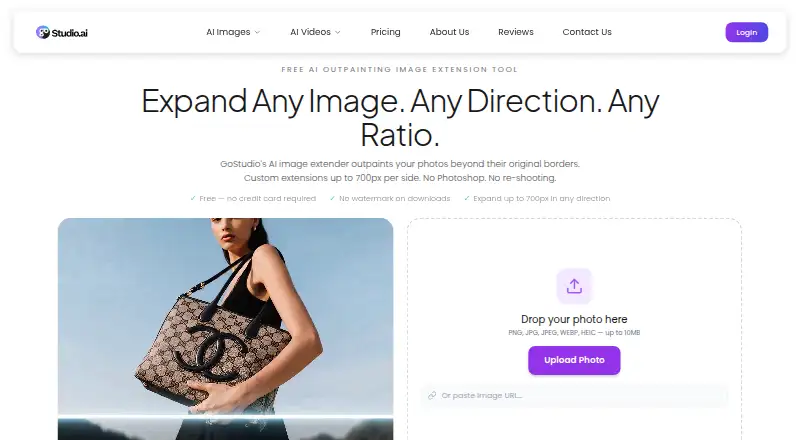
GoStudio AI Outpaint is a browser-based image expansion tool for creators and businesses that need to extend an image beyond its original borders. Users can upload PNG, JPG, JPEG, WEBP, or HEIC files with drag and drop, then choose custom canvas dimensions or preset aspect ratios for social and professional platforms. Its primary use case is adding space around existing imagery while preserving the visual context of the source scene.
The published plans are Lite, Pro, and Max. Each includes full access to all AI image and video models, while the monthly credit allowance increases from 80 credits on Lite to 160 on Pro and 500 on Max. The product is paid, with no free plan. This structure makes the choice primarily about the amount of recurring generation capacity required rather than access to different named outpainting features. Buyers should review their expected image and video generation volume before selecting a tier.
GoStudio AI Outpaint’s strongest focus is canvas expansion: it supports scene-aware generation that matches lighting, color, and context, custom dimensions, platform presets, and extensions up to 700px per side. Watermark-free PNG downloads are useful when the expanded image needs to move directly into a publishing or design workflow. The trade-off is a narrow platform footprint and a credit-based plan structure. It suits creators and businesses seeking a dedicated web outpainting workflow, but buyers looking for a broader platform mix or a free entry plan should consider alternatives.
Your product? Our editors can test GoStudio AI Outpaint in depth and publish a review, labelled as paid · from $149/mo →
GoStudio AI Outpaint pricing
All 3 GoStudio AI Outpaint plans and prices →
GoStudio AI Outpaint fact sheet
| Free plan | No |
|---|---|
| Paid from | Not verified |
| Max output size | 700 px |
| Batch expansion | Not verified |
| API access | Not verified |
| Commercial use | Not verified |
| Primary platform | Web |
| Input formats | PNG, JPG, JPEG, WEBP, HEIC |
| Deployment | Cloud |
| Platforms | Web |
| Support | |
| Built for | Solo, Small business, Mid-market (editorial estimate) |
| Pricing | Paid (source) |
| Website | gostudio.ai |
| Facts checked | 22 Sep 2026 |
Alternatives to GoStudio AI Outpaint
- ClipdropA broad AI image toolkit with uncropping, editing, mobile apps, and API access.9.4
- Magnific ExpandA focused outpainting tool with custom dimensions, prompts, upscaling, and API access.9.2
- EZ Expand ImageA focused web tool for affordable, watermark-free image expansion.9.0



See all GoStudio AI Outpaint alternatives →
Used GoStudio AI Outpaint? Be the first to review it
The editor score above is our own research. What this page doesn't have yet is a reader's view — what you used GoStudio AI Outpaint for, what worked and what didn't. No stars are seeded and no review is paid for; an editor reads every one before it appears.
Write a reviewTwo minutes · verified accounts only · read by an editor before it appears
Featured on iTechGuides

GoStudio AI Outpaint is listed in our AI Image Expanders directory. Add the badge to your site — it links back to this page.
<a href="https://www.itechguides.com/products/gostudio-ai-outpaint/"><img src="https://www.itechguides.com/best/badge/gostudio-ai-outpaint.svg" alt="Featured on iTechGuides" width="230" height="46"></a>
Reviewed by iTechGuides Editors · Editorial team · Updated Oct 2026
Advertiser disclosure: iTechGuides is reader-supported. Vendors can pay for top positions in our rankings and for a place on other products' pages, and we may earn a commission when you click some links. Bought places stand at the number bought; this page and our disclosure say so. Paying vendors may get a fuller, more detailed review from our editors, and that review can change their score. How we rank.
Last updated · How we research and update