
Go Button
Go Button: A focused iOS cue player with strong playback control and remote triggering. Ranked #18 of 26 in Soundboard Software by our editors (7.5/10); pricing: Free plan; best for iOS theatrical cue operators.
At a glance
- Editor score7.5 / 10
- PricingFree plan
- Best foriOS theatrical cue operators
- Free planYes
- Desktop appNo
- Founded2006 · Baltimore, Maryland, USA
- Facts checked20 Sep 2026
Where it wins
- Sequential and simultaneous playback for live show cues
- Per-cue volume, pan, speed, pitch, fades, loops, and ducking
- Bluetooth, MIDI, OSC, AirDrop, and iOS Files support
Where it doesn't
- Limited to iPhone, iPad, and iPod touch
- Free Version allows one saved show playlist at a time
- Unlimited saved playlists require the Pro License
Our verdict on Go Button
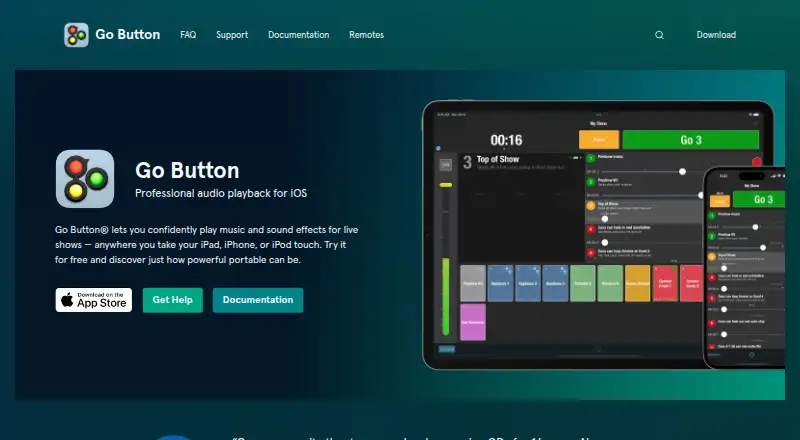
Go Button is an iOS audio playback app for live performances, including theater, dance recitals, weddings, church services, puppetry, and magic shows. It supports sequential cue playback with a GO button, manual Hit buttons for ad-lib playback, and simultaneous playback of multiple sounds. Operators can build show playlists and run cues from iPhone, iPad, or iPod touch, making it a focused option for productions that need a dedicated mobile playback workflow.
Its strongest area is cue control. Each cue can have independent volume, pan, speed, and pitch settings, along with auto-stop, fade in, fade out, loop, and ducking options. Go Button also supports Bluetooth and MIDI remote control, plus an OSC control API for triggering from QLab or other OSC sources. Audio can be imported and shared through AirDrop and iOS Files, with Dropbox and iCloud Drive also listed among its integrations. Passcode protection adds a control layer for shows.
The Free Version includes all Go Button functionality, no ads, and no time limits, but supports one saved show playlist at a time. The Pro License adds unlimited saved show playlists. That structure suits operators managing a single production or evaluating the workflow before keeping multiple shows available. Go Button is a strong fit for iOS-based theatrical cue operators who need detailed playback controls and external triggering. Teams requiring a desktop or browser app, or a platform beyond iOS, should choose an alternative designed for broader deployment.
Your product? Our editors can test Go Button in depth and publish a review, labelled as paid · from $149/mo →
Go Button pricing
All 2 Go Button plans and prices →
Go Button fact sheet
| Free plan | Yes |
|---|---|
| Paid from | Not verified |
| Desktop app | No |
| Browser app | No |
| Hotkey triggering | Yes |
| Streaming integrations | No |
| Voice effects | Not verified |
| Multiple soundboards | Yes |
| Deployment | Mobile |
| Platforms | iOS |
| Support | Email, Community, Docs |
| Built for | Solo, Small business (editorial estimate) |
| Integrations | 6 integrations: QLab, Dropbox, iCloud Drive, Bluetooth, MIDI, OSC |
| Pricing | Free plan (source) |
| Website | gobutton.app |
| Facts checked | 20 Sep 2026 |
Go Button integrations
Go Button lists 6 integrations on its own site.
- QLab
- Dropbox
- iCloud Drive
- Bluetooth
- MIDI
- OSC
Alternatives to Go Button
- AudioPadA strong free choice for desktop sound triggers, routing, and voice-chat playback.9.4
- ResananceA free, flexible soundboard for hotkeys, voice effects, and streaming audio.9.2
- Sound ShowA flexible cross-platform soundboard for live shows, streaming, and multimedia cues.9.1

See all Go Button alternatives →
Used Go Button? Be the first to review it
The editor score above is our own research. What this page doesn't have yet is a reader's view — what you used Go Button for, what worked and what didn't. No stars are seeded and no review is paid for; an editor reads every one before it appears.
Write a reviewTwo minutes · verified accounts only · read by an editor before it appears
Featured on iTechGuides

Go Button is listed in our Soundboard Software directory. Add the badge to your site — it links back to this page.
<a href="https://www.itechguides.com/products/go-button/"><img src="https://www.itechguides.com/best/badge/go-button.svg" alt="Featured on iTechGuides" width="230" height="46"></a>
Reviewed by iTechGuides Editors · Editorial team · Updated Oct 2026
Advertiser disclosure: iTechGuides is reader-supported. Vendors can pay for top positions in our rankings and for a place on other products' pages, and we may earn a commission when you click some links. Bought places stand at the number bought; this page and our disclosure say so. Paying vendors may get a fuller, more detailed review from our editors, and that review can change their score. How we rank.
Last updated · How we research and update