
GetInfographic
GetInfographic: Turns written content into editable, branded visuals for publishing and social content. Ranked #10 of 26 in Infographic Makers by our editors (7.6/10); pricing: Free plan; best for content marketers converting text into visuals.
At a glance
- Editor score7.6 / 10
- PricingFree plan
- Best forContent marketers converting text into visuals
- Free planYes
- Paid from$9/mo
- Data importYes
- Facts checked20 Sep 2026
Where it wins
- Generates editable visuals from text, articles, and blog posts
- Brand Kit saves reusable colors, fonts, and logos
- WordPress, Chrome extension, and REST API support workflows
Where it doesn't
- High-resolution PNG is the listed download format
- Monthly credits apply to paid plans
- Advanced Business features start at $49 per month
Our verdict on GetInfographic
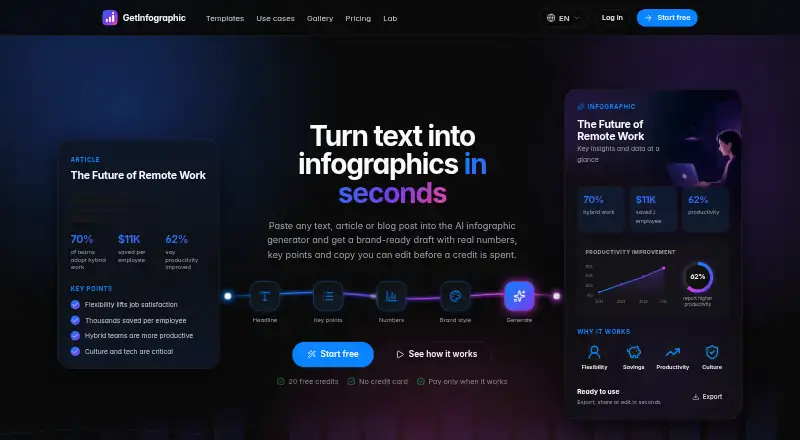
GetInfographic is an AI infographic generator for creators, publishers, marketers, and teams that need to turn written content into visual assets. Users can paste text, articles, or blog posts, after which the product extracts headlines, key points, and figures for editing before generation. Its output formats extend beyond infographics to featured images, carousels, quote cards, CTAs, and product visuals. A browser-based template editor is available without sign-up, and the product runs on the web with Chrome extension and API options.
Pricing is structured around four monthly plans. The Free plan costs $0 and includes every tool, instant generation, and no card requirement. Creator costs $9 per month and adds up to 4K output without a watermark, Brand Kit and logo controls, WordPress access, and API access. Pro costs $19 per month and lists the same highlighted additions. Business costs $49 per month and adds batch backfill, webhooks, multiple sites, and the lowest price per credit. Paid plans use monthly credits, making the lower-priced tiers a practical starting point for individual content workflows and the Business tier more relevant to larger publishing operations.
The strongest fit is for teams that want one source article to produce several branded visual formats. Brand controls cover reusable colors, fonts, and logos, while the browser-based editor keeps generated templates editable. WordPress can save visuals to the media library, the Chrome extension can generate visuals from selected webpage text, and the REST API supports application and automation workflows. The main constraint is the listed download format: templates support high-resolution PNG export. Choose GetInfographic for text-to-visual production with WordPress, browser, or API connections; choose an alternative if your workflow depends on other export formats.
Your product? Our editors can test GetInfographic in depth and publish a review, labelled as paid · from $149/mo →
GetInfographic pricing
All 4 GetInfographic plans and prices →
GetInfographic fact sheet
| Free plan | Yes |
|---|---|
| Paid from | $9/mo |
| Data import | Yes |
| Custom dimensions | Not verified |
| PDF export | Not verified |
| SVG export | Not verified |
| Animated output | Not verified |
| Brand kit | Yes |
| Deployment | Cloud, Browser extension |
| Platforms | Web, Chrome extension |
| Support | Email, Docs |
| Built for | Solo, Small business, Mid-market (editorial estimate) |
| Integrations | 1 integrations: WordPress |
| Pricing | Free plan (source) |
| Website | getinfographic.com |
| Facts checked | 20 Sep 2026 |
GetInfographic integrations
GetInfographic lists 1 integrations on its own site.
- WordPress
Alternatives to GetInfographic
- InfogramA strong choice for teams that need interactive visuals, live data, and collaboration.9.4
- PiktochartA broad browser-based visual editor for infographics, presentations, data graphics, and branded content.9.2
- VismeA broad visual-content suite for teams that need infographics, presentations, and brand control.9.0



See all GetInfographic alternatives →
Also Ranked In
GetInfographic is ranked in 2 of our directories.
Used GetInfographic? Be the first to review it
The editor score above is our own research. What this page doesn't have yet is a reader's view — what you used GetInfographic for, what worked and what didn't. No stars are seeded and no review is paid for; an editor reads every one before it appears.
Write a reviewTwo minutes · verified accounts only · read by an editor before it appears
Featured on iTechGuides

GetInfographic is listed in our Infographic Makers directory. Add the badge to your site — it links back to this page.
<a href="https://www.itechguides.com/products/getinfographic/"><img src="https://www.itechguides.com/best/badge/getinfographic.svg" alt="Featured on iTechGuides" width="230" height="46"></a>
Reviewed by iTechGuides Editors · Editorial team · Updated Oct 2026
Advertiser disclosure: iTechGuides is reader-supported. Vendors can pay for top positions in our rankings and for a place on other products' pages, and we may earn a commission when you click some links. Bought places stand at the number bought; this page and our disclosure say so. Paying vendors may get a fuller, more detailed review from our editors, and that review can change their score. How we rank.
Last updated · How we research and update