Gameplay Time Tracker
Gameplay Time Tracker: A focused, open-source Windows tracker with useful statistics and backup tools. Ranked #8 of 20 in Game Playtime Trackers by our editors (7.8/10); pricing: Free plan; best for simple Windows tracking with backup options.
At a glance
- Editor score7.8 / 10
- PricingFree plan
- Best forSimple Windows tracking with backup options
- Free planYes
- Paid fromFree
- Tracking modeAutomatic
- Facts checked20 Sep 2026
Where it wins
- Automatic tracking observes selected game and application executables
- Local restore tools and optional remote game-save backups
- Seven-day graphs, themes, layouts, and SteamGridDB artwork
Where it doesn't
- Verified platform coverage is limited to Windows
- Tracking depends on monitored application executables
- SteamGridDB is the only listed integration
Our verdict on Gameplay Time Tracker
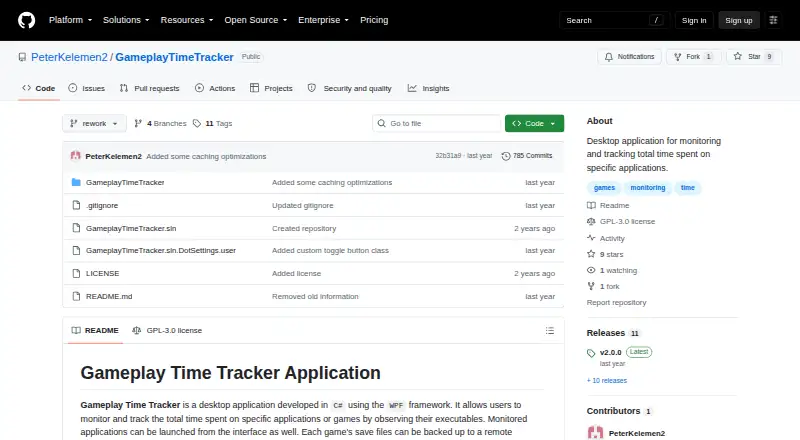
Gameplay Time Tracker is a Windows desktop application for recording time spent in selected games or other applications. It observes executable files automatically, tracks total and recent playtime, and can launch monitored programs from its interface. The focus is straightforward desktop tracking rather than a broad multi-platform service, making it a fit for Windows users who want a simple way to review recent activity and organize a personal game library.
Its standout feature is the combination of automatic tracking and lightweight presentation tools. A seven-day playtime graph provides a recent activity view, while customizable themes and display layouts allow users to adjust the interface. SteamGridDB integration adds icons and hero images for monitored games. The application is distributed as open source under the GNU General Public License v3.0, and the published project identifies C# and WPF as its underlying technologies. There are no listed AI features.
Backup options add practical depth beyond basic time logging. Users can back up and restore the local data file, enable optional remote game-save backups, and configure save frequency. These tools make the product more suitable for users who value local control and backup flexibility, while the Windows-only scope narrows its fit for people who play across other operating systems. Choose Gameplay Time Tracker for automatic Windows tracking with customization and backup controls; choose an alternative if cross-platform coverage or a wider integration ecosystem is essential.
Your product? Our editors can test Gameplay Time Tracker in depth and publish a review, labelled as paid · from $149/mo →
Gameplay Time Tracker pricing
Gameplay Time Tracker fact sheet
| Free plan | Yes |
|---|---|
| Paid from | Free |
| Tracking mode | Automatic |
| Supported platforms | Windows |
| Mobile app | Not verified |
| Desktop app | Yes |
| History retention | Not verified |
| Data export | Not verified |
| Deployment | Desktop |
| Platforms | Windows |
| Built for | Solo, Small business (editorial estimate) |
| Integrations | 1 integrations: SteamGridDB |
| Pricing | Free plan |
| Website | github.com |
| Facts checked | 20 Sep 2026 |
Gameplay Time Tracker integrations
Gameplay Time Tracker lists 1 integrations on its own site.
- SteamGridDB
Alternatives to Gameplay Time Tracker
- PlayCounterA free, open-source Windows tracker with broad launcher coverage and local history.9.4
- PlayTrackerA broad tracker for gamers who want one view across supported gaming accounts.9.0
- PyroblastA free web tracker that unifies playtime, achievements, and profiles across major platforms.8.8


See all Gameplay Time Tracker alternatives →
Gameplay Time Tracker vs the competition
- Gameplay Time Tracker vs PlayCounter
- Gameplay Time Tracker vs PlayTracker
- Gameplay Time Tracker vs Pyroblast
- Gameplay Time Tracker vs GamingGaiden
- Gameplay Time Tracker vs Steins;Tracker
- Gameplay Time Tracker vs Thusfar

Compare Gameplay Time Tracker with any tool side by side →
Used Gameplay Time Tracker? Be the first to review it
The editor score above is our own research. What this page doesn't have yet is a reader's view — what you used Gameplay Time Tracker for, what worked and what didn't. No stars are seeded and no review is paid for; an editor reads every one before it appears.
Write a reviewTwo minutes · verified accounts only · read by an editor before it appears
Featured on iTechGuides

Gameplay Time Tracker is listed in our Game Playtime Trackers directory. Add the badge to your site — it links back to this page.
<a href="https://www.itechguides.com/products/gameplay-time-tracker/"><img src="https://www.itechguides.com/best/badge/gameplay-time-tracker.svg" alt="Featured on iTechGuides" width="230" height="46"></a>
Reviewed by iTechGuides Editors · Editorial team · Updated Oct 2026
Advertiser disclosure: iTechGuides is reader-supported. Vendors can pay for top positions in our rankings and for a place on other products' pages, and we may earn a commission when you click some links. Bought places stand at the number bought; this page and our disclosure say so. Paying vendors may get a fuller, more detailed review from our editors, and that review can change their score. How we rank.
Last updated · How we research and update