Game Time Manager
Game Time Manager: A focused, free Windows overlay for automatic playtime tracking. Ranked #14 of 20 in Game Playtime Trackers by our editors (6.6/10); pricing: Free plan; best for windows gamers wanting a lightweight playtime overlay.
At a glance
- Editor score6.6 / 10
- PricingFree plan
- Best forWindows gamers wanting a lightweight playtime overlay
- Free planYes
- Paid fromFree
- Tracking modeAutomatic
- Facts checked20 Sep 2026
Where it wins
- Automatic fullscreen-game detection and play-history tracking
- Configurable in-game overlay with periodic elapsed-time display
- Free, open-source Windows app with background operation and startup
Where it doesn't
- Windows-only support limits use to PC gamers on that platform
- The feature set does not include export or integrations
- Alpha releases may not suit users seeking a mature product
Our verdict on Game Time Manager
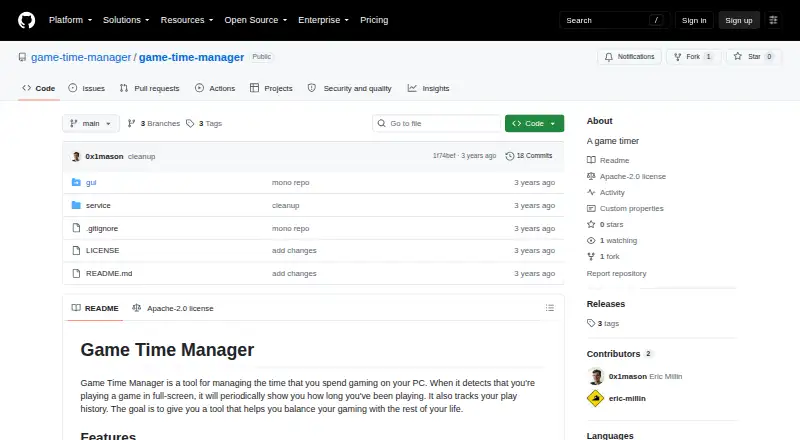
Game Time Manager is a free, open-source Windows desktop utility for PC gamers who want automatic playtime tracking without a broader game-management suite. It detects fullscreen games, records play history, and displays elapsed time in a configurable in-game overlay. The application is intended for Windows 10 and 11 and is compatible with most PC games, according to the project documentation. It can run in the background and start automatically when the user logs in.
Its main strength is the focused overlay workflow. Users can monitor elapsed playtime while a fullscreen game is running, with periodic time updates presented in-game rather than requiring a separate window. Settings are configurable through config.toml, giving the utility a direct way to adjust its behavior. Automatic startup and background operation also support a set-and-monitor approach for users who want tracking to begin without repeated manual launches.
Game Time Manager is a good fit for Windows gamers who want a simple, free, open-source timer centered on fullscreen detection, history, and an on-screen elapsed-time display. Its scope is deliberately narrow: the verified feature set does not include export or integrations, so it is less suitable for users who want to move playtime data into other tools or connect it with a wider gaming ecosystem. The project’s releases are alpha versions, which is another consideration for buyers seeking a more established utility. Choose Game Time Manager for lightweight local tracking; consider an alternative if cross-platform support, data portability, or broader integrations are priorities.
Your product? Our editors can test Game Time Manager in depth and publish a review, labelled as paid · from $149/mo →
Game Time Manager pricing
Game Time Manager fact sheet
| Free plan | Yes |
|---|---|
| Paid from | Free |
| Tracking mode | Automatic |
| Supported platforms | Windows PC |
| Mobile app | Not verified |
| Desktop app | Yes |
| History retention | Not verified |
| Data export | Not verified |
| Deployment | Desktop |
| Platforms | Windows |
| Built for | Solo, Small business (editorial estimate) |
| Pricing | Free plan |
| Website | github.com |
| Facts checked | 20 Sep 2026 |
Alternatives to Game Time Manager
- PlayCounterA free, open-source Windows tracker with broad launcher coverage and local history.9.4
- PlayTrackerA broad tracker for gamers who want one view across supported gaming accounts.9.0
- PyroblastA free web tracker that unifies playtime, achievements, and profiles across major platforms.8.8


See all Game Time Manager alternatives →
Used Game Time Manager? Be the first to review it
The editor score above is our own research. What this page doesn't have yet is a reader's view — what you used Game Time Manager for, what worked and what didn't. No stars are seeded and no review is paid for; an editor reads every one before it appears.
Write a reviewTwo minutes · verified accounts only · read by an editor before it appears
Featured on iTechGuides

Game Time Manager is listed in our Game Playtime Trackers directory. Add the badge to your site — it links back to this page.
<a href="https://www.itechguides.com/products/game-time-manager/"><img src="https://www.itechguides.com/best/badge/game-time-manager.svg" alt="Featured on iTechGuides" width="230" height="46"></a>
Reviewed by iTechGuides Editors · Editorial team · Updated Oct 2026
Advertiser disclosure: iTechGuides is reader-supported. Vendors can pay for top positions in our rankings and for a place on other products' pages, and we may earn a commission when you click some links. Bought places stand at the number bought; this page and our disclosure say so. Paying vendors may get a fuller, more detailed review from our editors, and that review can change their score. How we rank.
Last updated · How we research and update