
FTB App
FTB App: A free-to-start launcher for FTB and CurseForge packs, with flexible instance and mod controls. Ranked #18 of 75 in Minecraft Launchers by our editors (7.7/10); pricing: Free; best for players focused on Feed The Beast modpacks.
At a glance
- Editor score7.7 / 10
- PricingFree
- Best forPlayers focused on Feed The Beast modpacks
- Free planYes
- Paid fromFree
- Facts checked19 Sep 2026
Where it wins
- Browse and install Feed The Beast and CurseForge modpacks
- Manage separate instances, mods, Java versions, and memory settings
- Available for Windows, macOS, and Linux
Where it doesn't
- Its verified pack catalog is narrower than broader launcher catalogs
- The app is described as ad-supported
- Some feature descriptions differ on custom instance availability
Our verdict on FTB App
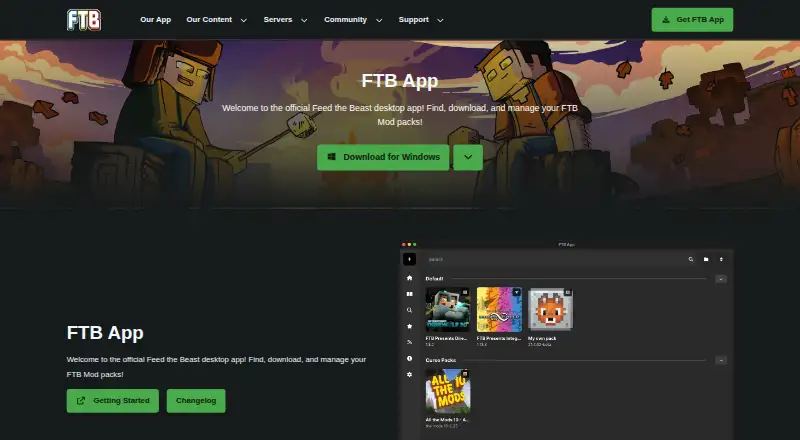
FTB App is a desktop launcher for players who want to browse, install, and manage Feed The Beast and CurseForge modpacks. It is especially suited to Feed The Beast pack users, while also supporting custom modpacks and multiple Minecraft instances. Forge, Fabric, and NeoForge are supported, and the launcher is available for Windows, macOS, and Linux. A standalone edition is available; the Windows edition can also use Overwolf.
Instance and mod management are central to the app. Players can maintain an instance library, add, remove, update, and search mods, and configure Java versions, Java arguments, and memory allocation per instance. The app also supports importing CurseForge packs from ZIP files, creating and sharing custom packs, updating modpacks, and installing modded Minecraft servers. Microsoft/Minecraft authentication, CurseForge, and Overwolf form its stated ecosystem connections. This breadth of controls makes it a fit for players who want to manage modded setups rather than only launch a standard game profile.
FTB App is free to start, but the published product information describes it as ad-supported and does not give a price list for paid plans. Its verified catalog coverage is narrower, so players who prioritize a wider selection of packs may prefer another launcher. There is also a discrepancy in the vendor's descriptions: the homepage labels custom instance creation and management as coming soon, while current documentation describes instance creation and library management as available. Players considering custom setups should check the current app documentation before choosing it. Pick FTB App for FTB-focused pack management and per-instance controls; look elsewhere if broader catalog coverage is the priority.
Your product? Our editors can test FTB App in depth and publish a review, labelled as paid · from $149/mo →
FTB App pricing
FTB App fact sheet
| Free plan | Yes |
|---|---|
| Paid from | Free |
| Desktop OS support | Not verified |
| Separate instances | Yes |
| Modpack import | Both |
| Mod loader support | Multiple |
| Java runtime management | Yes |
| Built-in modpack catalog | Yes |
| Automatic updates | Yes |
| Deployment | Desktop |
| Platforms | Windows, macOS, Linux |
| Integrations | 3 integrations: CurseForge, Microsoft/Minecraft authentication, Overwolf |
| Pricing | Free |
| Website | feed-the-beast.com |
| Facts checked | 19 Sep 2026 |
FTB App integrations
FTB App lists 3 integrations on its own site.
- CurseForge
- Microsoft/Minecraft authentication
- Overwolf
Alternatives to FTB App
- Prism LauncherA free, open-source launcher for organizing isolated Minecraft instances and modpacks.9.4
- RefractA broad, free launcher for players moving libraries and modpacks from other launchers.9.2
- Spectra LauncherA free, open-source launcher with strong instance, mod, and modpack workflows.9.1


See all FTB App alternatives →
Also Ranked In
FTB App is ranked in 2 of our directories.
Used FTB App? Be the first to review it
The editor score above is our own research. What this page doesn't have yet is a reader's view — what you used FTB App for, what worked and what didn't. No stars are seeded and no review is paid for; an editor reads every one before it appears.
Write a reviewTwo minutes · verified accounts only · read by an editor before it appears
Featured on iTechGuides

FTB App is listed in our Minecraft Launchers directory. Add the badge to your site — it links back to this page.
<a href="https://www.itechguides.com/products/ftb-app/"><img src="https://www.itechguides.com/best/badge/ftb-app.svg" alt="Featured on iTechGuides" width="230" height="46"></a>
Reviewed by iTechGuides Editors · Editorial team · Updated Oct 2026
Advertiser disclosure: iTechGuides is reader-supported. Vendors can pay for top positions in our rankings and for a place on other products' pages, and we may earn a commission when you click some links. Bought places stand at the number bought; this page and our disclosure say so. Paying vendors may get a fuller, more detailed review from our editors, and that review can change their score. How we rank.
Last updated · How we research and update