Front-End SVGConverter
Front-End SVGConverter: A free, open-source browser converter for monochrome SVG batch workflows. Ranked #16 of 26 in Image Vectorization Software by our editors (7.2/10); pricing: Free plan; best for private browser-based line-art batch processing.
At a glance
- Editor score7.2 / 10
- PricingFree plan
- Best forPrivate browser-based line-art batch processing
- Free planYes
- Paid fromFree
- Batch conversionYes
- Facts checked20 Sep 2026
Where it wins
- Client-side batch processing with ZIP downloads
- Line-art and silhouette tracing modes with real-time previews
- Free, open-source web tool with detailed image controls
Where it doesn't
- Tracing is limited to monochrome output
- SVG is the only listed output format
- Requires a web browser instead of a desktop application
Our verdict on Front-End SVGConverter
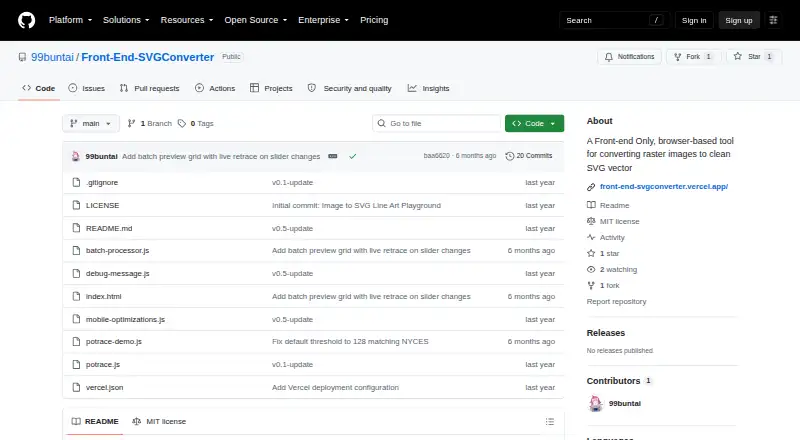
Front-End SVGConverter is an open-source web application that converts raster images into SVG vector graphics. It is aimed at designers, developers, and other users who need browser-based tracing without installing desktop software. The tool handles individual images and batches, with drag-and-drop upload, line-art and silhouette modes, and ZIP downloads for grouped results. Its workflow is focused rather than broad: monochrome tracing is the central use case, and SVG is the listed output format.
The strongest fit is its client-side processing model. Images are processed in the browser without a backend server, which suits users who want a local browser workflow and do not need a server-based conversion service. Real-time previews make parameter changes visible during adjustment, while controls for brightness, contrast, brilliance, shadows, edge threshold, smoothing, line thickness, and sensitivity provide direct control over the tracing result. Gaussian blur noise reduction adds a specific option for preparing images before conversion, and mobile-oriented performance optimizations support browser use across device types.
Batch processing gives Front-End SVGConverter a practical edge for repeated monochrome work: multiple images can be processed together and downloaded as a ZIP archive. The trade-off is scope. Users seeking color tracing, multiple vector output types, or a broader illustration conversion workflow should choose a tool built around those requirements instead. Front-End SVGConverter is a good choice for designers and developers who want a free, open-source, browser-based utility for line art, silhouettes, previews, and SVG export. It is less suitable when the workflow depends on color detail, non-SVG formats, or desktop-native operation.
Your product? Our editors can test Front-End SVGConverter in depth and publish a review, labelled as paid · from $149/mo →
Front-End SVGConverter pricing
Front-End SVGConverter fact sheet
| Free plan | Yes |
|---|---|
| Paid from | Free |
| Batch conversion | Yes |
| Tracing modes | Monochrome |
| Available platforms | Web |
| Vector output formats | SVG |
| Batch file limit | Not verified |
| Maximum color count | Not verified |
| Deployment | Cloud, Self-hosted |
| Platforms | Web |
| Support | Docs |
| Built for | Solo, Small business (editorial estimate) |
| Pricing | Free plan |
| Website | github.com |
| Facts checked | 20 Sep 2026 |
Alternatives to Front-End SVGConverter
- VectorItA free offline vectorizer with detailed tracing controls and broad desktop export options.9.4
- EdgeSVGA developer-focused engine for automated, measurable raster-to-SVG conversion.9.3
- Adobe CaptureA free mobile vectorization tool for Creative Cloud workflows, with broad Adobe integrations.9.2



See all Front-End SVGConverter alternatives →
Used Front-End SVGConverter? Be the first to review it
The editor score above is our own research. What this page doesn't have yet is a reader's view — what you used Front-End SVGConverter for, what worked and what didn't. No stars are seeded and no review is paid for; an editor reads every one before it appears.
Write a reviewTwo minutes · verified accounts only · read by an editor before it appears
Featured on iTechGuides

Front-End SVGConverter is listed in our Image Vectorization Software directory. Add the badge to your site — it links back to this page.
<a href="https://www.itechguides.com/products/front-end-svgconverter/"><img src="https://www.itechguides.com/best/badge/front-end-svgconverter.svg" alt="Featured on iTechGuides" width="230" height="46"></a>
Reviewed by iTechGuides Editors · Editorial team · Updated Oct 2026
Advertiser disclosure: iTechGuides is reader-supported. Vendors can pay for top positions in our rankings and for a place on other products' pages, and we may earn a commission when you click some links. Bought places stand at the number bought; this page and our disclosure say so. Paying vendors may get a fuller, more detailed review from our editors, and that review can change their score. How we rank.
Last updated · How we research and update