
FrameSprite
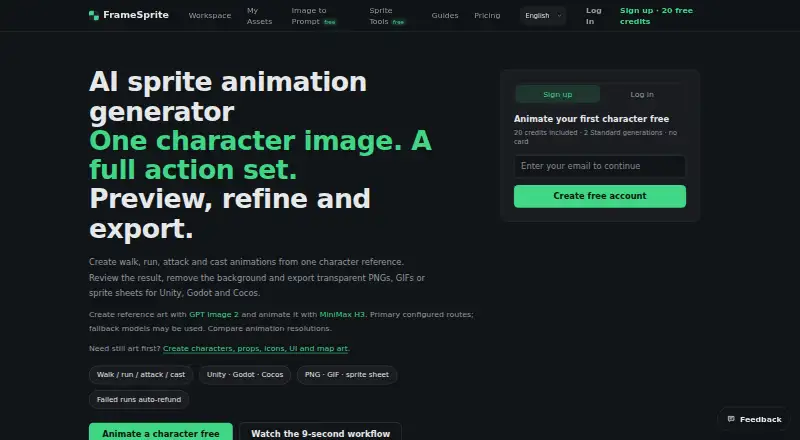
FrameSprite: A focused web tool for turning character references into export-ready sprite animations. Ranked #14 of 23 in AI Animation Makers by our editors (7.9/10); pricing: Paid; best for sprite animation from character references.
At a glance
- Editor score7.9 / 10
- PricingPaid
- Best forSprite animation from character references
- Free planNo
- Paid from$9.99 one-time
- AI character creationYes
- Facts checked20 Sep 2026
Where it wins
- Generates action animations from one character reference image
- Exports transparent PNG sequences, GIFs, and sprite sheets
- Integrates with Unity, Godot, and Cocos
Where it doesn't
- Web-based workflow only
- Action generation is organized around 14 presets
- One-time prices exclude applicable taxes
Our verdict on FrameSprite
FrameSprite is a web-based AI animation tool for indie game developers, game-art freelancers, and animation learners. It can generate or accept uploaded character art, then create action animations from a single character reference image. The workflow also includes browser background removal, frame extraction, image generation, sprite-sheet utilities, and other 2D game-asset tools. Its core output is aimed at game-ready animation assets rather than broad animation production.
Pricing is organized as one-time credit packs. The Starter plan costs $9.99 and includes 500 credits, or approximately 50 standard generations. Standard costs $17.99 for 1,050 credits and approximately 105 standard generations, while Studio costs $25.99 for 1,700 credits and approximately 170 standard generations. New accounts receive 20 credits. According to the published plans, the paid tiers scale generation capacity rather than introducing different named feature sets. Prices exclude applicable taxes, so buyers should account for that when comparing total cost.
FrameSprite’s standout strength is the path from a character reference to usable 2D exports: users can choose from 14 action presets, remove backgrounds, extract frames, and export transparent PNG sequences, GIFs, or sprite sheets. Unity, Godot, and Cocos integrations improve its fit within common game-development workflows. The web-only format and preset-based action library make it better suited to focused sprite production than to teams seeking a broader animation environment or extensive motion direction. Choose FrameSprite for reference-based character assets and straightforward engine exports; consider an alternative if you need a desktop application or a wider animation toolset.
Your product? Our editors can test FrameSprite in depth and publish a review, labelled as paid · from $149/mo →
FrameSprite pricing
All 3 FrameSprite plans and prices →
FrameSprite fact sheet
| Free plan | No |
|---|---|
| Paid from | $9.99 one-time |
| AI character creation | Yes |
| Scene editor | Not verified |
| Image-to-animation | Yes |
| Motion transfer | Not verified |
| Reference consistency | Yes |
| Maximum clip duration | Not verified |
| Export formats | PNG, GIF, sprite sheet |
| Deployment | Cloud |
| Platforms | Web |
| Support | Email, Docs |
| Built for | Solo, Small business (editorial estimate) |
| Integrations | 3 integrations: Unity, Godot, Cocos |
| Pricing | Paid (source) |
| Website | framesprite.com |
| Facts checked | 20 Sep 2026 |
FrameSprite integrations
FrameSprite lists 3 integrations on its own site.
- Unity
- Godot
- Cocos
Alternatives to FrameSprite
- LTX StudioA broad AI filmmaking workspace that connects generation, planning, editing, audio, and export.9.4
- ArtiroomBroad AI animation tools with character consistency, scene composition, and flexible plans.9.3
- TheToonMakerA focused 2D animation workspace for producing consistent cartoon episodes.9.1


See all FrameSprite alternatives →
Used FrameSprite? Be the first to review it
The editor score above is our own research. What this page doesn't have yet is a reader's view — what you used FrameSprite for, what worked and what didn't. No stars are seeded and no review is paid for; an editor reads every one before it appears.
Write a reviewTwo minutes · verified accounts only · read by an editor before it appears
Featured on iTechGuides

FrameSprite is listed in our AI Animation Makers directory. Add the badge to your site — it links back to this page.
<a href="https://www.itechguides.com/products/framesprite/"><img src="https://www.itechguides.com/best/badge/framesprite.svg" alt="Featured on iTechGuides" width="230" height="46"></a>
Reviewed by iTechGuides Editors · Editorial team · Updated Oct 2026
Advertiser disclosure: iTechGuides is reader-supported. Vendors can pay for top positions in our rankings and for a place on other products' pages, and we may earn a commission when you click some links. Bought places stand at the number bought; this page and our disclosure say so. Paying vendors may get a fuller, more detailed review from our editors, and that review can change their score. How we rank.
Last updated · How we research and update