Frameshift
Frameshift: A hybrid staging workspace for teams combining AI renders with manual placement. Ranked #26 of 28 in Virtual Staging Software by our editors (6.6/10); pricing: 5-day trial; best for design teams mixing AI renders with manual placement.
At a glance
- Editor score6.6 / 10
- Pricing5-day trial
- Best forDesign teams mixing AI renders with manual placement
- Free planNo
- Paid from$35/mo
- Service modeHybrid
- Facts checked21 Sep 2026
Where it wins
- Combines product uploads, AI renders, and manual layout control
- Includes chat and Studio editing plus video walkthrough creation
- Unlimited projects and two-year image retention on paid plans
Where it doesn't
- Web-only access limits platform flexibility
- No free plan; the five-day trial requires a card
- Credit-based generation and uploads tie usage to monthly allowances
Our verdict on Frameshift
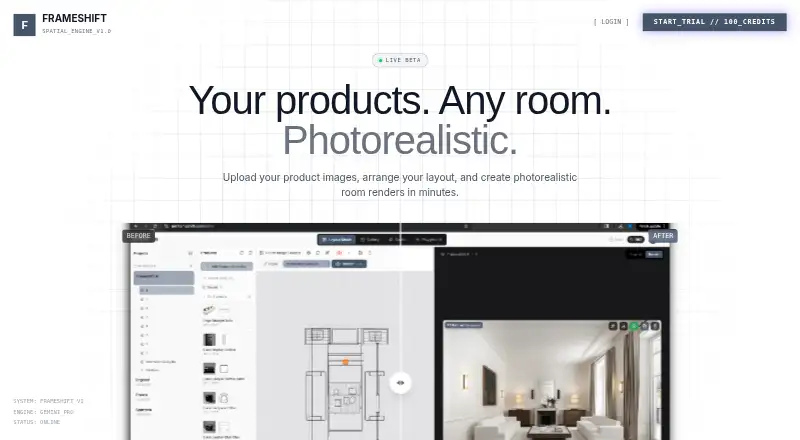
Frameshift is an AI-powered virtual staging platform for interior designers, virtual stagers, furniture companies, and ecommerce teams. It supports room-photo uploads alongside furniture or product images, allowing teams to arrange items manually before generating photorealistic staged rooms. Generated images can be edited through chat or Studio mode, downloaded, and shared. The platform also creates video walkthroughs from renders, giving teams a way to present both still images and cinematic room views.
Its hybrid workflow is the main distinction: teams can combine AI-generated room renders with manual product placement and layout arrangement rather than relying only on automatic staging. This makes Frameshift a fit for design teams working with real furniture or product imagery, especially when visual accuracy and controlled arrangement matter. Product uploads and generation use credits, while paid subscribers receive image retention. The platform is available on the web, so its workflow suits teams comfortable working through a browser rather than a dedicated desktop or mobile application.
The published monthly plans are Starter at $35 for 400 credits, Pro at $79 for 1,300 credits, and Agency at $199 for 3,300 credits. All include unlimited projects and two-year image retention; rendering queues become faster at higher tiers. Pro adds one 30-minute implementation call, while Agency adds priority support and two 30-minute implementation calls. A five-day trial is available, and a card is required to begin it. Frameshift suits teams that need AI staging tied to their own products and room photos, but teams seeking a free plan, non-web access, or a more directly real-estate-focused feature set should look elsewhere.
Questions about Frameshift
Does Frameshift have a free plan? No free plan is listed; paid plans start at $35/mo (Starter).
How much does Frameshift cost? Frameshift lists 3 paid plans; the lowest is Starter at $35/mo.
Is there a free trial of Frameshift? Yes: a 5-day free trial; a card is required.
What does Frameshift run on? Web. It runs in the cloud.
Who is Frameshift built for? Small businesses and mid-market companies (our editorial estimate).
Your product? Our editors can test Frameshift in depth and publish a review, labelled as paid · from $149/mo →
Frameshift pricing
All 3 Frameshift plans and prices →
Frameshift fact sheet
| Free plan | No |
|---|---|
| Paid from | $35/mo |
| Service mode | Hybrid |
| Exterior staging | Not verified |
| Floor-plan staging | Not verified |
| Turnaround time | Not verified |
| Included revisions | Not verified |
| Output resolution | Not verified |
| Free trial | 5 days · card required |
| Deployment | Cloud |
| Platforms | Web |
| Support | Email, Docs |
| Built for | Small business, Mid-market (editorial estimate) |
| Pricing | 5-day trial (source) |
| Website | getframeshift.com |
| Facts checked | 21 Sep 2026 |
Alternatives to Frameshift
- Apply DesignA broad web-based staging suite with coin-based pricing and 360° support.9.4
- PadStyler AIBroad property-visualization coverage with AI subscriptions and designer-led staging.9.2
- PristageA broad AI toolkit that pairs virtual staging with listing and promotional assets.9.0


See all Frameshift alternatives →
Used Frameshift? Be the first to review it
The editor score above is our own research. What this page doesn't have yet is a reader's view — what you used Frameshift for, what worked and what didn't. No stars are seeded and no review is paid for; an editor reads every one before it appears.
Write a reviewTwo minutes · verified accounts only · read by an editor before it appears
Featured on iTechGuides

Frameshift is listed in our Virtual Staging Software directory. Add the badge to your site — it links back to this page.
<a href="https://www.itechguides.com/products/frameshift/"><img src="https://www.itechguides.com/best/badge/frameshift.svg" alt="Featured on iTechGuides" width="230" height="46"></a>
Reviewed by iTechGuides Editors · Editorial team · Updated Nov 2026
Advertiser disclosure: iTechGuides is reader-supported. Vendors can pay for top positions in our rankings and for a place on other products' pages, and we may earn a commission when you click some links. Bought places stand at the number bought; this page and our disclosure say so. Paying vendors may get a fuller, more detailed review from our editors, and that review can change their score. How we rank.
Last updated · How we research and update