Fotosizer
Fotosizer: A practical Windows batch processor with broad controls and lifetime licensing. Ranked #20 of 37 in Batch Photo Processing Software by our editors (5.6/10); pricing: Free plan · paid from $18.50; best for windows users needing batch resizing and renaming.
At a glance
- Editor score5.6 / 10
- PricingFree plan · paid from $18.50
- Best forWindows users needing batch resizing and renaming
- Free planYes
- Facts checked20 Sep 2026
Where it wins
- Resizes by pixels, percentage or print measurements
- Renames files using parameters and EXIF fields
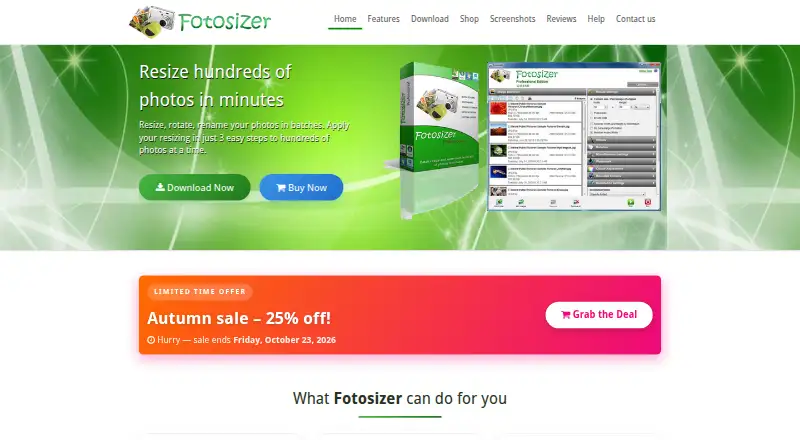
- Includes previews, profiles, watermarks and completion actions
Where it doesn't
- Windows-only desktop application
- RAW processing is not a documented strength
- Preset-based automation rather than a watched-folder workflow
Our verdict on Fotosizer
Fotosizer is a Windows desktop application for people who need to resize, rename, rotate and process groups of photographs locally. It suits home users, photographers and businesses working with folders of images rather than teams seeking a cloud-based workflow. The free Standard Edition covers batch resizing, batch rotation and destination features, while the broader feature set includes cropping, effects, watermarks, colour adjustments, EXIF handling and multiple output formats such as TIFF, JPEG, GIF, BMP, PNG and WEBP.
Pricing is centered on one-time lifetime licenses. Personal costs $18.50 for installation on up to 1 computer and includes Professional Edition features. Home 360 and Business 360 cost $35.95 for up to 3 computers. Startup costs $99.95 for up to 10 computers, Business costs $485.95 for up to 50 computers, Business Plus costs $899.50 for up to 150 computers, and Enterprise costs $2,120.95 for up to 350 computers. These tiers make the product easier to match to computer count, while the free edition provides a starting point for basic batch work.
Its strongest area is controlled local processing: users can select folders with subfolders, save reusable profiles, preview results, apply text or image watermarks, and move or delete originals after completion. Renaming can use filename parameters and EXIF fields, and rotation can follow EXIF orientation. The trade-off is a narrow platform and workflow focus. Fotosizer is Windows-only, does not provide AI features, and RAW processing is not a documented strength. It is a good fit for Windows users who want repeatable desktop batch operations and lifetime licensing; users needing broader platform coverage, verified RAW workflows or continuously watched folders should choose another tool.
Fotosizer pricing
All 10 Fotosizer plans and prices →
Fotosizer fact sheet
| Free plan | Yes |
|---|---|
| Paid from | Not verified |
| RAW processing | Not verified |
| Bulk renaming | Yes |
| Bulk resizing | Yes |
| Output formats | TIFF, JPEG, GIF, BMP, PNG, WMF, EMF, WEBP |
| Supported platforms | Windows |
| Watched folders | Not verified |
| Batch automation level | Preset-based |
| Deployment | Desktop |
| Platforms | Windows |
| Support | Docs |
| Built for | Solo, Small business, Mid-market, Enterprise (editorial estimate) |
| Pricing | Free plan · paid from $18.50 (source) |
| Website | fotosizer.com |
| Facts checked | 20 Sep 2026 |
Alternatives to Fotosizer
- XnConvertA low-cost desktop tool for automated, multi-format batch image processing.9.8
- ImageMagickA capable command-line toolkit for developers building automated image pipelines.8.2
- reaConverterA strong fit for high-volume Windows conversion with watched-folder automation.8.2



See all Fotosizer alternatives →
Also listed in
Used Fotosizer? Be the first to review it
The editor score above is our own research. What this page doesn't have yet is a reader's view — what you used Fotosizer for, what worked and what didn't. No stars are seeded and no review is paid for; an editor reads every one before it appears.
Write a reviewTwo minutes · verified accounts only · read by an editor before it appears
Featured on iTechGuides

Fotosizer is listed in our Batch Photo Processing Software directory. Add the badge to your site — it links back to this page.
<a href="https://www.itechguides.com/products/fotosizer/"><img src="https://www.itechguides.com/best/badge/fotosizer.svg" alt="Featured on iTechGuides" width="230" height="46"></a>
Reviewed by iTechGuides Editors · Editorial team · Updated Sep 2026
Advertiser disclosure: iTechGuides is reader-supported. We may earn a commission when you click some links. How we rank.
Last updated · How we research and update