Fotocx
Fotocx: A capable Linux choice for RAW workflows, batch edits, HDR, and photo collections. Ranked #90 of 158 in Photo Editing Software by our editors (3.0/10); pricing: Free plan; best for linux photographers needing batch and HDR tools.
At a glance
- Editor score3.0 / 10
- PricingFree plan
- Best forLinux photographers needing batch and HDR tools
- Free planYes
- Paid fromFree
- PlatformDesktop
- Facts checked22 Sep 2026
Where it wins
- Batch conversion, renaming, resizing, metadata edits, and scripted edits
- RAW processing, selective editing, HDR, panoramas, and stacking
- Collection search, albums, slideshows, and GIMP/ImageMagick integration
Where it doesn't
- Runs on Linux desktop platforms only
- Does not provide layer-based editing
- Works with local image files rather than cloud-synced libraries
Our verdict on Fotocx
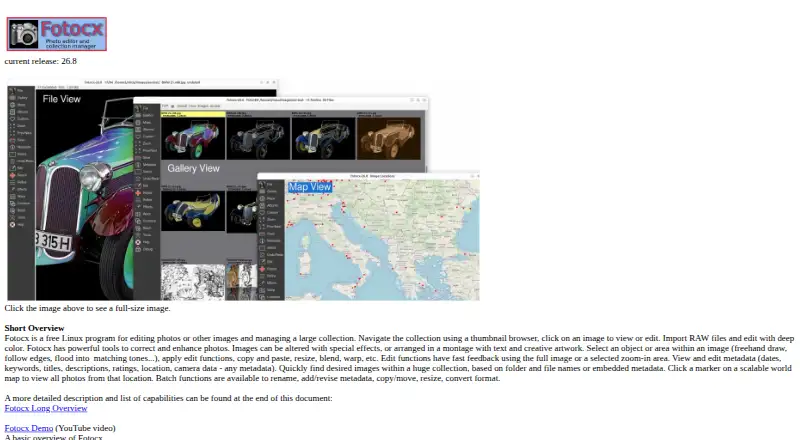
Fotocx is a free, open-source Linux desktop application for photo editing and image collection management. It is aimed at photographers who need RAW import and conversion alongside organized local libraries, metadata tools, selective editing, and batch processing. The feature set also covers albums, slideshows, photo montages, image repair, and enhancement tools such as denoise, sharpening, defogging, and smart erase.
Batch workflows are a central strength. Fotocx supports batch RAW conversion, renaming, resizing, format conversion, metadata editing, and scripted edits, while collection search helps users work across large image libraries. Its editing toolkit extends beyond basic correction with selective object and image-area edits, masking, HDR, focus-depth compositing, panoramas, and image stacking. These capabilities make it suitable for photographers managing repeated file operations or specialized composite projects, not just one-image-at-a-time adjustments.
Fotocx also fits into a Linux-focused image workflow through integrations with GIMP and ImageMagick. The vendor provides source, Debian, binary, and AppImage packages, giving Linux users several installation formats. Its narrow platform focus and local-file approach will suit photographers who organize images on a desktop and want an open-source tool without a paid tier. Choose another editor if layer-based editing or cloud-synced libraries are essential; Fotocx is better aligned with batch operations, metadata, collection management, and HDR-oriented work on Linux.
Questions about Fotocx
What does Fotocx run on? Linux. It runs as a desktop app.
What does Fotocx integrate with? 2 integrations: GIMP and ImageMagick.
Who is Fotocx built for? Solo users and small businesses (our editorial estimate).
Your product? Our editors can test Fotocx in depth and publish a review, labelled as paid · from $149/mo →
Fotocx pricing
Fotocx fact sheet
| Free plan | Yes |
|---|---|
| Paid from | Free |
| Platform | Desktop |
| RAW photo support | Yes |
| Layer editing | No |
| Masking tools | Yes |
| Batch editing | Yes |
| Cloud sync | Not verified |
| AI retouching | Not verified |
| Deployment | Desktop |
| Platforms | Linux |
| Support | Docs |
| Built for | Solo, Small business (editorial estimate) |
| Integrations | 2 integrations: GIMP, ImageMagick |
| Pricing | Free plan |
| Website | kornelix.net |
| Facts checked | 22 Sep 2026 |
Fotocx integrations
Fotocx lists 2 integrations on its own site.
- GIMP
- ImageMagick
Alternatives to Fotocx
- Adobe PhotoshopA deep, multi-platform editor for compositing, retouching, RAW work, and AI-assisted edits.9.4
- Adobe LightroomA broad Lightroom workflow for RAW editing, masking, organization, and synchronized access.9.2
- Capture OneA deep choice for professional RAW and tethered workflows, without a free plan.9.0



Used Fotocx? Be the first to review it
The editor score above is our own research. What this page doesn't have yet is a reader's view — what you used Fotocx for, what worked and what didn't. No stars are seeded and no review is paid for; an editor reads every one before it appears.
Write a reviewTwo minutes · verified accounts only · read by an editor before it appears
Featured on iTechGuides

Fotocx is listed in our Photo Editing Software directory. Add the badge to your site — it links back to this page.
<a href="https://www.itechguides.com/products/fotocx/"><img src="https://www.itechguides.com/best/badge/fotocx.svg" alt="Featured on iTechGuides" width="230" height="46"></a>
Reviewed by iTechGuides Editors · Editorial team · Updated Nov 2026
Advertiser disclosure: iTechGuides is reader-supported. Vendors can pay for top positions in our rankings and for a place on other products' pages, and we may earn a commission when you click some links. Bought places stand at the number bought; this page and our disclosure say so. Paying vendors may get a fuller, more detailed review from our editors, and that review can change their score. How we rank.
Last updated · How we research and update