
Font Awesome
Font Awesome: A mature icon toolkit with wide format, framework, API, and design-tool coverage. Ranked #4 of 46 in Icon Libraries by our editors (8.9/10); pricing: Free plan; best for product teams needing mature cross-platform tooling.
At a glance
- Editor score8.9 / 10
- PricingFree plan
- Best forProduct teams needing mature cross-platform tooling
- Free planYes
- Facts checked20 Sep 2026
Where it wins
- Free and paid collections cover multiple icon families and visual styles.
- Hosted or downloadable kits support SVG, CSS, Sass, SCSS, and web fonts.
- React, Vue, Angular, CMS, package, Figma, and API integrations are supported.
Where it doesn't
- Some collections and capabilities are reserved for paid plans or Pro kits.
- Its wide feature set may exceed the needs of teams seeking a narrow icon set.
- Custom icon uploads are available only through Pro kits.
Our verdict on Font Awesome
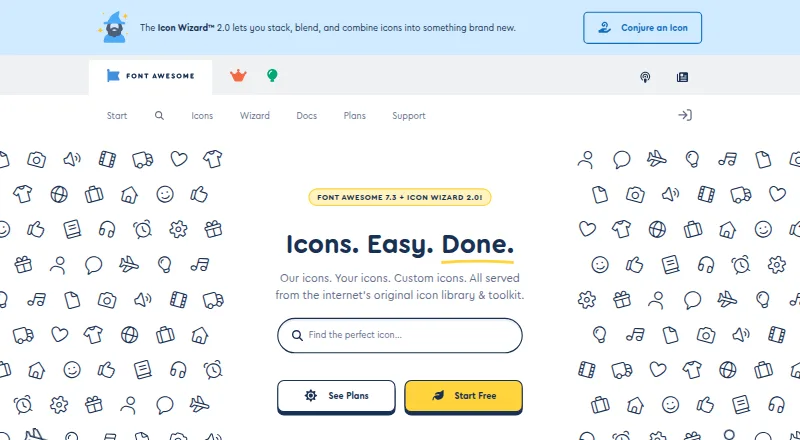
Font Awesome is an icon library and styling toolkit for designers and developers working across web, desktop, and design workflows. It offers free and paid icon collections, multiple visual families, SVG and web-font assets, JavaScript packages, hosted or downloadable kits, and desktop-use downloads. A free plan makes the toolkit accessible for teams that need a starting collection, while paid options extend the available collections and capabilities.
Its strongest fit is an ecosystem that spans design, development, and content platforms. The official Figma plugin supports design workflows, while React, React Native, Vue, Angular, and Ember integrations support application development. WordPress and Squarespace integrations address content platforms, and npm, Yarn, pnpm, Sass, and SCSS support common package and styling workflows. Teams can also work with SVG sprites, CSS, JavaScript, web fonts, and SVG-based rendering rather than being limited to one delivery format.
The standout distinction is the combination of collection breadth and programmatic access. JavaScript, GraphQL, REST, and conflict-detection APIs provide routes to icon metadata and collections, while Pro kits allow custom icon uploads. That range suits product teams standardizing icon use across applications, design files, and content systems. Smaller teams that need only a limited, fixed icon set may find the broader toolkit unnecessary, and teams requiring custom uploads need a Pro kit. Font Awesome is the stronger choice when cross-platform consistency and workflow coverage matter more than a narrowly focused library.
Your product? Our editors can test Font Awesome in depth and publish a review, labelled as paid · from $149/mo →
Font Awesome pricing
Font Awesome fact sheet
| Free plan | Yes |
|---|---|
| Paid from | Not verified |
| Icons included | Not verified |
| Icon formats | SVG, CSS, SCSS, Sass, JavaScript, web fonts, SVG sprites |
| Style coverage | Multiple |
| Commercial use | Not verified |
| Figma plugin | Yes |
| API access | Yes |
| Icon font | Yes |
| Deployment | Cloud, Self-hosted, Desktop |
| Platforms | Web, Windows, macOS, Linux |
| Support | Docs |
| Built for | Solo, Small business, Mid-market, Enterprise (editorial estimate) |
| Integrations | 12 integrations: React, React Native, Vue, Angular, Ember, WordPress … |
| Pricing | Free plan (source) |
| Website | fontawesome.com |
| Facts checked | 20 Sep 2026 |
Font Awesome integrations
Font Awesome lists 12 integrations on its own site.
- React
- React Native
- Vue
- Angular
- Ember
- WordPress
- Squarespace
- Sass
- SCSS
- npm
- Yarn
- pnpm
Alternatives to Font Awesome
- The Noun ProjectA broad icon library with strong editing, integration, and API options at a low entry price.9.4
- FlaticonA broad icon library with strong format support, editing tools, and workflow integrations.9.2
- IconifyA broad, open-source icon ecosystem with APIs, generation tools, and Figma support.9.0



See all Font Awesome alternatives →
Font Awesome vs the competition
- Font Awesome vs The Noun Project
- Font Awesome vs Flaticon
- Font Awesome vs Iconify
- Font Awesome vs SVG Repo
- Font Awesome vs Hugeicons
- Font Awesome vs Material Symbols



Compare Font Awesome with any tool side by side →
Used Font Awesome? Be the first to review it
The editor score above is our own research. What this page doesn't have yet is a reader's view — what you used Font Awesome for, what worked and what didn't. No stars are seeded and no review is paid for; an editor reads every one before it appears.
Write a reviewTwo minutes · verified accounts only · read by an editor before it appears
Featured on iTechGuides

Font Awesome is listed in our Icon Libraries directory. Add the badge to your site — it links back to this page.
<a href="https://www.itechguides.com/products/font-awesome/"><img src="https://www.itechguides.com/best/badge/font-awesome.svg" alt="Featured on iTechGuides" width="230" height="46"></a>
Reviewed by iTechGuides Editors · Editorial team · Updated Oct 2026
Advertiser disclosure: iTechGuides is reader-supported. Vendors can pay for top positions in our rankings and for a place on other products' pages, and we may earn a commission when you click some links. Bought places stand at the number bought; this page and our disclosure say so. Paying vendors may get a fuller, more detailed review from our editors, and that review can change their score. How we rank.
Last updated · How we research and update