
FOATT Planning
FOATT Planning: Spreadsheet-style financial planning with scenario forks and ledger connections. Ranked #80 of 90 in Scenario Planning Software by our editors (3.0/10); pricing: 14-day trial; best for small teams building spreadsheet-style budget scenarios.
At a glance
- Editor score3.0 / 10
- Pricing14-day trial
- Best forSmall teams building spreadsheet-style budget scenarios
- Free planNo
- Paid from$149/mo
- Facts checked24 Sep 2026
Where it wins
- Fork and compare what-if plans with driver and assumption rows.
- Import ledger data by CSV or sync QuickBooks Online and NetSuite.
- Review plan-versus-actual reports and cell-level edit history.
Where it doesn't
- No free plan; Starter is priced at $149 per month.
- Web-only cloud deployment may not fit teams needing other platforms.
- Multi-currency support and balance sheet planning require Pro.
Our verdict on FOATT Planning
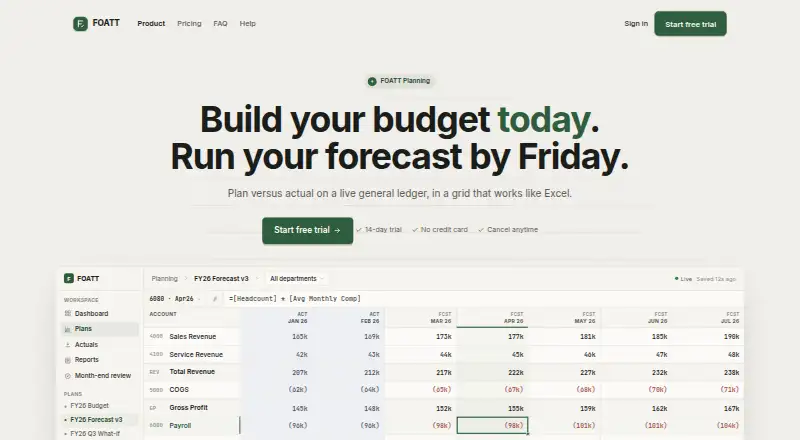
FOATT Planning gives finance teams and businesses a spreadsheet-style workspace for budgets, forecasts, and plan-versus-actual reporting. Its grid supports formulas and optional drivers such as headcount, while users can fork plans into what-if scenarios and compare them. That makes it a fit for small teams that want to model financial choices in a familiar planning format rather than work only from static reports. Teams that need a free plan or non-web deployment should look elsewhere.
Ledger connectivity is a central part of the product’s workflow: general-ledger data can be imported from CSV or synced from QuickBooks Online and NetSuite. Planning outputs include variance reports, and reports can be assembled by dragging accounts, dimensions, and time fields. Comments, mentions, shared plan links, and cell-level history support review and collaboration. For teams already working with either supported accounting system, the connection options may suit a planning process built around ledger data; a CSV import offers another route. FOATT Planning is web-based and cloud-deployed, with email and documentation support.
According to the vendor’s pricing page, Starter costs $149 per month and includes company-level budgeting, planning, driver and assumption rows, scenario forks, and plan import and export. Growth costs $349 per month, adding consolidated reports across companies, rollback, scheduled report emails, and dimension hierarchies. Pro costs $699 per month and adds point-in-time restore, AI explanations, multi-currency support, and balance sheet planning. A 14-day trial does not require a card, and the vendor lists a 14-day money-back guarantee for annual plans. The tier progression suits teams whose needs grow from basic scenario work to multi-company reporting or broader planning; teams prioritizing a lower-cost or free entry point may prefer an alternative.
Your product? Our editors can test FOATT Planning in depth and publish a review, labelled as paid · from $149/mo →
FOATT Planning pricing
All 3 FOATT Planning plans and prices →
FOATT Planning fact sheet
| Free plan | No |
|---|---|
| Paid from | $149/mo |
| Scenario limit | Not verified |
| Modeling scope | Financial |
| Financial modeling | Yes |
| Operational modeling | Not verified |
| Sensitivity analysis | Not verified |
| Data connection level | Files |
| Version history | Yes |
| Free trial | 14 days · no card needed |
| Money-back guarantee | 14 days |
| Deployment | Cloud |
| Platforms | Web |
| Compliance & security | 2FA |
| Support | Email, Docs |
| Built for | Solo, Small business, Mid-market (editorial estimate) |
| Integrations | 2 integrations: QuickBooks Online, NetSuite |
| Pricing | 14-day trial (source) |
| Website | foatt.com |
| Facts checked | 24 Sep 2026 |
FOATT Planning integrations
FOATT Planning lists 2 integrations on its own site.
- QuickBooks Online
- NetSuite
Alternatives to FOATT Planning
- Workday Adaptive PlanningA broad FP&A suite for enterprises that need scenarios and Office connectivity.9.4
- IBM Planning AnalyticsA broad IBM planning suite for complex finance and workforce planning.9.3
- AnaplanA connected planning suite for enterprise finance, workforce, and operational scenarios.9.2



See all FOATT Planning alternatives →
Used FOATT Planning? Be the first to review it
The editor score above is our own research. What this page doesn't have yet is a reader's view — what you used FOATT Planning for, what worked and what didn't. No stars are seeded and no review is paid for; an editor reads every one before it appears.
Write a reviewTwo minutes · verified accounts only · read by an editor before it appears
Featured on iTechGuides

FOATT Planning is listed in our Scenario Planning Software directory. Add the badge to your site — it links back to this page.
<a href="https://www.itechguides.com/products/foatt-planning/"><img src="https://www.itechguides.com/best/badge/foatt-planning.svg" alt="Featured on iTechGuides" width="230" height="46"></a>
Reviewed by iTechGuides Editors · Editorial team · Updated Oct 2026
Advertiser disclosure: iTechGuides is reader-supported. Vendors can pay for top positions in our rankings and for a place on other products' pages, and we may earn a commission when you click some links. Bought places stand at the number bought; this page and our disclosure say so. Paying vendors may get a fuller, more detailed review from our editors, and that review can change their score. How we rank.
Last updated · How we research and update