
FluidCalendar
FluidCalendar: A task-aware calendar for self-hosters who want automated scheduling across calendars. Ranked #68 of 193 in Calendar Apps by our editors (3.0/10); pricing: Open source; best for self-hosters wanting automated task scheduling.
At a glance
- Editor score3.0 / 10
- PricingOpen source
- Best forSelf-hosters wanting automated task scheduling
- Paid from$200 one-time
- Facts checked22 Sep 2026
Where it wins
- Automatic scheduling weighs availability, deadlines, priorities, and energy preferences.
- Syncs Google Calendar, Outlook/Microsoft 365, CalDAV, and task services.
- Docker and PostgreSQL support enables self-hosted deployment.
Where it doesn't
- The Lifetime Subscription costs $200 one-time, creating a high upfront commitment.
- Native mobile apps, scheduling links, and video meetings are not part of the stated offer.
- Beta positioning may not suit teams seeking a mature production option.
Our verdict on FluidCalendar
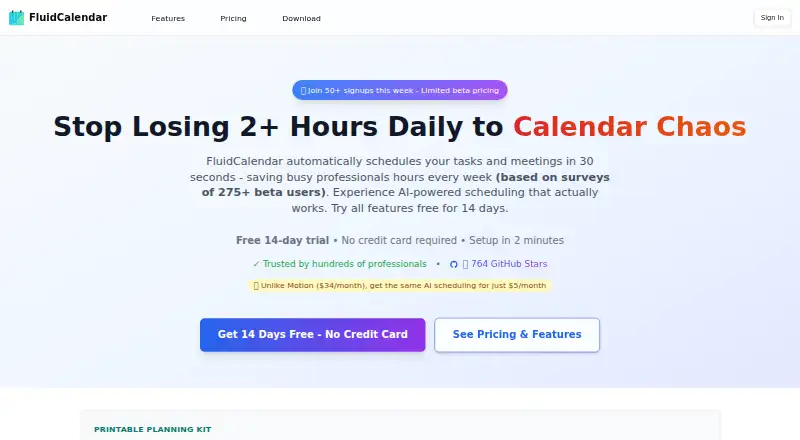
FluidCalendar is an open-source calendar and task-scheduling application for people managing multiple calendars and competing priorities. Its central feature automatically places tasks into available time using deadlines, priorities, energy preferences, working hours, buffers, and conflicts. The product also combines calendar views, recurring tasks, project organization, focus mode, and task synchronization, making it a fit for self-hosters and individuals who want scheduling and task management in one workspace.
The available Lifetime Subscription costs $200 USD one-time and includes early access to the beta, premium features, and lifetime access. That structure is straightforward, but it requires a substantial upfront payment rather than a recurring monthly commitment. The scheduling engine is the main point of differentiation: it is designed to turn task constraints and personal working preferences into calendar placements. Focus mode adds a timer and quick actions, while Kanban and list views give projects a separate organizational layer. Buyers who mainly need a simple calendar may find this broader task-planning approach unnecessary.
FluidCalendar connects with Google Calendar, Outlook/Microsoft 365, and CalDAV, and it supports two-way synchronization with Google Tasks and Outlook To Do. Docker and PostgreSQL self-hosting provide a deployment path for users who want control over their environment, while a managed SaaS option is also presented. The current product presentation centers on beta access, so organizations seeking a mature, broadly packaged calendar service may prefer an established alternative. Self-hosters and users with complex priorities should consider FluidCalendar; buyers focused on mobile-first access, meeting workflows, or a lower upfront price should look elsewhere.
Your product? Our editors can test FluidCalendar in depth and publish a review, labelled as paid · from $149/mo →
FluidCalendar pricing
All 1 FluidCalendar plans and prices →
FluidCalendar fact sheet
| Free plan | Not verified |
|---|---|
| Paid from | $200 one-time |
| Shared calendars | Yes |
| Time blocking | Yes |
| Scheduling links | Not verified |
| Calendar sync | Not verified |
| Mobile apps | Not verified |
| Video meeting support | Not verified |
| Deployment | Cloud, Self-hosted |
| Support | |
| Built for | Solo, Small business, Mid-market (editorial estimate) |
| Integrations | 5 integrations: Google Calendar, Outlook/Microsoft 365, CalDAV, Google Tasks, Outlook To Do |
| Pricing | Open source (source) |
| Website | fluidcalendar.com |
| Facts checked | 22 Sep 2026 |
FluidCalendar integrations
FluidCalendar lists 5 integrations on its own site.
- Google Calendar
- Outlook/Microsoft 365
- CalDAV
- Google Tasks
- Outlook To Do
Alternatives to FluidCalendar
- Google CalendarA versatile calendar for personal schedules and Google Workspace collaboration.9.4
- Microsoft OutlookA flexible calendar choice for people and teams already working in Microsoft’s ecosystem.9.2
- Zoho CalendarA low-cost calendar with booking, sync, room reservations, and broad integrations.9.1


See all FluidCalendar alternatives →
Used FluidCalendar? Be the first to review it
The editor score above is our own research. What this page doesn't have yet is a reader's view — what you used FluidCalendar for, what worked and what didn't. No stars are seeded and no review is paid for; an editor reads every one before it appears.
Write a reviewTwo minutes · verified accounts only · read by an editor before it appears
Featured on iTechGuides

FluidCalendar is listed in our Calendar Apps directory. Add the badge to your site — it links back to this page.
<a href="https://www.itechguides.com/products/fluidcalendar/"><img src="https://www.itechguides.com/best/badge/fluidcalendar.svg" alt="Featured on iTechGuides" width="230" height="46"></a>
Reviewed by iTechGuides Editors · Editorial team · Updated Oct 2026
Advertiser disclosure: iTechGuides is reader-supported. Vendors can pay for top positions in our rankings and for a place on other products' pages, and we may earn a commission when you click some links. Bought places stand at the number bought; this page and our disclosure say so. Paying vendors may get a fuller, more detailed review from our editors, and that review can change their score. How we rank.
Last updated · How we research and update