
FluentBoard
FluentBoard: A focused teaching board with PDF annotation, live vocabulary tools, and shared student access. Ranked #50 of 56 in Online Whiteboard Tools by our editors (6.0/10); pricing: Free plan; best for teachers explaining PDFs and vocabulary live.
At a glance
- Editor score6.0 / 10
- PricingFree plan
- Best forTeachers explaining PDFs and vocabulary live
- Free planYes
- Paid from$9.90/mo
- Infinite canvasYes
- Facts checked19 Sep 2026
Where it wins
- Annotate PDFs and explain material on an infinite whiteboard
- Share live classes with students through one link
- Free plan includes all drawing tools and PDF export
Where it doesn't
- Free plan limits live classes to 1 student and 20 boards total
- Runs on the web only
- Focused on language teaching rather than broad whiteboard workflows
Our verdict on FluentBoard
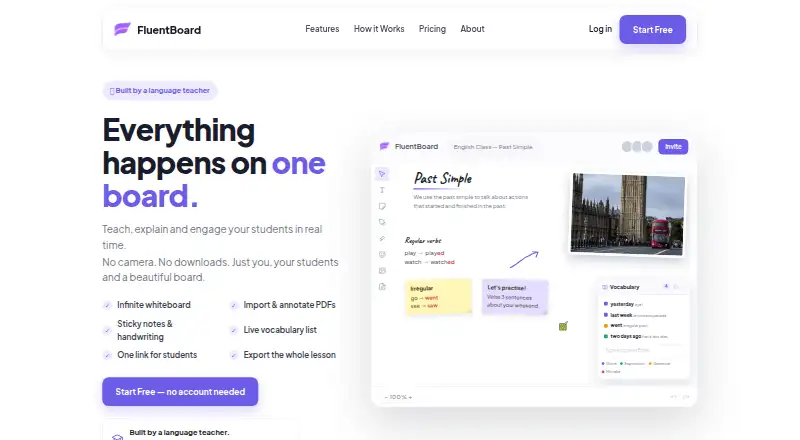
FluentBoard is an online collaborative whiteboard designed for language teachers who explain material live and want students to follow along. Its infinite canvas supports real-time drawing, highlighting, typing, handwriting, and sticky notes. Teachers can import and annotate PDFs, build vocabulary lists, save classes, and share student access through one link. The free plan includes all drawing tools, PDF export, and unlimited saved classes, with a limit of 1 student per live class and 20 boards total.
The monthly plans expand class size and board capacity. Free costs $0 forever. Pro costs $9.9 per month and adds live classes with up to 5 students, unlimited boards, a vocabulary panel with word-level formatting, and PDF backgrounds; unlimited saved classes are included. Studio costs $19.9 per month and raises the live-class limit to up to 10 students, while including everything in Pro and priority support. The listed paid prices are monthly; the published plans do not describe them as per-user prices. Pro is the clearest step up for teachers who need vocabulary formatting or more boards, while Studio fits classes that need a larger student group or priority support.
The product’s strength is a teaching flow centered on PDFs and vocabulary rather than a broad set of general-purpose whiteboard tools. Its sharing link, saved classes, and PDF export support lesson delivery and reuse. FluentBoard runs on the web, so it suits teachers who want an online board without installing a desktop app. It is a less natural fit for teams looking for presentation mode, diagrams, templates, AI, voting, or a wider integration ecosystem. Choose it for live language lessons and annotated documents; consider another tool if those broader collaboration features are central to your work.
Your product? Our editors can test FluentBoard in depth and publish a review, labelled as paid · from $149/mo →
FluentBoard pricing
All 3 FluentBoard plans and prices →
FluentBoard fact sheet
| Free plan | Yes |
|---|---|
| Paid from | $9.90/mo |
| Infinite canvas | Yes |
| Diagramming tools | Not verified |
| Workshop templates | Not verified |
| Guest collaboration | Not verified |
| Presentation mode | Not verified |
| Board limit | 20 boards |
| Voting tools | Not verified |
| Deployment | Cloud |
| Platforms | Web |
| Pricing | Free plan (source) |
| Website | fluentboard.com |
| Facts checked | 19 Sep 2026 |
Alternatives to FluentBoard
- MiroA broad whiteboard suite for teams that need collaboration, workshops, diagrams, and presentations.9.4
- MURALA facilitation-focused whiteboard with strong workshop controls and enterprise options.9.2
- FigJamAn affordable collaborative whiteboard with strong workshop tools and a focused ecosystem.9.0



See all FluentBoard alternatives →
Used FluentBoard? Be the first to review it
The editor score above is our own research. What this page doesn't have yet is a reader's view — what you used FluentBoard for, what worked and what didn't. No stars are seeded and no review is paid for; an editor reads every one before it appears.
Write a reviewTwo minutes · verified accounts only · read by an editor before it appears
Featured on iTechGuides

FluentBoard is listed in our Online Whiteboard Tools directory. Add the badge to your site — it links back to this page.
<a href="https://www.itechguides.com/products/fluentboard/"><img src="https://www.itechguides.com/best/badge/fluentboard.svg" alt="Featured on iTechGuides" width="230" height="46"></a>
Reviewed by iTechGuides Editors · Editorial team · Updated Oct 2026
Advertiser disclosure: iTechGuides is reader-supported. Vendors can pay for top positions in our rankings and for a place on other products' pages, and we may earn a commission when you click some links. Bought places stand at the number bought; this page and our disclosure say so. Paying vendors may get a fuller, more detailed review from our editors, and that review can change their score. How we rank.
Last updated · How we research and update