
FlowWrite
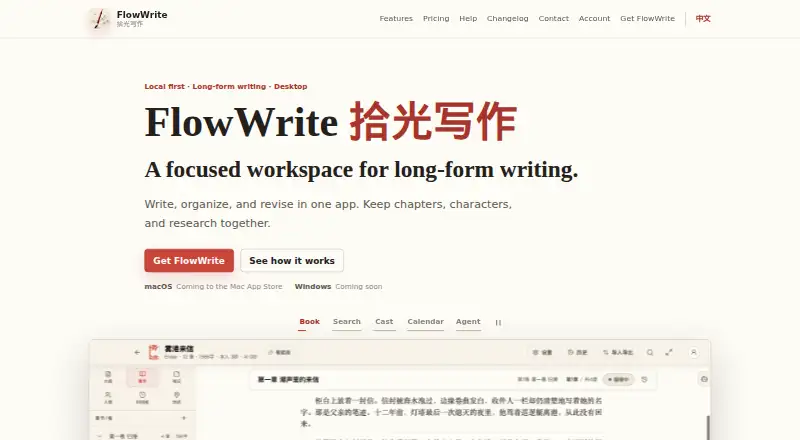
FlowWrite: A local-first Mac writing studio with manuscript planning and AI review. Ranked #74 of 135 in Writing Apps by our editors (3.0/10); pricing: Free plan; best for mac authors wanting local AI manuscript review.
At a glance
- Editor score3.0 / 10
- PricingFree plan
- Best forMac authors wanting local AI manuscript review
- Free planYes
- Publishing toolsYes
- Facts checked22 Sep 2026
Where it wins
- Local storage, snapshots, history comparison, and backups
- Manuscript planning with chapters, characters, places, and timelines
- AI review plus import and export for common manuscript formats
Where it doesn't
- Available only on macOS
- AI model costs are separate on Professional
- Website purchases are currently unavailable
Our verdict on FlowWrite
FlowWrite is a local-first desktop writing studio for long-form projects, including novels, nonfiction, serials, and course manuscripts. It is aimed at solo and small-team writers who want one workspace for drafting, planning, references, revision, and manuscript export. Its structure covers books, volumes, chapters, outlines, characters, places, timelines, notes, and inspiration, while typewriter and zen modes support focused writing. Materials can stay locally stored, with optional iCloud Drive support.
The product’s strongest case is its depth for manuscript organization and revision. Whole-book search supports single and batch replacement, and the writing calendar tracks time, word count, and goals. Document history, version comparison, restoration, and book snapshots give writers several ways to manage changes across a long project. Professional adds unlimited books, chapters, and length, full editing, worldbuilding management, writing statistics, import/export, themes, and iCloud Drive. AI assistance and custom models are included, but model costs are separate.
FlowWrite also offers a freemium path: Free includes basic editing and local storage, while the published pricing information includes a 38 CNY starting price for paid access. Intelligent adds all Professional features, official AI services, text creation, image understanding, image generation, and 90,000 credits per month. Actual currency, periods, trial status, and purchase availability follow the App Store and in-app display. Choose FlowWrite if you write long manuscripts on a Mac and value local materials, planning depth, and revision history. Writers needing Windows, web access, or a broader platform ecosystem should choose an alternative.
Your product? Our editors can test FlowWrite in depth and publish a review, labelled as paid · from $149/mo →
FlowWrite pricing
All 3 FlowWrite plans and prices →
FlowWrite fact sheet
| Free plan | Yes |
|---|---|
| Paid from | Not verified |
| Publishing tools | Yes |
| Real-time collaboration | Not verified |
| Version history | Yes |
| Offline mode | Not verified |
| Mobile apps | Not verified |
| Export formats | Extensive |
| Deployment | Desktop |
| Platforms | macOS |
| Support | |
| Built for | Solo, Small business (editorial estimate) |
| Integrations | 1 integrations: iCloud Drive |
| Pricing | Free plan (source) |
| Website | getflowwrite.com |
| Facts checked | 22 Sep 2026 |
FlowWrite integrations
FlowWrite lists 1 integrations on its own site.
- iCloud Drive
Alternatives to FlowWrite
- Final DraftA screenplay-focused toolkit with deep planning, production, revision, and collaboration features.9.4
- ScrivenerA structured workspace for drafting, organizing, and compiling long-form work.9.3
- CeltxScriptwriting and production planning for screenwriters working with collaborators.9.2



See all FlowWrite alternatives →
Used FlowWrite? Be the first to review it
The editor score above is our own research. What this page doesn't have yet is a reader's view — what you used FlowWrite for, what worked and what didn't. No stars are seeded and no review is paid for; an editor reads every one before it appears.
Write a reviewTwo minutes · verified accounts only · read by an editor before it appears
Featured on iTechGuides

FlowWrite is listed in our Writing Apps directory. Add the badge to your site — it links back to this page.
<a href="https://www.itechguides.com/products/flowwrite/"><img src="https://www.itechguides.com/best/badge/flowwrite.svg" alt="Featured on iTechGuides" width="230" height="46"></a>
Reviewed by iTechGuides Editors · Editorial team · Updated Oct 2026
Advertiser disclosure: iTechGuides is reader-supported. Vendors can pay for top positions in our rankings and for a place on other products' pages, and we may earn a commission when you click some links. Bought places stand at the number bought; this page and our disclosure say so. Paying vendors may get a fuller, more detailed review from our editors, and that review can change their score. How we rank.
Last updated · How we research and update