Flowmingo
Flowmingo: A cloud workflow tool with branching, task tracking, forms, and reports. Ranked #48 of 52 in Business Process Management Software by our editors (4.1/10); pricing: 30-day trial; best for small teams running repeatable cloud workflows.
At a glance
- Editor score4.1 / 10
- Pricing30-day trial
- Best forSmall teams running repeatable cloud workflows
- Free planNo
- Paid from$49/mo
- Process modelingYes
- Facts checked23 Sep 2026
Where it wins
- Supports linear, parallel, branching, and loop workflows.
- Combines task assignment, forms, scheduling, and status dashboards.
- Includes workflow and task reports plus activity audit trails.
Where it doesn't
- No free plan; monthly plans start at $49.
- Zapier is the only listed integration.
- Cloud-only deployment may not suit teams requiring another option.
Our verdict on Flowmingo
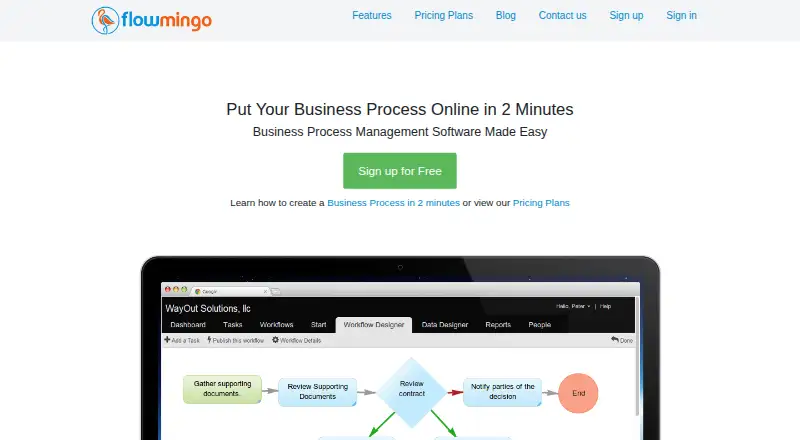
Flowmingo is a web-based business process management application for creating and running repeatable workflows. It suits small and medium-sized businesses that need to coordinate procedures such as approvals, document routing, invoice approvals, or purchasing requests. Teams can create templates with connected tasks, assign work to users, groups, or roles, and publish workflows for users to start. Forms collect workflow or task data, while dashboards show status and task progress.
Workflow structure is a central strength. The designer supports linear, parallel, branching, and loop workflows, so a process can route work through decisions or run tasks in parallel rather than follow only a straight sequence. Scheduling and delayed starts support recurring or time-dependent work. Comments and document collaboration keep discussion attached to tasks and workflows; reports cover workflow, task, and individual performance, and audit trails record workflow and task activity. That combination makes Flowmingo a fit for teams seeking operational workflow management rather than process mining or a broad integration ecosystem.
According to the vendor's pricing page, Basic costs $49 per month and includes 5 users, 2 GB storage, SSL security, unlimited processes, and a 30-day free trial. Professional is $69 per month for 25 users and 5 GB storage; Premier is $129 per month for 50 users and 10 GB storage. Both retain SSL security and unlimited processes, and both list a 30-day trial. The plans are presented as monthly amounts. Zapier is the listed integration, and deployment is cloud-only. Email and documentation are the listed support channels. Small teams that want structured, trackable workflows may find its focus appropriate; organizations that need a free plan, broader listed integrations, BPMN support, or self-hosting should consider alternatives.
Your product? Our editors can test Flowmingo in depth and publish a review, labelled as paid · from $149/mo →
Flowmingo pricing
All 3 Flowmingo plans and prices →
Flowmingo fact sheet
| Free plan | No |
|---|---|
| Paid from | $49/mo |
| BPMN support | No |
| Process modeling | Yes |
| Workflow automation | Yes |
| Process mining | No |
| Forms builder | Yes |
| Process analytics | Yes |
| Deployment options | Cloud |
| Free trial | 30 days · no card needed |
| Deployment | Cloud |
| Platforms | Web |
| Compliance & security | PCI DSS |
| Support | Email, Docs |
| Built for | Small business, Mid-market (editorial estimate) |
| Integrations | 1 integrations: Zapier |
| Pricing | 30-day trial (source) |
| Website | flowmingo.com |
| Facts checked | 23 Sep 2026 |
Flowmingo integrations
Flowmingo lists 1 integrations on its own site.
- Zapier
Alternatives to Flowmingo
- SS&C Blue Prism ChorusA broad suite for modeling, automating and monitoring complex business processes.9.1
- CamundaA broad BPMN orchestration platform for complex enterprise workflows.8.9
- SAP Signavio Process ManagerA strong choice for governed BPMN collaboration, with a primary focus on modeling.8.9


See all Flowmingo alternatives →
Used Flowmingo? Be the first to review it
The editor score above is our own research. What this page doesn't have yet is a reader's view — what you used Flowmingo for, what worked and what didn't. No stars are seeded and no review is paid for; an editor reads every one before it appears.
Write a reviewTwo minutes · verified accounts only · read by an editor before it appears
Featured on iTechGuides

Flowmingo is listed in our Business Process Management Software directory. Add the badge to your site — it links back to this page.
<a href="https://www.itechguides.com/products/flowmingo/"><img src="https://www.itechguides.com/best/badge/flowmingo.svg" alt="Featured on iTechGuides" width="230" height="46"></a>
Reviewed by iTechGuides Editors · Editorial team · Updated Oct 2026
Advertiser disclosure: iTechGuides is reader-supported. Vendors can pay for top positions in our rankings and for a place on other products' pages, and we may earn a commission when you click some links. Bought places stand at the number bought; this page and our disclosure say so. Paying vendors may get a fuller, more detailed review from our editors, and that review can change their score. How we rank.
Last updated · How we research and update