FlashVSR
FlashVSR: A local 4× diffusion upscaler for developers comfortable with self-hosted workflows. Ranked #24 of 32 in AI Video Upscalers by our editors (6.4/10); pricing: Free plan; best for developers experimenting with diffusion upscaling.
At a glance
- Editor score6.4 / 10
- PricingFree plan
- Best forDevelopers experimenting with diffusion upscaling
- Free planYes
- Paid fromFree
- Facts checked20 Sep 2026
Where it wins
- One-step diffusion workflow focused on 4× video super-resolution
- Streaming inference uses causal processing and KV caching
- Supports video files, image-frame folders, batch processing, and multiple weights
Where it doesn't
- Requires Linux-oriented self-hosted deployment and local hardware
- Requires users to manage Python dependencies, CUDA components, and model files
- Focused on super-resolution rather than a broader video-enhancement workflow
Our verdict on FlashVSR
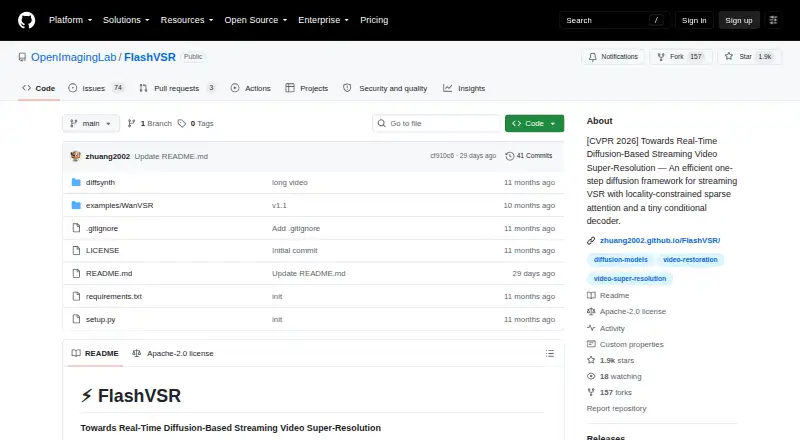
FlashVSR is an open-source video super-resolution framework from OpenImagingLab for researchers and developers who want to enhance low-resolution video locally. Its core workflow uses one-step diffusion-based processing, with a primary focus on 4× video super-resolution. The project accepts video files and image-frame folders, supports batch processing, and includes v1 and v1.1 model weights. It is best suited to technically capable users who can work with self-hosted software and their own hardware rather than people seeking a hosted commercial application.
Its main technical distinction is the combination of streaming inference, causal processing, and KV caching. Locality-constrained sparse attention and a Tiny Conditional Decoder are also part of the framework, targeting a practical reconstruction pipeline while keeping the workflow focused on video super-resolution. Full, tiny, and tiny-long-video inference scripts give developers several ways to run the available models, while the supported video formats include MP4, MOV, AVI, and MKV. The image-frame-folder input is useful for workflows that already operate on extracted frames.
The trade-off is deployment effort. FlashVSR requires users to install Python dependencies, CUDA-oriented components, and model files on their own Linux-oriented setup. That makes it a fit for experimentation, research, and custom pipelines, but a less suitable choice for users who want a desktop application or a managed web service. Pick FlashVSR when open-source access, local processing, streaming inference, and a 4× workflow matter most. Choose a different type of tool when ease of setup, hosted access, or a broader set of video-enhancement functions is the priority.
Your product? Our editors can test FlashVSR in depth and publish a review, labelled as paid · from $149/mo →
FlashVSR pricing
FlashVSR fact sheet
| Free plan | Yes |
|---|---|
| Paid from | Free |
| Max output resolution | Not verified |
| Enhancement modes | v1; v1.1; full; tiny; tiny long video |
| Frame interpolation | Not verified |
| Batch processing | Yes |
| Supported video formats | MP4; MOV; AVI; MKV |
| Desktop app | Not verified |
| API access | Not verified |
| Deployment | Self-hosted |
| Support | Community, Docs |
| Built for | Solo, Small business, Mid-market, Enterprise (editorial estimate) |
| Pricing | Free plan |
| Website | github.com |
| Facts checked | 20 Sep 2026 |
Alternatives to FlashVSR
- Topaz VideoA professional desktop editor for AI upscaling, restoration, motion work, and batch processing.9.4
- PixopA professional video upscaler with 8K output, restoration, conversion, and archive processing.9.1
- AVCLabs Video Enhancer AIA feature-rich desktop tool for restoring and enlarging video up to 8K.8.9


See all FlashVSR alternatives →
Used FlashVSR? Be the first to review it
The editor score above is our own research. What this page doesn't have yet is a reader's view — what you used FlashVSR for, what worked and what didn't. No stars are seeded and no review is paid for; an editor reads every one before it appears.
Write a reviewTwo minutes · verified accounts only · read by an editor before it appears
Featured on iTechGuides

FlashVSR is listed in our AI Video Upscalers directory. Add the badge to your site — it links back to this page.
<a href="https://www.itechguides.com/products/flashvsr/"><img src="https://www.itechguides.com/best/badge/flashvsr.svg" alt="Featured on iTechGuides" width="230" height="46"></a>
Reviewed by iTechGuides Editors · Editorial team · Updated Oct 2026
Advertiser disclosure: iTechGuides is reader-supported. Vendors can pay for top positions in our rankings and for a place on other products' pages, and we may earn a commission when you click some links. Bought places stand at the number bought; this page and our disclosure say so. Paying vendors may get a fuller, more detailed review from our editors, and that review can change their score. How we rank.
Last updated · How we research and update