
Fine Artist
Fine Artist: A focused free app for simple numbered pixel-art coloring. Ranked #17 of 20 in Coloring Apps by our editors (7.4/10); pricing: Free plan; best for budget-friendly basic pixel coloring.
At a glance
- Editor score7.4 / 10
- PricingFree plan
- Best forBudget-friendly basic pixel coloring
- Free planYes
- Coloring modesNumbered
- Facts checked21 Sep 2026
Where it wins
- Free download with optional Fine Artist Pro subscriptions
- Numbered-cell coloring with palette selection and swipe filling
- Color Splash and Magic Wand boosters plus artwork sharing
Where it doesn't
- Coloring is limited to a numbered mode
- Designed for basic pixel art rather than broader coloring tools
- Pro is split into weekly and yearly subscription plans
Our verdict on Fine Artist
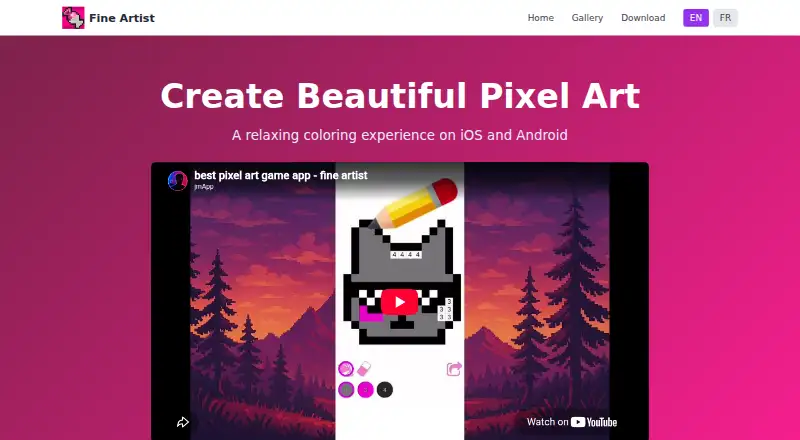
Fine Artist is a mobile coloring app for creating pixel art by matching colors to numbered cells. It is available on iOS and Android, can be downloaded for free, and suits people who want a simple, focused coloring activity rather than a broad digital art workspace. Users choose colors from a palette, then fill cells with matching numbers by swiping across them. Completed artwork can be shared with others, while optional Fine Artist Pro subscriptions provide additional access.
The core interaction is narrow but clear: select a palette color, find the corresponding numbered cells, and swipe across them. Color Splash and Magic Wand boosters add faster ways to color, giving the app more than a purely manual fill process without changing its numbered-pixel focus. This makes Fine Artist a reasonable choice for users who enjoy structured coloring and small pixel-art compositions. It is less suitable for artists looking for freeform brushes, image importing, or multiple coloring modes.
Fine Artist follows a freemium model. The free download provides the basic app experience, while the paid options are Fine Artist Pro (weekly) and Fine Artist Pro (yearly). The published offering does not frame Fine Artist as a full creative suite; its appeal comes from accessible numbered coloring on two major mobile platforms and a small set of boosters. Choose it if you want budget-conscious, guided pixel coloring with sharing. Consider another app if you need a wider toolset, broader creative control, or coloring beyond numbered cells.
Your product? Our editors can test Fine Artist in depth and publish a review, labelled as paid · from $149/mo →
Fine Artist pricing
All 2 Fine Artist plans and prices →
Fine Artist fact sheet
| Free plan | Yes |
|---|---|
| Paid from | Not verified |
| Coloring modes | Numbered |
| Offline access | Not verified |
| Import own images | Not verified |
| Brush tools | Not verified |
| Page library size | Not verified |
| Supported platforms | Cross_platform |
| Deployment | Mobile |
| Platforms | iOS, Android |
| Built for | Solo, Small business (editorial estimate) |
| Pricing | Free plan (source) |
| Website | fineartist.jmapp.com |
| Facts checked | 21 Sep 2026 |
Alternatives to Fine Artist
- ColorfyA flexible mobile coloring app with a broad library, imports, brushes, and community features.9.2
- ChromaA broad coloring app for creative users who want more than basic page filling.9.1
- RecolorA feature-rich freeform coloring app for large libraries and personal photo imports.8.9


See all Fine Artist alternatives →
Used Fine Artist? Be the first to review it
The editor score above is our own research. What this page doesn't have yet is a reader's view — what you used Fine Artist for, what worked and what didn't. No stars are seeded and no review is paid for; an editor reads every one before it appears.
Write a reviewTwo minutes · verified accounts only · read by an editor before it appears
Featured on iTechGuides

Fine Artist is listed in our Coloring Apps directory. Add the badge to your site — it links back to this page.
<a href="https://www.itechguides.com/products/fine-artist/"><img src="https://www.itechguides.com/best/badge/fine-artist.svg" alt="Featured on iTechGuides" width="230" height="46"></a>
Reviewed by iTechGuides Editors · Editorial team · Updated Oct 2026
Advertiser disclosure: iTechGuides is reader-supported. Vendors can pay for top positions in our rankings and for a place on other products' pages, and we may earn a commission when you click some links. Bought places stand at the number bought; this page and our disclosure say so. Paying vendors may get a fuller, more detailed review from our editors, and that review can change their score. How we rank.
Last updated · How we research and update