
FastStone Capture
FastStone Capture: A Windows-only capture and recording tool with OCR, editing, and a one-time price. Ranked #10 of 61 in Screen Capture Software by our editors (7.9/10); pricing: 30-day trial; best for windows users wanting a lifetime purchase.
At a glance
- Editor score7.9 / 10
- Pricing30-day trial
- Best forWindows users wanting a lifetime purchase
- Free planNo
- Paid from$29.95 one-time
- Annotation toolsYes
- Facts checked19 Sep 2026
Where it wins
- Captures scrolling pages, screen regions, windows, menus, and full screens
- Combines OCR, annotation, image editing, recording, and PDF creation
- One-time licenses include free upgrades; family license covers up to 5 computers
Where it doesn't
- Windows only, with no support for other desktop platforms
- No free plan; access starts with a 30-day trial
- Family license costs more than the single-user license
Our verdict on FastStone Capture
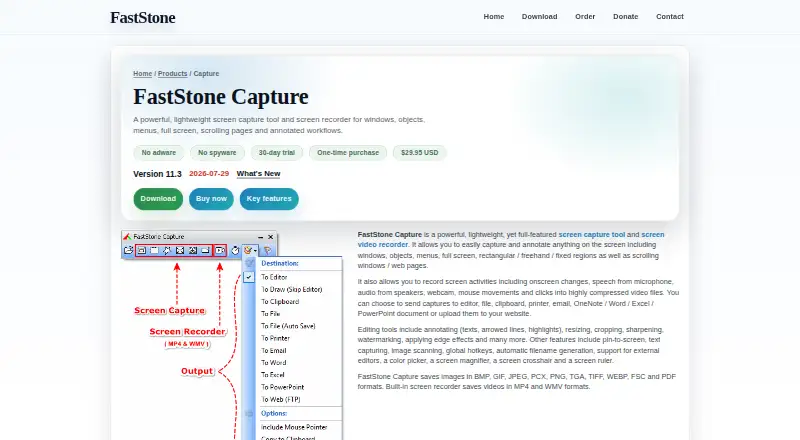
FastStone Capture is a Windows desktop application for people who need more than a basic screenshot. It can capture windows, objects, menus, full screens, selected regions, and scrolling web pages, then add annotations or edit images. Screen recording includes microphone, speaker, webcam, mouse movements, and clicks. The combination suits Windows users who want capture, recording, and document-oriented output in one application, rather than a tool limited to still screenshots.
Its feature range reaches from OCR text capture and callouts, arrows, highlights, watermarks, shapes, steps, and emojis to resizing, cropping, rotating, sharpening, color adjustment, blur, and effects. Captures can be saved in formats including BMP, GIF, JPEG, PNG, TIFF, WEBP, FSC, and PDF; the product also converts images into single- or multi-page PDFs. For users who move captures into office workflows, it can send them to OneNote, Word, Excel, PowerPoint, email, or FTP. That breadth makes it a fit for documentation and sharing tasks; buyers who only need a lightweight screenshot utility may not need the editing and export options.
According to the vendor's pricing page, the 30-day trial is followed by a lifetime-license purchase, with no free plan. The Single-user lifetime license costs $29.95 one time and includes free upgrades. The Family lifetime license costs $69.95 one time, is for home users, and covers up to 5 computers. This purchase model will appeal to Windows users who prefer a one-time payment over recurring charges. Its platform restriction is the clearest reason to choose another product: users who need macOS or another desktop platform should look elsewhere, while Windows buyers seeking capture, recording, and annotation in a single paid tool have a broad set of functions to consider.
Your product? Our editors can test FastStone Capture in depth and publish a review, labelled as paid · from $149/mo →
FastStone Capture pricing
All 2 FastStone Capture plans and prices →
FastStone Capture fact sheet
| Free plan | No |
|---|---|
| Paid from | $29.95 one-time |
| Scrolling capture | Yes |
| Annotation tools | Yes |
| OCR | Yes |
| Browser extension | Not verified |
| Desktop platforms | Windows |
| Cloud sharing | Not verified |
| Export formats | BMP, GIF, JPEG, PCX, PNG, TGA, TIFF, WEBP, FSC, PDF, MP4, WMV |
| Free trial | 30 days |
| Deployment | Desktop |
| Platforms | Windows |
| Integrations | 5 integrations: OneNote, Microsoft Word, Microsoft Excel, Microsoft PowerPoint, FTP |
| Pricing | 30-day trial (source) |
| Website | faststone.org |
| Facts checked | 19 Sep 2026 |
FastStone Capture integrations
FastStone Capture lists 5 integrations on its own site.
- OneNote
- Microsoft Word
- Microsoft Excel
- Microsoft PowerPoint
- FTP
Alternatives to FastStone Capture
- SnagitA polished capture and editing toolkit for teams that can budget for an annual subscription.9.3
- ShareXA flexible Windows capture toolkit with scrolling screenshots, OCR, recording and upload workflows.9.1
- ZightA cross-platform capture tool with team workflows, integrations, and a free plan.9.0



See all FastStone Capture alternatives →
Also Ranked In
FastStone Capture is ranked in 3 of our directories.
Used FastStone Capture? Be the first to review it
The editor score above is our own research. What this page doesn't have yet is a reader's view — what you used FastStone Capture for, what worked and what didn't. No stars are seeded and no review is paid for; an editor reads every one before it appears.
Write a reviewTwo minutes · verified accounts only · read by an editor before it appears
Featured on iTechGuides

FastStone Capture is listed in our Screen Capture Software directory. Add the badge to your site — it links back to this page.
<a href="https://www.itechguides.com/products/faststone-capture/"><img src="https://www.itechguides.com/best/badge/faststone-capture.svg" alt="Featured on iTechGuides" width="230" height="46"></a>
Reviewed by iTechGuides Editors · Editorial team · Updated Oct 2026
Advertiser disclosure: iTechGuides is reader-supported. Vendors can pay for top positions in our rankings and for a place on other products' pages, and we may earn a commission when you click some links. Bought places stand at the number bought; this page and our disclosure say so. Paying vendors may get a fuller, more detailed review from our editors, and that review can change their score. How we rank.
Last updated · How we research and update