
Farrago
Farrago: A mature Mac soundboard with deep playback controls, but no Windows or browser version. Ranked #12 of 26 in Soundboard Software by our editors (8.2/10); pricing: Paid; best for established Mac live-show operators.
At a glance
- Editor score8.2 / 10
- PricingPaid
- Best forEstablished Mac live-show operators
- Free planNo
- Paid from$55/user one-time
- Desktop appYes
- Founded2002 · Boston, Massachusetts, United States
- Facts checked20 Sep 2026
Where it wins
- Multiple sound sets support up to 80 tiles per set.
- Built-in trimming, fade editing, and secondary-output preview.
- MIDI, OSC, Stream Deck, and Shortcuts provide flexible control.
Where it doesn't
- Runs on macOS only.
- The license costs $55 one time, with no free plan.
- Voice effects are not included.
Our verdict on Farrago
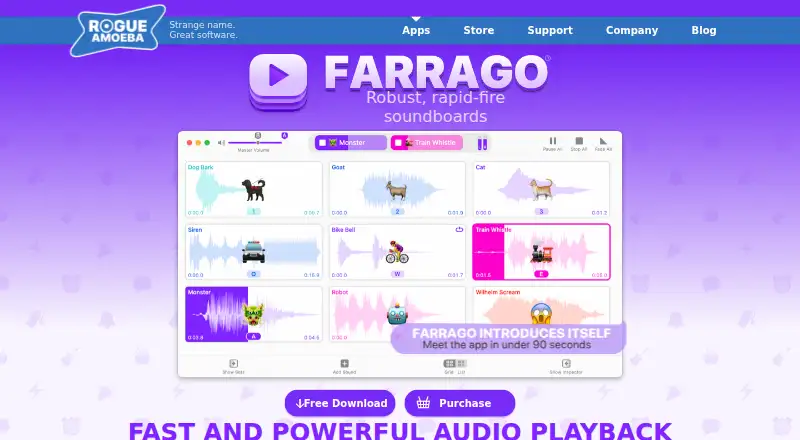
Farrago is a macOS soundboard application for podcasters, radio producers, theater technicians, and live performers. It supports keyboard shortcuts, global hotkeys, mouse-triggered playback, and grid or list layouts for managing sound effects, music, and audio clips. Multiple sound sets can contain up to 80 tiles each, giving operators a structured way to organize material for different shows or segments. Rogue Amoeba has developed Farrago since 2002, and the app is currently listed for macOS 14 through 27.
Its strongest area is playback depth. Farrago includes built-in trimming and fade editing, library and Freesound search, and audio preview through a secondary output device. Hardware and automation options extend beyond basic trigger buttons: MIDI, OSC, Stream Deck, and Shortcuts are supported, while Loopback and Audio Hijack are documented for voice chat and podcast workflows. These capabilities make it suitable for live operators who need more control than a simple clip launcher provides.
The published plan is straightforward: the Farrago License Key costs $55 USD as a one-time purchase, covers a single user, and unlocks the application on one or more personally owned Macs. Farrago is distributed as a free trial download, while the paid license provides the full product. Its Mac-only design is the main boundary: there is no Windows or browser app, and voice effects are not part of the feature set. Choose Farrago for established Mac-based shows that value hardware control, sound-set organization, and automation; choose another soundboard if cross-platform access or built-in voice processing is essential.
Your product? Our editors can test Farrago in depth and publish a review, labelled as paid · from $149/mo →
Farrago pricing
All 1 Farrago plans and prices →
Farrago fact sheet
| Free plan | No |
|---|---|
| Paid from | $55/user one-time |
| Desktop app | Yes |
| Browser app | No |
| Hotkey triggering | Yes |
| Streaming integrations | Yes |
| Voice effects | No |
| Multiple soundboards | Yes |
| Money-back guarantee | 14 days |
| Deployment | Desktop |
| Platforms | macOS |
| Support | Email, Docs |
| Built for | Solo, Small business, Mid-market (editorial estimate) |
| Integrations | 6 integrations: Loopback, Audio Hijack, Shortcuts, MIDI, OSC, Stream Deck |
| Pricing | Paid (source) |
| Website | rogueamoeba.com |
| Facts checked | 20 Sep 2026 |
Farrago integrations
Farrago lists 6 integrations on its own site.
- Loopback
- Audio Hijack
- Shortcuts
- MIDI
- OSC
- Stream Deck
Alternatives to Farrago
- AudioPadA strong free choice for desktop sound triggers, routing, and voice-chat playback.9.4
- ResananceA free, flexible soundboard for hotkeys, voice effects, and streaming audio.9.2
- Sound ShowA flexible cross-platform soundboard for live shows, streaming, and multimedia cues.9.1

See all Farrago alternatives →
Used Farrago? Be the first to review it
The editor score above is our own research. What this page doesn't have yet is a reader's view — what you used Farrago for, what worked and what didn't. No stars are seeded and no review is paid for; an editor reads every one before it appears.
Write a reviewTwo minutes · verified accounts only · read by an editor before it appears
Featured on iTechGuides

Farrago is listed in our Soundboard Software directory. Add the badge to your site — it links back to this page.
<a href="https://www.itechguides.com/products/farrago/"><img src="https://www.itechguides.com/best/badge/farrago.svg" alt="Featured on iTechGuides" width="230" height="46"></a>
Reviewed by iTechGuides Editors · Editorial team · Updated Oct 2026
Advertiser disclosure: iTechGuides is reader-supported. Vendors can pay for top positions in our rankings and for a place on other products' pages, and we may earn a commission when you click some links. Bought places stand at the number bought; this page and our disclosure say so. Paying vendors may get a fuller, more detailed review from our editors, and that review can change their score. How we rank.
Last updated · How we research and update