FacePause
FacePause: A privacy-focused Mac app for posture, blink, and focus-distance break nudges. Ranked #36 of 36 in Screen Time Management Apps by our editors (6.0/10); pricing: Paid; best for mac users needing posture and fatigue nudges.
At a glance
- Editor score6.0 / 10
- PricingPaid
- Best forMac users needing posture and fatigue nudges
- Facts checked22 Sep 2026
Where it wins
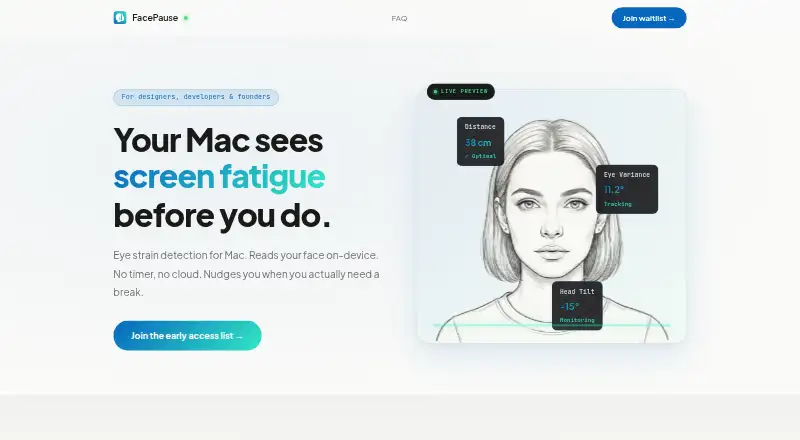
- Detects posture drift, blink rate, and focus distance on-device
- Releases the camera automatically during Zoom and Teams calls
- Supports Intel and Apple Silicon Macs with background monitoring
Where it doesn't
- Available only for macOS 11 and later
- Requires camera access for fatigue detection
- Does not focus on app limits or website blocking
Our verdict on FacePause
FacePause is a macOS desktop app for designers, developers, founders, and other solo users who want reminders tied to screen-fatigue signals rather than app restrictions. It uses the Mac camera to detect posture drift, blink rate, and focus distance, then sends break nudges with snooze and dismiss actions. Background monitoring keeps the feature active while working, and support for macOS 11 and later covers both Intel and Apple Silicon Macs.
Its standout feature is local camera analysis. FacePause processes camera data on-device using WebAssembly and Apple Vision, while stating that it does not record video or store frames. That approach fits users who want fatigue guidance without sending camera footage to a remote service. The app also releases the camera automatically during Zoom and Microsoft Teams calls, which makes its monitoring behavior more suitable for workdays that include video meetings. GDPR compliance is also listed.
FacePause is a narrow screen-fatigue tool, not a general productivity blocker. Its signals address posture, blinking, and viewing distance, so it should appeal to people seeking physical-work-habit reminders. Users who need screen schedules, app limits, website blocking, or broader family controls should choose a product built around those functions instead. The product is currently collecting early-access signups, and its paid model is aimed at individual Mac users rather than larger teams. Choose FacePause for on-device fatigue detection and break prompts; look elsewhere if cross-platform coverage or app-control features matter more.
Your product? Our editors can test FacePause in depth and publish a review, labelled as paid · from $149/mo →
FacePause pricing
FacePause fact sheet
| Free plan | Not verified |
|---|---|
| Paid from | Not verified |
| Devices included | Not verified |
| Supported platforms | macOS 11 and later; Intel and Apple Silicon |
| Usage reports | Not verified |
| Application limits | Not verified |
| Scheduled limits | Not verified |
| Focus sessions | Not verified |
| Usage history retention | Not verified |
| Money-back guarantee | 30 days |
| Deployment | Desktop |
| Platforms | macOS |
| Compliance & security | GDPR |
| Support | |
| Built for | Solo (editorial estimate) |
| Integrations | 2 integrations: Zoom, Microsoft Teams |
| Pricing | Paid |
| Website | facepause.app |
| Facts checked | 22 Sep 2026 |
FacePause integrations
FacePause lists 2 integrations on its own site.
- Zoom
- Microsoft Teams
Alternatives to FacePause
- FreedomA flexible cross-device blocker with strong scheduling and session controls.9.4
- ScreenZenA free, broad screen-time toolkit for blocking apps and websites across four platforms.9.3
- AppBlockA flexible blocker for scheduled focus, stricter limits, and mobile-first screen-time control.9.2



See all FacePause alternatives →
Used FacePause? Be the first to review it
The editor score above is our own research. What this page doesn't have yet is a reader's view — what you used FacePause for, what worked and what didn't. No stars are seeded and no review is paid for; an editor reads every one before it appears.
Write a reviewTwo minutes · verified accounts only · read by an editor before it appears
Featured on iTechGuides

FacePause is listed in our Screen Time Management Apps directory. Add the badge to your site — it links back to this page.
<a href="https://www.itechguides.com/products/facepause/"><img src="https://www.itechguides.com/best/badge/facepause.svg" alt="Featured on iTechGuides" width="230" height="46"></a>
Reviewed by iTechGuides Editors · Editorial team · Updated Oct 2026
Advertiser disclosure: iTechGuides is reader-supported. Vendors can pay for top positions in our rankings and for a place on other products' pages, and we may earn a commission when you click some links. Bought places stand at the number bought; this page and our disclosure say so. Paying vendors may get a fuller, more detailed review from our editors, and that review can change their score. How we rank.
Last updated · How we research and update