EZ CD Audio Converter
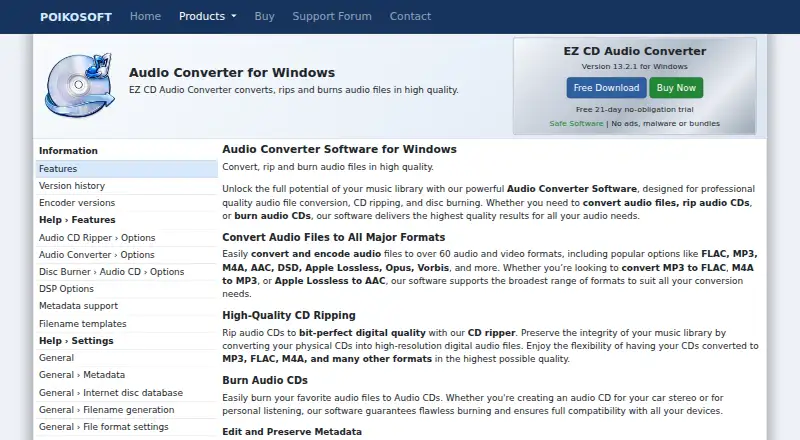
EZ CD Audio Converter: A feature-rich Windows converter for serious format, CD, metadata, and audio-processing work. Ranked #7 of 36 in Audio Converter Software by our editors (8.7/10); pricing: 21-day trial; best for professional Windows conversion and CD work.
At a glance
- Editor score8.7 / 10
- Pricing21-day trial
- Best forProfessional Windows conversion and CD work
- Free planNo
- Batch conversionYes
- Facts checked21 Sep 2026
Where it wins
- Supports conversion to and from more than 60 audio and video formats.
- Offers secure ripping with error detection and two-pass CRC verification.
- Combines batch conversion, metadata tools, DSP, and disc burning.
Where it doesn't
- Runs on Windows only.
- No cloud conversion workflow.
- There is no free plan; access is through paid licensing or a 21-day trial.
Our verdict on EZ CD Audio Converter
EZ CD Audio Converter is Windows desktop software for converting audio, ripping CDs, managing metadata, processing high-resolution audio, and creating discs. It suits audio enthusiasts, studios, radio stations, and other users who need more than a basic file converter. The format coverage includes FLAC, MP3, M4A, AAC, DSD, WAV, Opus, Vorbis, Apple Lossless, AIFF, WMA, WavPack, and other supported audio and video formats. Batch conversion can handle unlimited audio files with up to 64 parallel converters.
Its strongest area is the combination of conversion quality controls and CD workflows. Secure ripping includes error detection and two-pass CRC verification, while metadata tools can edit, preserve, and retrieve album artwork. GD3, MusicBrainz, Discogs, Deezer, and Amazon support metadata and artwork-related workflows. Professional sample-rate conversion, DSD and PCM support, ReplayGain, EBU R128, normalization, silence removal, and fade effects add control for users working with detailed audio-processing requirements.
The software also covers disc output, including audio CDs, MP3 CDs, data discs, and ISO images. Its paid licensing model includes a 21-day trial, but it does not provide a free plan. Because it is Windows-only and does not offer cloud conversion, it is a focused choice for users who want a desktop application with broad local processing and CD capabilities. Users seeking browser-based conversion, cross-platform access, or a permanently free option should choose an alternative instead.
Your product? Our editors can test EZ CD Audio Converter in depth and publish a review, labelled as paid · from $149/mo →
EZ CD Audio Converter pricing
EZ CD Audio Converter fact sheet
| Free plan | No |
|---|---|
| Paid from | Not verified |
| Batch conversion | Yes |
| Supported formats | 60+ audio and video formats, including FLAC, MP3, M4A, AAC, DSD, WAV, Opus, Vorbis, Apple Lossless, AIFF, WMA, and WavPack |
| Quality controls | Yes |
| Metadata editing | Yes |
| CD ripping | Yes |
| Cloud conversion | No |
| Free trial | 21 days |
| Deployment | Desktop |
| Platforms | Windows |
| Support | Community |
| Built for | Solo, Small business, Mid-market (editorial estimate) |
| Integrations | 5 integrations: GD3, MusicBrainz, Discogs, Deezer, Amazon |
| Pricing | 21-day trial (source) |
| Website | poikosoft.com |
| Facts checked | 21 Sep 2026 |
EZ CD Audio Converter integrations
EZ CD Audio Converter lists 5 integrations on its own site.
- GD3
- MusicBrainz
- Discogs
- Deezer
- Amazon
Alternatives to EZ CD Audio Converter
- fre:acA capable free desktop converter for cross-platform library management and CD ripping.9.4
- MediaHuman Audio ConverterA capable free converter for batch jobs, metadata handling, and everyday library exports.9.2
- X Lossless DecoderA free macOS tool for accurate lossless conversion, ripping, tagging, and batch processing.9.1

See all EZ CD Audio Converter alternatives →
EZ CD Audio Converter vs the competition
- EZ CD Audio Converter vs fre:ac
- EZ CD Audio Converter vs MediaHuman Audio Converter
- EZ CD Audio Converter vs X Lossless Decoder
- EZ CD Audio Converter vs CUETools
- EZ CD Audio Converter vs dBpoweramp Music Converter
- EZ CD Audio Converter vs XRECODE3

Compare EZ CD Audio Converter with any tool side by side →
Also Ranked In
EZ CD Audio Converter is ranked in 2 of our directories.
Used EZ CD Audio Converter? Be the first to review it
The editor score above is our own research. What this page doesn't have yet is a reader's view — what you used EZ CD Audio Converter for, what worked and what didn't. No stars are seeded and no review is paid for; an editor reads every one before it appears.
Write a reviewTwo minutes · verified accounts only · read by an editor before it appears
Featured on iTechGuides

EZ CD Audio Converter is listed in our Audio Converter Software directory. Add the badge to your site — it links back to this page.
<a href="https://www.itechguides.com/products/ez-cd-audio-converter/"><img src="https://www.itechguides.com/best/badge/ez-cd-audio-converter.svg" alt="Featured on iTechGuides" width="230" height="46"></a>
Reviewed by iTechGuides Editors · Editorial team · Updated Oct 2026
Advertiser disclosure: iTechGuides is reader-supported. Vendors can pay for top positions in our rankings and for a place on other products' pages, and we may earn a commission when you click some links. Bought places stand at the number bought; this page and our disclosure say so. Paying vendors may get a fuller, more detailed review from our editors, and that review can change their score. How we rank.
Last updated · How we research and update