
EXIF Magic
EXIF Magic: A free cross-platform metadata editor focused on privacy, GPS control, and pixel preservation. Ranked #12 of 31 in Photo Metadata Editors by our editors (8.0/10); pricing: Free plan; best for mobile users needing private metadata cleanup.
At a glance
- Editor score8.0 / 10
- PricingFree plan
- Best forMobile users needing private metadata cleanup
- Free planYes
- Paid fromFree
- Facts checked21 Sep 2026
Where it wins
- Reads 128 named fields across EXIF, TIFF, IPTC, GPS, XMP, and maker notes
- Removes or edits metadata, including GPS coordinates and location details
- Processes on-device and preserves image pixels without re-encoding
Where it doesn't
- Batch processing is not verified
- RAW support is not verified
- Android availability is described as beta testing
Our verdict on EXIF Magic
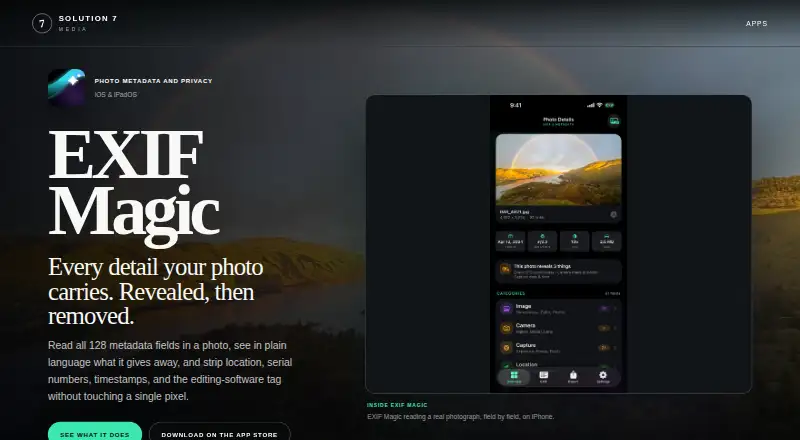
EXIF Magic is a free photo metadata and privacy utility for people who need to inspect, edit, or remove embedded information from images. It reads 128 named fields across EXIF, TIFF, IPTC, GPS, XMP, and maker-note data, including coordinates and device identifiers. Users can edit author, title, description, copyright, keywords, camera details, dates, and GPS coordinates. The app is listed across iOS, macOS, and Android, with a focus on mobile photo management and private processing.
Its strongest area is metadata control. EXIF Magic can remove all metadata or selected containers, replace a location through a map, place search, address, ZIP code, or coordinates, and replace the original file. It also verifies exported metadata before saving and can copy results as readable text or structured JSON. Pixel preservation is a useful distinction: the app processes metadata without re-encoding image data, helping keep the image itself unchanged. Processing occurs on-device, without uploads or accounts, and the Free plan has no in-app purchases or subscription.
EXIF Magic fits users who want detailed inspection and targeted cleanup without creating an account or sending photos to a server. It is especially suitable for GPS privacy, metadata verification, and maintaining original image pixels. The product is less clearly suited to workflows that depend on batch processing or RAW files, since those capabilities are not verified. Users should also distinguish the platform listings: iOS and iPadOS are described directly, Android is associated with beta testing, and Apple lists Mac compatibility while noting macOS verification status. Choose EXIF Magic for field-level control and on-device privacy; consider an alternative if batch or RAW workflows are essential.
Your product? Our editors can test EXIF Magic in depth and publish a review, labelled as paid · from $149/mo →
EXIF Magic pricing
All 1 EXIF Magic plans and prices →
EXIF Magic fact sheet
| Free plan | Yes |
|---|---|
| Paid from | Free |
| Metadata scope | Broader |
| Batch editing | Not verified |
| RAW file support | Not verified |
| Platform | Mobile |
| GPS metadata tools | Yes |
| Metadata templates | Not verified |
| Documented file formats | Not verified |
| Deployment | Mobile |
| Platforms | iOS, macOS, Android |
| Support | Email, Docs |
| Built for | Solo, Small business (editorial estimate) |
| Pricing | Free plan (source) |
| Website | solution7media.com |
| Facts checked | 21 Sep 2026 |
Alternatives to EXIF Magic
- ExifToolA free, open-source metadata toolkit for deep, cross-platform batch control.9.4
- PhotiniA complete open-source metadata editor with batch tools, geotagging, and RAW support.9.2
- GeoSetterA focused, free Windows tool for detailed metadata editing and GPS-based photo organization.9.0


See all EXIF Magic alternatives →
Used EXIF Magic? Be the first to review it
The editor score above is our own research. What this page doesn't have yet is a reader's view — what you used EXIF Magic for, what worked and what didn't. No stars are seeded and no review is paid for; an editor reads every one before it appears.
Write a reviewTwo minutes · verified accounts only · read by an editor before it appears
Featured on iTechGuides

EXIF Magic is listed in our Photo Metadata Editors directory. Add the badge to your site — it links back to this page.
<a href="https://www.itechguides.com/products/exif-magic/"><img src="https://www.itechguides.com/best/badge/exif-magic.svg" alt="Featured on iTechGuides" width="230" height="46"></a>
Reviewed by iTechGuides Editors · Editorial team · Updated Oct 2026
Advertiser disclosure: iTechGuides is reader-supported. Vendors can pay for top positions in our rankings and for a place on other products' pages, and we may earn a commission when you click some links. Bought places stand at the number bought; this page and our disclosure say so. Paying vendors may get a fuller, more detailed review from our editors, and that review can change their score. How we rank.
Last updated · How we research and update