Excise
Excise: A capable open-source PDF toolkit for forms, redaction, OCR, and command-line automation. Ranked #88 of 102 in PDF Editors by our editors (3.0/10); pricing: Free plan; best for technical PDF processing and batch workflows.
At a glance
- Editor score3.0 / 10
- PricingFree plan
- Best forTechnical PDF processing and batch workflows
- Free planYes
- Paid fromFree
- OCRYes
- Facts checked20 Sep 2026
Where it wins
- Glyph-level redaction includes metadata and attachment scrubbing.
- Forms, annotations, OCR, and signatures inspection cover technical workflows.
- Cross-platform desktop apps pair with .NET libraries and JSON batch output.
Where it doesn't
- Does not edit existing PDF text.
- Does not provide general PDF format conversion.
- OCR depends on the system Tesseract CLI.
Our verdict on Excise
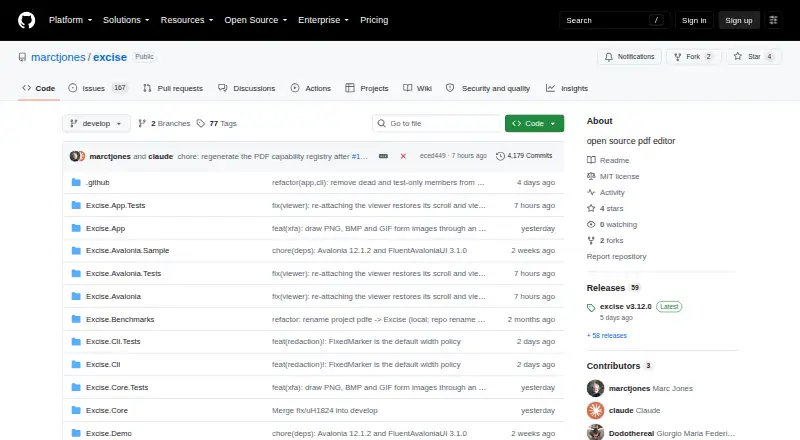
Excise is an open-source PDF editor and pure-.NET PDF framework for desktop users and .NET developers. Its desktop application supports Windows, macOS, and Linux, while the codebase provides reusable parser, rendering, OCR, and viewer libraries under the MIT license. The feature set is aimed at technical document handling: users can view, search, copy text, organize pages, fill and author AcroForms, place flat typewriter text, create annotations, redact document content, inspect signatures, and work with attachments.
Its strongest fit is structured, repeatable PDF processing. Command-line batch workflows with JSON output give developers a way to automate document operations, while page insertion, extraction, removal, reordering, and rotation cover common document-management tasks. Glyph-level redaction is paired with metadata and attachment scrubbing, and OCR workflows use the system Tesseract CLI. These capabilities make Excise a practical choice for teams that value local tooling, scriptable operations, and access to .NET components rather than a hosted subscription workflow.
Excise is free and open source, with no paid tier structure described. The main boundary is editing depth: it adds flat typewriter text but does not edit existing PDF text. It also does not provide general PDF format conversion, so users who need broad conversion or direct modification of established text should choose a different PDF editor. Pick Excise for cross-platform forms, annotations, redaction, OCR, signature inspection, and batch JSON workflows; avoid it when full text editing or format conversion is central to the job.
Your product? Our editors can test Excise in depth and publish a review, labelled as paid · from $149/mo →
Excise pricing
Excise fact sheet
| Free plan | Yes |
|---|---|
| Paid from | Free |
| Text editing | No |
| Annotation tools | Yes |
| OCR | Yes |
| PDF conversion | No |
| Form creation | Yes |
| Supported platforms | Windows, macOS, Linux |
| Deployment | Desktop, Self-hosted |
| Platforms | Windows, macOS, Linux |
| Support | Docs |
| Built for | Solo, Small business, Mid-market (editorial estimate) |
| Pricing | Free plan |
| Website | github.com |
| Facts checked | 20 Sep 2026 |
Alternatives to Excise
- Foxit PDF EditorA mature PDF workspace with deep editing, OCR, forms, security, and integrations.9.3
- iLovePDFA broad PDF toolkit with free access, offline desktop processing, and cross-device apps.9.2
- SmallpdfA broad PDF toolkit for simple editing across web, Windows, mobile, and Chrome.9.1


Also Ranked In
Excise is ranked in 2 of our directories.
Used Excise? Be the first to review it
The editor score above is our own research. What this page doesn't have yet is a reader's view — what you used Excise for, what worked and what didn't. No stars are seeded and no review is paid for; an editor reads every one before it appears.
Write a reviewTwo minutes · verified accounts only · read by an editor before it appears
Featured on iTechGuides

Excise is listed in our PDF Editors directory. Add the badge to your site — it links back to this page.
<a href="https://www.itechguides.com/products/excise/"><img src="https://www.itechguides.com/best/badge/excise.svg" alt="Featured on iTechGuides" width="230" height="46"></a>
Reviewed by iTechGuides Editors · Editorial team · Updated Oct 2026
Advertiser disclosure: iTechGuides is reader-supported. Vendors can pay for top positions in our rankings and for a place on other products' pages, and we may earn a commission when you click some links. Bought places stand at the number bought; this page and our disclosure say so. Paying vendors may get a fuller, more detailed review from our editors, and that review can change their score. How we rank.
Last updated · How we research and update