
Envisioneer
Envisioneer: Residential BIM software that turns 3D models into construction documents and material lists. Ranked #21 of 36 in Architecture Software by our editors (6.9/10); pricing: 30-day trial; best for residential designers needing construction details.
At a glance
- Editor score6.9 / 10
- Pricing30-day trial
- Best forResidential designers needing construction details
- Free planNo
- Paid from$115/yr
- BIM workflowsYes
- Facts checked23 Sep 2026
Where it wins
- Generates floor plans, elevations, sections, details and material lists from models
- Construction Suite adds framing, panel diagrams and quote generation
- Offers both Windows desktop software and a cloud-based home design tool
Where it doesn't
- Its documented focus is residential rather than broad architecture BIM
- Construction Suite buy-now pricing is $3,350
- Pro Architect's listed feature set is narrower than Construction Suite's
Our verdict on Envisioneer
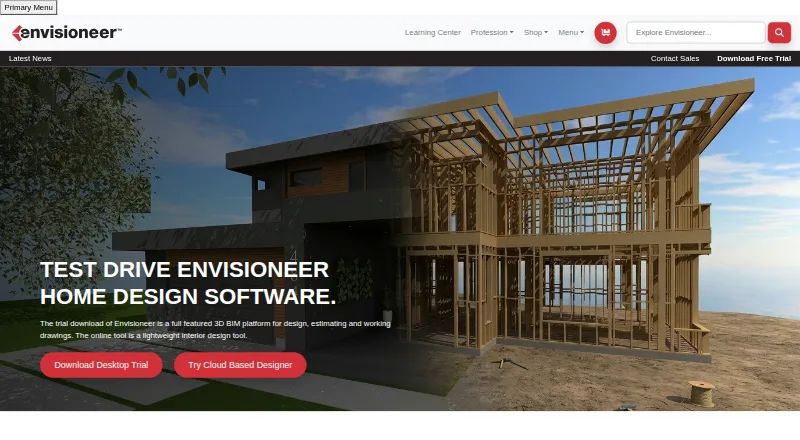
Envisioneer is residential design software from Cadsoft Corporation for homeowners, designers, builders, remodelers, estimators and building-material suppliers. Its desktop BIM tools create 3D residential models and derive floor plans, elevations, sections, construction details and material lists. There is also a cloud-based Personal Architect tool for home design. The product suits teams whose work centers on residential projects and construction documentation; it is less suited to practices seeking a broad architecture BIM focus.
The editions differ in how far they take a project toward construction. Pro Architect includes 3D design and modeling, construction documents and VR mode. Building Essentials adds material and cut lists and partner integrations. Construction Suite adds panel diagrams and quote generation to 3D modeling, construction documents and material and cut lists. Its feature set also includes framing and cost estimates. Integrations named by the vendor include Autodesk, SketchUp, MiTek, 2020, BuilderTREND and Sketchfab, while selected CAD and 3D model formats can be imported and exported. These capabilities make edition choice important: buyers who need quoting and panel workflows should compare Construction Suite with the narrower Pro Architect option.
According to the vendor's pricing page, options include one-time purchases and monthly or annual subscriptions. Construction Suite is listed at $3,350 to buy, $185 per month or $2,331 per year; Building Essentials is $2,515 to buy, $140 per month or $1,764 per year. Pro Architect is listed at $1,250 to buy or $72 per month. The starting price is $115 per license per year, and a 30-day free trial is offered. Envisioneer is a reasonable fit for residential designers who need construction details and related lists, while those needing broader architectural workflows should look elsewhere.
Your product? Our editors can test Envisioneer in depth and publish a review, labelled as paid · from $149/mo →
Envisioneer pricing
All 10 Envisioneer plans and prices →
Envisioneer fact sheet
| Free plan | No |
|---|---|
| Paid from | $115/yr |
| BIM workflows | Yes |
| Construction documents | Yes |
| Rendering tools | Yes |
| Supported file formats | BMP, JPG, TGA, DWG, DXF, SKP, 3DS, IFC, OBJ, GLB, GLTF, VRML, Artlantis, XML, AVI |
| Team collaboration | Yes |
| Supported platforms | Windows desktop; cloud-based web tool |
| Free trial | 30 days |
| Deployment | Cloud, Desktop |
| Platforms | Windows, Web |
| Support | Email, Phone |
| Built for | Solo, Small business, Mid-market (editorial estimate) |
| Integrations | 6 integrations: Autodesk, SketchUp, MiTek, 2020, BuilderTREND, Sketchfab |
| Pricing | 30-day trial (source) |
| Website | cadsoft.com |
| Facts checked | 23 Sep 2026 |
Envisioneer integrations
Envisioneer lists 6 integrations on its own site.
- Autodesk
- SketchUp
- MiTek
- 2020
- BuilderTREND
- Sketchfab
Alternatives to Envisioneer
- Autodesk RevitA Windows BIM tool for multidisciplinary modeling, documentation, and model coordination.9.4
- ArchicadA full architectural BIM workflow with openBIM and cloud teamwork, at a substantial annual cost.9.2
- AllplanA multidisciplinary BIM suite with coordination, detailing and cost workflows at annual per-user prices.9.1



See all Envisioneer alternatives →
Used Envisioneer? Be the first to review it
The editor score above is our own research. What this page doesn't have yet is a reader's view — what you used Envisioneer for, what worked and what didn't. No stars are seeded and no review is paid for; an editor reads every one before it appears.
Write a reviewTwo minutes · verified accounts only · read by an editor before it appears
Featured on iTechGuides

Envisioneer is listed in our Architecture Software directory. Add the badge to your site — it links back to this page.
<a href="https://www.itechguides.com/products/envisioneer/"><img src="https://www.itechguides.com/best/badge/envisioneer.svg" alt="Featured on iTechGuides" width="230" height="46"></a>
Reviewed by iTechGuides Editors · Editorial team · Updated Oct 2026
Advertiser disclosure: iTechGuides is reader-supported. Vendors can pay for top positions in our rankings and for a place on other products' pages, and we may earn a commission when you click some links. Bought places stand at the number bought; this page and our disclosure say so. Paying vendors may get a fuller, more detailed review from our editors, and that review can change their score. How we rank.
Last updated · How we research and update