
Enlarger
Enlarger: A focused offline upscaler for batch image work on Windows and macOS. Ranked #28 of 28 in AI Image Upscalers by our editors (6.2/10); pricing: Paid; best for offline desktop batch processing.
At a glance
- Editor score6.2 / 10
- PricingPaid
- Best forOffline desktop batch processing
- Free planNo
- Paid from$39 one-time
- Facts checked20 Sep 2026
Where it wins
- Runs locally and offline with no per-image limits
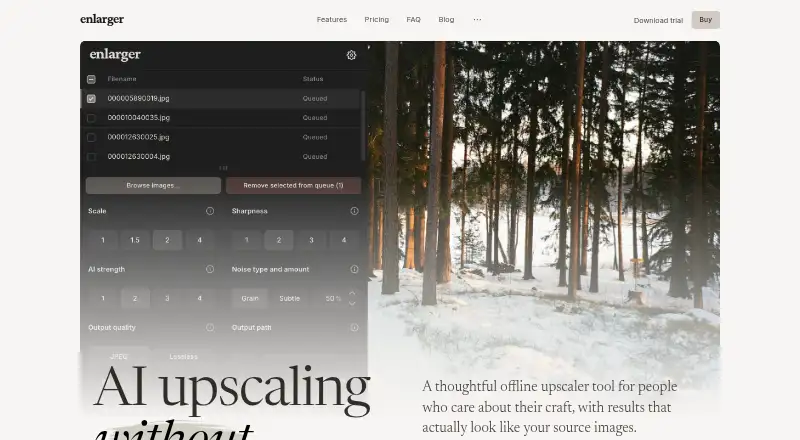
- Supports queue-based parallel batch processing
- Accepts JPEG, PNG, AVIF, and WebP inputs
Where it doesn't
- No free plan or API access
- Exports only JPEG and PNG
- Available only on Windows and macOS
Our verdict on Enlarger
Enlarger is an offline desktop image upscaler for photographers, illustrators, designers, and print professionals who need local image enlargement. It uses AI-assisted processing, supports folder-based batch work, and applies automatic post-processing intended to preserve fine detail. JPEG artifact reduction is included, while input support covers JPEG, PNG, AVIF, and WebP. The application runs on Windows and macOS and exports JPEG or PNG files.
The published license is a one-time purchase of $39 € + taxes may apply, with the currency display shown in that format. The Enlarger license includes updates to the current major version, two activations, no per-image limits, and local offline operation. There is no free plan, although the product offers a 10-image trial without a watermark or credit card. This pricing structure suits buyers who prefer a desktop license over recurring payments, especially when repeated batch processing makes per-image limits undesirable.
Enlarger’s strongest fit is a privacy-conscious or workflow-focused desktop environment: images remain on the local machine, and queue-based workflow with batch parallel processing can organize multiple files. It is narrower than products that provide online access, API integration, broader output support, or video upscaling. Buyers who need a straightforward offline tool for JPEG, PNG, AVIF, or WebP source files should consider it; teams needing an API, a free plan, wider platform coverage, or JPEG and PNG output beyond the listed formats should choose an alternative.
Your product? Our editors can test Enlarger in depth and publish a review, labelled as paid · from $149/mo →
Enlarger pricing
All 1 Enlarger plans and prices →
Enlarger fact sheet
| Free plan | No |
|---|---|
| Paid from | $39 one-time |
| Maximum upscale | Not verified |
| Batch processing | Yes |
| API access | No |
| Desktop app | Yes |
| Video upscaling | Not verified |
| Output formats | JPEG, PNG |
| Money-back guarantee | 14 days |
| Deployment | Desktop |
| Platforms | Windows, macOS |
| Compliance & security | GDPR |
| Support | Tickets, Docs |
| Built for | Solo, Small business (editorial estimate) |
| Pricing | Paid (source) |
| Website | enlarger.app |
| Facts checked | 20 Sep 2026 |
Alternatives to Enlarger
- NextGenUpA broad, free offline toolkit for image, video, and restoration work.9.4
- Real-ESRGANA flexible open-source upscaler for technical users who need local image and video workflows.9.2
- Adima Image Upscaler ProA local-first upscaler with 16× enlargement, batch folders, and specialized AI models.9.0


See all Enlarger alternatives →
Also Ranked In
Enlarger is ranked in 2 of our directories.
Used Enlarger? Be the first to review it
The editor score above is our own research. What this page doesn't have yet is a reader's view — what you used Enlarger for, what worked and what didn't. No stars are seeded and no review is paid for; an editor reads every one before it appears.
Write a reviewTwo minutes · verified accounts only · read by an editor before it appears
Featured on iTechGuides

Enlarger is listed in our AI Image Upscalers directory. Add the badge to your site — it links back to this page.
<a href="https://www.itechguides.com/products/enlarger/"><img src="https://www.itechguides.com/best/badge/enlarger.svg" alt="Featured on iTechGuides" width="230" height="46"></a>
Reviewed by iTechGuides Editors · Editorial team · Updated Oct 2026
Advertiser disclosure: iTechGuides is reader-supported. Vendors can pay for top positions in our rankings and for a place on other products' pages, and we may earn a commission when you click some links. Bought places stand at the number bought; this page and our disclosure say so. Paying vendors may get a fuller, more detailed review from our editors, and that review can change their score. How we rank.
Last updated · How we research and update