
EncodeX
EncodeX: A free desktop converter with batch processing and command-line and MCP automation. Ranked #50 of 74 in Video Converter Software by our editors (4.0/10); pricing: Free plan; best for free conversion with developer automation.
At a glance
- Editor score4.0 / 10
- PricingFree plan
- Best forFree conversion with developer automation
- Free planYes
- Paid fromFree
- Supported platformsCross-platform
- Facts checked24 Sep 2026
Where it wins
- Converts video and audio, with batch queues and preset or custom profiles
- Hardware-accelerated encoding, trimming, compression, and audio extraction
- Free, open source, cross-platform, and usable offline
Where it doesn't
- Desktop app rather than a browser-based conversion workflow
- Documentation is the listed support channel
- CLI and MCP automation may suit technical users better than occasional converters
Our verdict on EncodeX
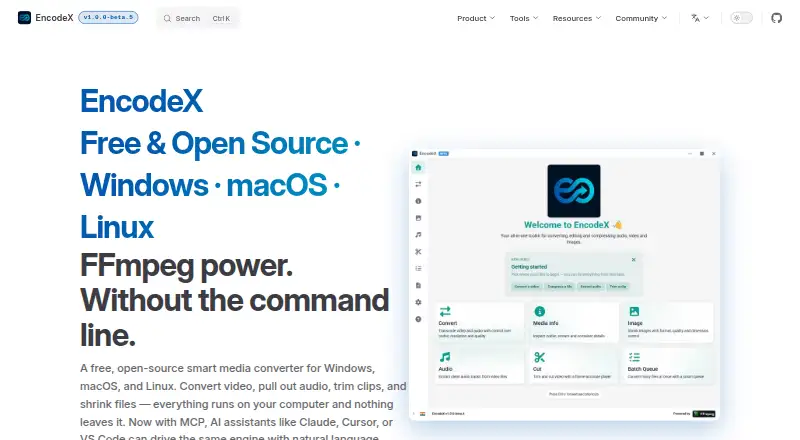
EncodeX is a free, open-source desktop media converter for people who need to change video or audio formats, prepare files for devices, or automate conversion tasks. It runs on Windows, macOS, and Linux, and processes files locally, so it can work offline. Its feature set spans routine conversion and file preparation as well as command-line and MCP automation, making it a fit for solo users and small teams that want a no-subscription tool rather than a hosted conversion service.
For everyday media work, EncodeX supports video formats including MP4, MKV, AVI, MOV, WebM, MPEG, and FLV, plus audio formats such as MP3, FLAC, WAV, M4A, AAC, and OGG. Batch queues handle multiple conversions, while preset and custom profiles provide a way to reuse settings. The app also supports resolution and bitrate adjustments, hardware-accelerated encoding, clip trimming, compression, and audio extraction from video. This breadth makes it useful for people who want conversion and basic file-preparation tools together; those seeking a narrowly focused single-purpose converter may not need the full set.
The Free plan costs $0 one time, is open source, and has no subscription. The standout distinction is automation: EncodeX provides a command-line interface and an MCP server, with integrations listed for Claude Desktop, Claude Code, Cursor, Visual Studio Code, and MCP-compatible clients. That makes it worth considering for developers who want to incorporate media conversion into scripted or assistant-driven workflows. The tradeoff is that command-line and MCP workflows are less suited to someone who wants only a simple point-and-click task, and the listed support channel is documentation. Choose EncodeX for local, free conversion and automation; consider another option if you need a browser-based service or a different support model.
Your product? Our editors can test EncodeX in depth and publish a review, labelled as paid · from $149/mo →
EncodeX pricing
All 1 EncodeX plans and prices →
EncodeX fact sheet
| Free plan | Yes |
|---|---|
| Paid from | Free |
| Supported platforms | Cross-platform |
| Output formats | MP4, MKV, AVI, MOV, WebM, MPEG, FLV; audio: MP3, FLAC, WAV, M4A, AAC, OGG |
| Batch conversion | Yes |
| Hardware acceleration | Yes |
| Maximum output resolution | Not verified |
| Audio extraction | Yes |
| Deployment | Desktop |
| Platforms | Windows, macOS, Linux |
| Support | Docs |
| Built for | Solo, Small business (editorial estimate) |
| Integrations | 5 integrations: Claude Desktop, Claude Code, Cursor, Visual Studio Code, MCP-compatible clients |
| Pricing | Free plan (source) |
| Website | encodex.in |
| Facts checked | 24 Sep 2026 |
EncodeX integrations
EncodeX lists 5 integrations on its own site.
- Claude Desktop
- Claude Code
- Cursor
- Visual Studio Code
- MCP-compatible clients
Alternatives to EncodeX
- FFmpegA powerful open-source toolkit for technical media workflows across major desktop platforms.9.4
- HandBrakeA capable free converter for everyday desktop encoding, presets, queues, and disc sources.9.3
- Adobe Media EncoderA deep Adobe-centered encoder for teams managing complex media pipelines.9.2



See all EncodeX alternatives →
Used EncodeX? Be the first to review it
The editor score above is our own research. What this page doesn't have yet is a reader's view — what you used EncodeX for, what worked and what didn't. No stars are seeded and no review is paid for; an editor reads every one before it appears.
Write a reviewTwo minutes · verified accounts only · read by an editor before it appears
Featured on iTechGuides

EncodeX is listed in our Video Converter Software directory. Add the badge to your site — it links back to this page.
<a href="https://www.itechguides.com/products/encodex/"><img src="https://www.itechguides.com/best/badge/encodex.svg" alt="Featured on iTechGuides" width="230" height="46"></a>
Reviewed by iTechGuides Editors · Editorial team · Updated Oct 2026
Advertiser disclosure: iTechGuides is reader-supported. Vendors can pay for top positions in our rankings and for a place on other products' pages, and we may earn a commission when you click some links. Bought places stand at the number bought; this page and our disclosure say so. Paying vendors may get a fuller, more detailed review from our editors, and that review can change their score. How we rank.
Last updated · How we research and update