
Easynote
Easynote: A broad project workspace for teams that need collaboration, planning, and document tools. Ranked #174 of 188 in Project Management Software by our editors (3.0/10); pricing: 7-day trial; best for teams needing broad collaboration coverage.
At a glance
- Editor score3.0 / 10
- Pricing7-day trial
- Best forTeams needing broad collaboration coverage
- Free planNo
- Founded2016 · Malmö, Sweden
- Facts checked20 Sep 2026
Where it wins
- Combines Kanban, Gantt, budgets, risks, deadlines, and dashboards
- Connects projects with documents, meetings, files, and calendars
- Available on web, desktop, and mobile platforms
Where it doesn't
- No ongoing free plan; access is limited to paid plans after the trial
- Enterprise pricing requires contact with sales
- The mobile application is described as forthcoming and in beta
Our verdict on Easynote
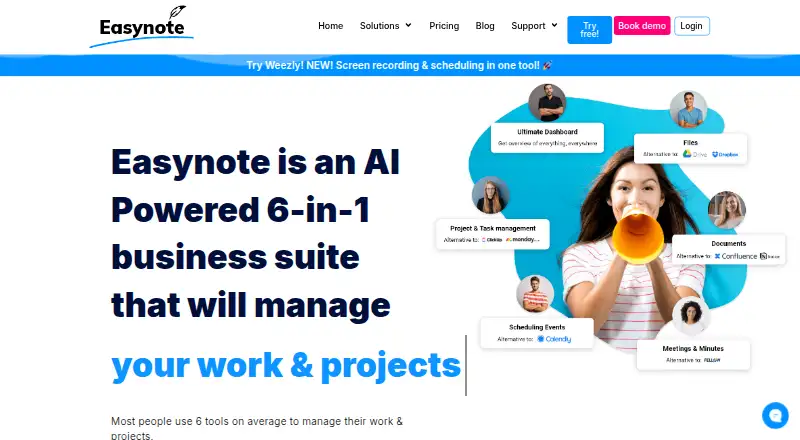
Easynote is project and work collaboration software for individuals, teams, and organizations. It brings project and task management together with customizable widgets, cross-project dashboards, Kanban-style workflows, Gantt timelines, documents, files, meetings, scheduling, and calendar connections. Teams can manage budgets, forecasts, risks, deadlines, linked tasks, folder access controls, and real-time collaboration in one workspace. It is available through web, Windows, macOS, Linux, iOS, and Android applications, with the mobile application described as forthcoming and in beta.
The published plans show a 7-day trial followed by paid access. Prime Unlimited includes tasks and projects, unlimited team members, 500 GB of storage, Kanban view, a Timeline (Gantt) chart, and 2FA authentication. Enterprise is aimed at medium and large companies and adds 10 TB of storage, a dedicated manager, priority support, an SLA agreement, and separate server hosting. Enterprise pricing requires contact with sales, so the main buying decision is whether the Prime feature set covers the team’s requirements or whether enterprise service arrangements justify a larger deployment.
Platform coverage and connected work are central strengths. Easynote integrates with Google Calendar, Outlook, Google Meet, Microsoft Teams, Skype, Zoom, Google Drive, Dropbox, OneDrive, and Slack. Its meeting minutes can connect to calendar events, while scheduling pages, synchronized calendars, linked files, and project dashboards support work that spans planning and collaboration. Choose Easynote if your team wants broad coverage across project delivery, documents, meetings, and scheduling. Consider a more focused alternative if you need a free ongoing plan, fully established mobile access, or a simpler workspace centered on one workflow.
Your product? Our editors can test Easynote in depth and publish a review, labelled as paid · from $149/mo →
Easynote pricing
All 2 Easynote plans and prices →
Easynote fact sheet
| Free plan | No |
|---|---|
| Paid from | Not verified |
| Task views | Not verified |
| Automation rules | Not verified |
| Time tracking | Not verified |
| Guest access | Not verified |
| Free-plan user limit | Not verified |
| Native integrations | Not verified |
| Free trial | 7 days |
| Deployment | Cloud, Desktop, Mobile |
| Platforms | Web, Windows, macOS, Linux, iOS, Android |
| Compliance & security | 2FA |
| Support | Email, Live chat, Phone, Docs · 24/7 |
| Built for | Small business, Mid-market, Enterprise (editorial estimate) |
| Integrations | 10 integrations: Google Calendar, Outlook, Google Meet, Microsoft Teams, Skype, Zoom … |
| Pricing | 7-day trial (source) |
| Website | easynote.com |
| Facts checked | 20 Sep 2026 |
Easynote integrations
Easynote lists 10 integrations on its own site.
- Google Calendar
- Outlook
- Google Meet
- Microsoft Teams
- Skype
- Zoom
- Google Drive
- Dropbox
- OneDrive
- Slack
Alternatives to Easynote
- ClickUpBroad project control with tasks, Docs, automations, reporting, time tracking, and AI.9.4
- JiraA mature choice for agile delivery teams needing boards, backlogs, workflows, and automation.9.3
- AsanaA mature project hub with flexible views, automation, reporting, and AI features.9.2


See all Easynote alternatives →
Used Easynote? Be the first to review it
The editor score above is our own research. What this page doesn't have yet is a reader's view — what you used Easynote for, what worked and what didn't. No stars are seeded and no review is paid for; an editor reads every one before it appears.
Write a reviewTwo minutes · verified accounts only · read by an editor before it appears
Featured on iTechGuides

Easynote is listed in our Project Management Software directory. Add the badge to your site — it links back to this page.
<a href="https://www.itechguides.com/products/easynote/"><img src="https://www.itechguides.com/best/badge/easynote.svg" alt="Featured on iTechGuides" width="230" height="46"></a>
Reviewed by iTechGuides Editors · Editorial team · Updated Oct 2026
Advertiser disclosure: iTechGuides is reader-supported. Vendors can pay for top positions in our rankings and for a place on other products' pages, and we may earn a commission when you click some links. Bought places stand at the number bought; this page and our disclosure say so. Paying vendors may get a fuller, more detailed review from our editors, and that review can change their score. How we rank.
Last updated · How we research and update