
Eagle
Eagle: An affordable desktop library with broad file support and strong search tools. Ranked #119 of 150 in Digital Asset Management Software by our editors (3.0/10); pricing: 30-day trial; best for individuals needing an affordable desktop asset library.
At a glance
- Editor score3.0 / 10
- Pricing30-day trial
- Best forIndividuals needing an affordable desktop asset library
- Free planNo
- Paid from$34.95 one-time
- Metadata and taggingYes
- Founded2017
- Facts checked21 Sep 2026
Where it wins
- One-time $34.95 license with lifetime access and updates
- Searches assets by tags, metadata, color, dimensions, format, and more
- Supports broad file types, browser capture, sync, and API automation
Where it doesn't
- Primarily desktop-oriented for Windows and macOS
- No verified approval workflows or version history
- Cloud synchronization relies on third-party storage services
Our verdict on Eagle
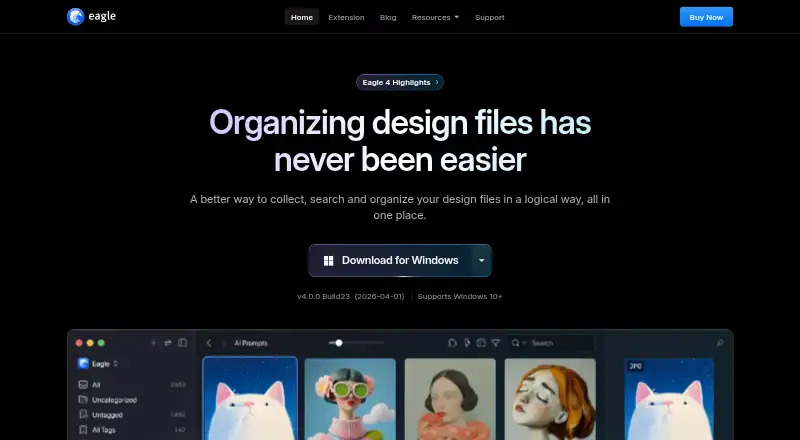
Eagle is a desktop digital asset manager for designers and creative professionals who need a local library for collecting, organizing, and finding creative files. It supports images, videos, audio, fonts, documents, webpages, eBooks, compressed files, Adobe files, and 3D models. Libraries can be organized with folders, tags, smart folders, ratings, comments, and filters, while guest sharing and API access extend its usefulness beyond basic file browsing.
Pricing is straightforward: the Eagle license costs $34.95 as a one-time purchase. It includes lifetime access, lifetime free updates, a Windows and macOS license, activation on 2 devices, and a browser extension. A 30-day free trial is available. The browser extension can save web images, screenshots, and webpage content, while batch renaming, import, export, format conversion, duplicate-file detection, and similar-image detection support everyday asset maintenance. Eagle also previews images, videos, audio, fonts, documents, and 3D files within the library.
Eagle fits individuals who want an affordable desktop-first asset library with detailed search and broad format coverage. Synchronization works through Google Drive, Dropbox, OneDrive, and Synology Drive, and plugins plus a Web API support integrations and automation. Its local-library approach makes available storage depend on the user's own storage rather than a stated plan quota. Teams needing governed approval workflows, version history, or a more centralized collaboration model should choose a different type of digital asset management system. For personal design collections and reference libraries, Eagle offers a focused combination of organization, discovery, capture, and file-handling tools.
Your product? Our editors can test Eagle in depth and publish a review, labelled as paid · from $149/mo →
Eagle pricing
All 1 Eagle plans and prices →
Eagle fact sheet
| Free plan | No |
|---|---|
| Paid from | $34.95 one-time |
| Storage limit | Not verified |
| Supported asset types | Images; videos; audio; fonts; documents and Office files; webpages; eBooks; compressed files; Adobe files; 3D models |
| Metadata and tagging | Yes |
| Approval workflows | Not verified |
| Version history | Not verified |
| Guest sharing | Yes |
| API access | Yes |
| Free trial | 30 days · no card needed |
| Deployment | Desktop, Browser extension |
| Platforms | Windows, macOS, Chrome extension |
| Support | Docs, Community |
| Built for | Solo, Small business (editorial estimate) |
| Integrations | 4 integrations: Google Drive, Dropbox, OneDrive, Synology Drive |
| Pricing | 30-day trial (source) |
| Website | en.eagle.cool |
| Facts checked | 21 Sep 2026 |
Eagle integrations
Eagle lists 4 integrations on its own site.
- Google Drive
- Dropbox
- OneDrive
- Synology Drive
Alternatives to Eagle
- Adobe Experience Manager AssetsA deep enterprise DAM for Adobe-centered teams that need governance, delivery, and automation.9.3
- ResourceSpaceA flexible open-source DAM for teams that need metadata, workflows and controlled sharing.9.2
- Acquia DAM (Widen)A broad DAM for enterprise content operations, portals, workflows, and analytics.9.1


Used Eagle? Be the first to review it
The editor score above is our own research. What this page doesn't have yet is a reader's view — what you used Eagle for, what worked and what didn't. No stars are seeded and no review is paid for; an editor reads every one before it appears.
Write a reviewTwo minutes · verified accounts only · read by an editor before it appears
Featured on iTechGuides

Eagle is listed in our Digital Asset Management Software directory. Add the badge to your site — it links back to this page.
<a href="https://www.itechguides.com/products/eagle/"><img src="https://www.itechguides.com/best/badge/eagle.svg" alt="Featured on iTechGuides" width="230" height="46"></a>
Reviewed by iTechGuides Editors · Editorial team · Updated Oct 2026
Advertiser disclosure: iTechGuides is reader-supported. Vendors can pay for top positions in our rankings and for a place on other products' pages, and we may earn a commission when you click some links. Bought places stand at the number bought; this page and our disclosure say so. Paying vendors may get a fuller, more detailed review from our editors, and that review can change their score. How we rank.
Last updated · How we research and update