
DynaScape Sketch3D
DynaScape Sketch3D: A focused SketchUp add-on for turning landscape designs into 3D presentations. Ranked #12 of 29 in 3D Landscape Design Software by our editors (7.8/10); pricing: Paid; best for sketchUp users adding landscape components.
At a glance
- Editor score7.8 / 10
- PricingPaid
- Best forSketchUp users adding landscape components
- Free planNo
- Paid from$50/mo
- Facts checked20 Sep 2026
Where it wins
- More than 1,000 landscape models for plants, structures, and surfaces
- Connects SketchUp with DynaScape Design, Creator, and AutoCAD
- CAD cleanup and reload tools streamline imported landscape drawings
Where it doesn't
- Windows-only availability limits platform flexibility
- No free plan; annual billing starts at $50 per month
- Works as a SketchUp add-on rather than a standalone landscape suite
Our verdict on DynaScape Sketch3D
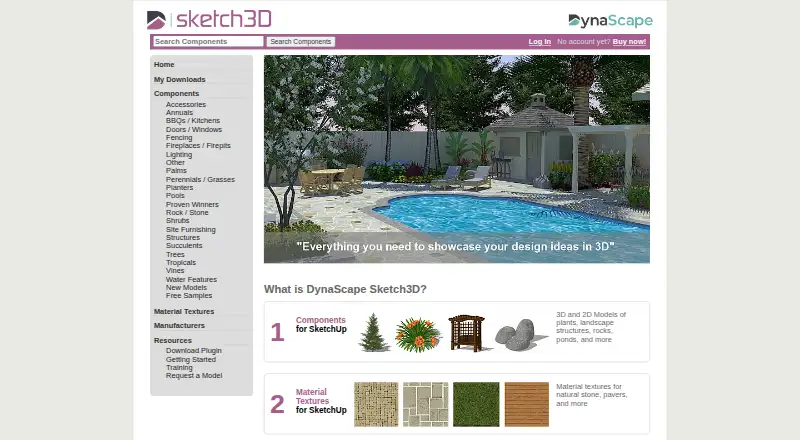
DynaScape Sketch3D is a SketchUp add-on for professional landscapers who need landscape-specific content in 3D presentations. Its library includes more than 1,000 models covering plants, trees, shrubs, ponds, pools, structures, rocks, and accessories. It also includes material textures for natural stone, pavers, and other surfaces, giving SketchUp users a focused way to represent landscape elements with more relevant components than a general modeling workflow may provide.
The product fits most closely into an existing DynaScape and SketchUp workflow. Designs can move from DynaScape Design to SketchUp through 2D-to-3D export, while compatibility with DynaScape Creator and AutoCAD supports drawing-based workflows. The CAD cleanup plugin is intended for imported CAD, DynaScape Design, or DynaScape Creator drawings, and the reload function can replace DynaScape figures or AutoCAD blocks with 3D components. These connections make Sketch3D more useful for teams already working across those applications than for users seeking an isolated design environment.
Pricing is structured around two subscriptions. The annual plan costs $50 per month with annual prepayment, while the monthly plan costs $59 per month with monthly billing. There is no free plan. Sketch3D is available for Windows and remains dependent on SketchUp, so it is best suited to SketchUp users who want a dedicated landscape component library, surface materials, and drawing cleanup tools. Users looking for a standalone landscape design suite or a platform beyond Windows should consider a different type of product.
Your product? Our editors can test DynaScape Sketch3D in depth and publish a review, labelled as paid · from $149/mo →
DynaScape Sketch3D pricing
All 2 DynaScape Sketch3D plans and prices →
DynaScape Sketch3D fact sheet
| Free plan | No |
|---|---|
| Paid from | $50/mo |
| Terrain modeling | Not verified |
| Plant library | Yes |
| Irrigation design | Not verified |
| Planting plans | Not verified |
| Supported platforms | windows |
| Import formats | Not verified |
| Deployment | Desktop |
| Platforms | Windows |
| Support | Email, Phone, Docs |
| Built for | Small business, Mid-market, Enterprise (editorial estimate) |
| Integrations | 4 integrations: SketchUp, DynaScape Design, DynaScape Creator, AutoCAD |
| Pricing | Paid (source) |
| Website | sketch3d.dynascape.com |
| Facts checked | 20 Sep 2026 |
DynaScape Sketch3D integrations
DynaScape Sketch3D lists 4 integrations on its own site.
- SketchUp
- DynaScape Design
- DynaScape Creator
- AutoCAD
Alternatives to DynaScape Sketch3D
- Vectorworks LandmarkA broad professional toolkit spanning terrain, planting, irrigation, documentation, and estimates.9.4
- PRO Landscape+A broad design-to-proposal toolkit for landscape contractors and related professionals.9.2
- Lands DesignA broad Windows toolkit for terrain, planting, irrigation, and landscape documentation.9.0


See all DynaScape Sketch3D alternatives →
Used DynaScape Sketch3D? Be the first to review it
The editor score above is our own research. What this page doesn't have yet is a reader's view — what you used DynaScape Sketch3D for, what worked and what didn't. No stars are seeded and no review is paid for; an editor reads every one before it appears.
Write a reviewTwo minutes · verified accounts only · read by an editor before it appears
Featured on iTechGuides

DynaScape Sketch3D is listed in our 3D Landscape Design Software directory. Add the badge to your site — it links back to this page.
<a href="https://www.itechguides.com/products/dynascape-sketch3d/"><img src="https://www.itechguides.com/best/badge/dynascape-sketch3d.svg" alt="Featured on iTechGuides" width="230" height="46"></a>
Reviewed by iTechGuides Editors · Editorial team · Updated Oct 2026
Advertiser disclosure: iTechGuides is reader-supported. Vendors can pay for top positions in our rankings and for a place on other products' pages, and we may earn a commission when you click some links. Bought places stand at the number bought; this page and our disclosure say so. Paying vendors may get a fuller, more detailed review from our editors, and that review can change their score. How we rank.
Last updated · How we research and update