
Vectorworks Landmark
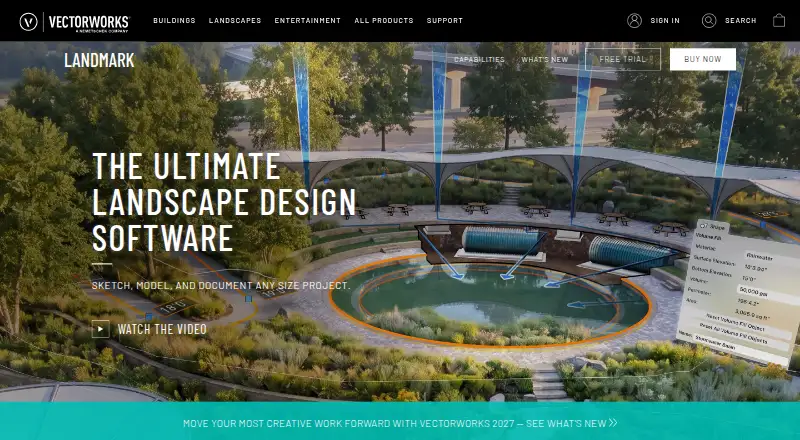
Vectorworks Landmark: A broad professional toolkit spanning terrain, planting, irrigation, documentation, and estimates. Ranked #1 of 29 in 3D Landscape Design Software by our editors (9.4/10); pricing: Paid; best for professional landscape architecture and documentation.
At a glance
- Editor score9.4 / 10
- PricingPaid
- Best forProfessional landscape architecture and documentation
- Terrain modelingYes
- Founded1985 · Columbia, Maryland, United States
- Facts checked20 Sep 2026
Where it wins
- Combines terrain, planting, irrigation, hardscape, and documentation workflows
- Supports estimates, quantity takeoffs, schedules, GIS, and sustainability analysis
- Works across web, Windows, macOS, cloud, and mobile workflows
Where it doesn't
- Paid software may not suit teams seeking an open-source option
- Its broad scope may exceed the needs of simple planting-plan projects
- Advanced workflows depend on familiarity with CAD, BIM, and landscape documentation
Our verdict on Vectorworks Landmark
Vectorworks Landmark is professional landscape design and BIM software for landscape architects, designers, and site-design teams. It covers workflows from pre-design and schematic design through design development and construction documentation. The feature set includes 2D drafting, 3D terrain modeling, slope analysis, cut-and-fill calculations, spot elevations, plant layouts, plant libraries, irrigation planning, hardscape design, schedules, details, legends, estimates, and material takeoffs. It is designed for projects that need more than visual concepts, including coordinated site documentation and technical planning.
Its ecosystem fit is a major strength for multidisciplinary work. Landmark supports import, export, and reference workflows for DWG, DXF, DWF, IFC, RVT, RFA, SAT, PDF, common image formats, SketchUp, and Rhino. Integrations include AutoTurn, Esri, plant providers, and nurseries. Cloud sharing and cloud processing extend collaboration, while mobile site-model and AR/VR workflows support field and presentation needs. The published platform coverage includes web, Windows, and macOS, giving teams several ways to access design and collaboration workflows.
The standout value is breadth: terrain, planting, irrigation, hardscape, construction documentation, estimating, GIS, geolocation, sustainability analysis, and water-management workflows sit within one product. That makes Landmark a strong fit for professional landscape architecture practices and site-design teams coordinating detailed deliverables across disciplines. It is less suitable for someone who only needs a lightweight tool for basic garden layouts or isolated planting plans, where the wider BIM and documentation scope may be unnecessary. Teams should choose it when technical depth and format interoperability matter more than a narrow, simple workflow.
Your product? Our editors can test Vectorworks Landmark in depth and publish a review, labelled as paid · from $149/mo →
Vectorworks Landmark pricing
Vectorworks Landmark fact sheet
| Free plan | Not verified |
|---|---|
| Paid from | Not verified |
| Terrain modeling | Yes |
| Plant library | Yes |
| Irrigation design | Yes |
| Planting plans | Yes |
| Supported platforms | windows, macos, web |
| Import formats | DWG, DXF, DWF, IFC, RVT, RFA, SAT, PDF, BMP, JPEG, PNG, TIFF, SketchUp, Rhino |
| Deployment | Cloud, Desktop, Mobile |
| Platforms | Web, Windows, macOS |
| Support | Email, Phone, Docs |
| Built for | Small business, Mid-market, Enterprise (editorial estimate) |
| Integrations | 4 integrations: AutoTurn, Esri, plant providers, nurseries |
| Pricing | Paid (source) |
| Website | vectorworks.net |
| Facts checked | 20 Sep 2026 |
Vectorworks Landmark integrations
Vectorworks Landmark lists 4 integrations on its own site.
- AutoTurn
- Esri
- plant providers
- nurseries
Alternatives to Vectorworks Landmark
- PRO Landscape+A broad design-to-proposal toolkit for landscape contractors and related professionals.9.2
- Lands DesignA broad Windows toolkit for terrain, planting, irrigation, and landscape documentation.9.0
- Realtime Landscaping ArchitectA complete Windows landscape design tool with terrain, planting, irrigation, and walkthroughs.8.8

See all Vectorworks Landmark alternatives →
Vectorworks Landmark vs the competition
- Vectorworks Landmark vs PRO Landscape+
- Vectorworks Landmark vs Lands Design
- Vectorworks Landmark vs Realtime Landscaping Architect
- Vectorworks Landmark vs VizTerra
- Vectorworks Landmark vs DATAflor LANDXPERT
- Vectorworks Landmark vs Planting F/X


Compare Vectorworks Landmark with any tool side by side →
Also Ranked In
Vectorworks Landmark is ranked in 3 of our directories.
Used Vectorworks Landmark? Be the first to review it
The editor score above is our own research. What this page doesn't have yet is a reader's view — what you used Vectorworks Landmark for, what worked and what didn't. No stars are seeded and no review is paid for; an editor reads every one before it appears.
Write a reviewTwo minutes · verified accounts only · read by an editor before it appears
Featured on iTechGuides

Vectorworks Landmark is listed in our 3D Landscape Design Software directory. Add the badge to your site — it links back to this page.
<a href="https://www.itechguides.com/products/vectorworks-landmark/"><img src="https://www.itechguides.com/best/badge/vectorworks-landmark.svg" alt="Featured on iTechGuides" width="230" height="46"></a>
Reviewed by iTechGuides Editors · Editorial team · Updated Oct 2026
Advertiser disclosure: iTechGuides is reader-supported. Vendors can pay for top positions in our rankings and for a place on other products' pages, and we may earn a commission when you click some links. Bought places stand at the number bought; this page and our disclosure say so. Paying vendors may get a fuller, more detailed review from our editors, and that review can change their score. How we rank.
Last updated · How we research and update