DxO PhotoLab
DxO PhotoLab: A focused desktop editor for RAW correction, denoising, and batch workflows. Ranked #7 of 158 in Photo Editing Software by our editors (8.5/10); pricing: 30-day trial; best for high-quality RAW correction and denoising.
At a glance
- Editor score8.5 / 10
- Pricing30-day trial
- Best forHigh-quality RAW correction and denoising
- Free planNo
- Paid from$159.99 one-time
- PlatformMulti-platform
- Founded2003
- Facts checked20 Sep 2026
Where it wins
- Camera- and lens-specific optical corrections
- DeepPRIME machine-learning noise reduction
- AI masks, batch retouching, and PhotoLibrary organization
Where it doesn't
- $159.99 one-time price for the Essential plan
- No native cloud synchronization
- Runs only on Windows and macOS
Our verdict on DxO PhotoLab
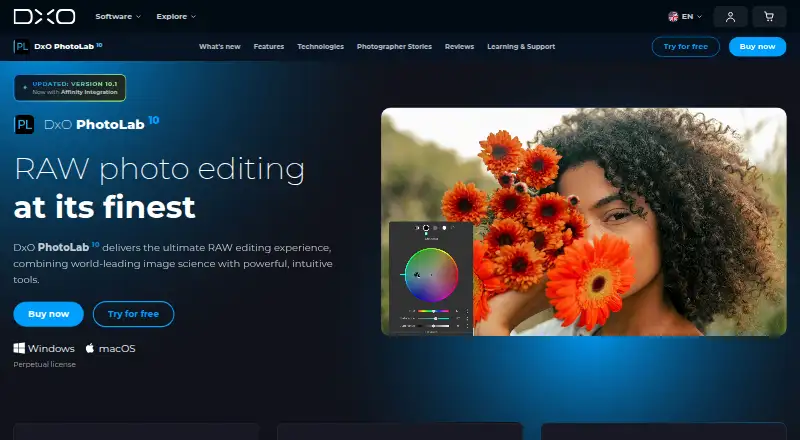
DxO PhotoLab is a desktop photo-editing and organizing application for photographers who want detailed RAW processing, camera- and lens-specific corrections, and control over local adjustments. It supports RAW, DNG, JPEG, TIFF, HEIC/HEIF, and Apple ProRAW files, subject to documented compatibility requirements. The feature set also covers color and tonal adjustments, non-destructive editing, virtual copies, image organization, and batch workflows. Windows and macOS are supported.
PhotoLab uses perpetual licenses rather than subscriptions. PhotoLab 10 Essential costs $159.99 one time and includes activation on 2 computers. PhotoLab 10 Elite costs $249.99 one time and includes activation on 3 computers. Both plans support Windows and macOS, while the product also offers a 30-day trial. PhotoLab works with Adobe Lightroom Classic, Adobe Photoshop, and Affinity, giving photographers a way to fit its RAW and correction tools into established editing workflows. The published plan details distinguish the editions by license activations, not by a separate feature list.
Its strongest focus is image quality and correction depth: DeepPRIME noise reduction, optical profiles, AI-powered masks, depth-aware selections, U Point control points, brushes, gradients, AI-powered dust removal, and facial-feature selection support detailed retouching. Batch processing, batch retouching, filtering, rating, and stacking extend that focus to larger libraries. PhotoLab is a good fit for photographers who prioritize RAW correction and desktop control and prefer a perpetual license. It is less suitable for teams or workflows that require native cloud synchronization, or for users seeking a broader platform than a Windows and macOS desktop application.
Your product? Our editors can test DxO PhotoLab in depth and publish a review, labelled as paid · from $149/mo →
DxO PhotoLab pricing
All 2 DxO PhotoLab plans and prices →
DxO PhotoLab fact sheet
| Free plan | No |
|---|---|
| Paid from | $159.99 one-time |
| Platform | Multi-platform |
| RAW photo support | Yes |
| Layer editing | Not verified |
| Masking tools | Yes |
| Batch editing | Yes |
| Cloud sync | Not verified |
| AI retouching | Yes |
| Free trial | 30 days · no card needed |
| Deployment | Desktop |
| Platforms | Windows, macOS |
| Support | Tickets, Community, Docs |
| Built for | Solo, Small business (editorial estimate) |
| Integrations | 4 integrations: Adobe Lightroom Classic, Affinity by Canva, Flickr, Nik Collection |
| Pricing | 30-day trial (source) |
| Website | dxo.com |
| Facts checked | 20 Sep 2026 |
DxO PhotoLab integrations
DxO PhotoLab lists 4 integrations on its own site.
- Adobe Lightroom Classic
- Affinity by Canva
- Flickr
- Nik Collection
Alternatives to DxO PhotoLab
- Adobe PhotoshopA deep, multi-platform editor for compositing, retouching, RAW work, and AI-assisted edits.9.4
- Adobe LightroomA broad Lightroom workflow for RAW editing, masking, organization, and synchronized access.9.2
- Capture OneA deep choice for professional RAW and tethered workflows, without a free plan.9.0



See all DxO PhotoLab alternatives →
DxO PhotoLab vs the competition
- DxO PhotoLab vs Adobe Photoshop
- DxO PhotoLab vs Adobe Lightroom
- DxO PhotoLab vs Capture One
- DxO PhotoLab vs darktable
- DxO PhotoLab vs GIMP
- DxO PhotoLab vs ON1 Photo RAW


Compare DxO PhotoLab with any tool side by side →
Also Ranked In
DxO PhotoLab is ranked in 6 of our directories.
Used DxO PhotoLab? Be the first to review it
The editor score above is our own research. What this page doesn't have yet is a reader's view — what you used DxO PhotoLab for, what worked and what didn't. No stars are seeded and no review is paid for; an editor reads every one before it appears.
Write a reviewTwo minutes · verified accounts only · read by an editor before it appears
Featured on iTechGuides

DxO PhotoLab is listed in our Photo Editing Software directory. Add the badge to your site — it links back to this page.
<a href="https://www.itechguides.com/products/dxo-photolab/"><img src="https://www.itechguides.com/best/badge/dxo-photolab.svg" alt="Featured on iTechGuides" width="230" height="46"></a>
Reviewed by iTechGuides Editors · Editorial team · Updated Oct 2026
Advertiser disclosure: iTechGuides is reader-supported. Vendors can pay for top positions in our rankings and for a place on other products' pages, and we may earn a commission when you click some links. Bought places stand at the number bought; this page and our disclosure say so. Paying vendors may get a fuller, more detailed review from our editors, and that review can change their score. How we rank.
Last updated · How we research and update