
Droplr
Droplr: A broad capture and sharing toolkit for teams that work through cloud links and integrations. Ranked #24 of 39 in Screenshot Software by our editors (7.0/10); pricing: 3-day trial; best for teams prioritizing cloud sharing and integrations.
At a glance
- Editor score7.0 / 10
- Pricing3-day trial
- Best forTeams prioritizing cloud sharing and integrations
- Free planNo
- Paid from$72/yr
- Scrolling captureYes
- Facts checked20 Sep 2026
Where it wins
- Captures screens, full webpages, GIFs, and HD video
- Annotations, folders, tags, cloud links, and click analytics
- Integrates with Slack, Jira, Google Drive, Dropbox, and more
Where it doesn't
- No free plan is available
- The 3-day trial is short
- Enterprise pricing is quote-based
Our verdict on Droplr
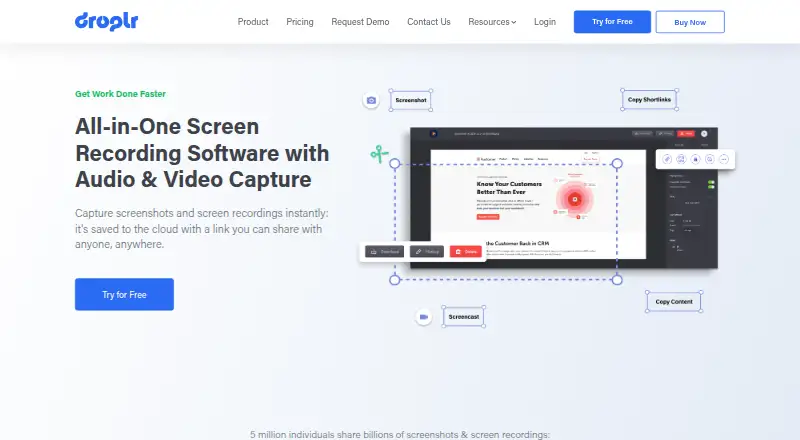
Droplr combines screenshot capture, webpage capture, screen recording, file uploads, cloud storage, and link sharing for individuals and teams. It can capture part or all of a screen, full webpages, and recordings with optional webcam and audio. Available on Windows, macOS, and Chrome Extension, it suits teams that need to explain work visually, share files through links, and keep captures organized in one cloud-based workflow.
The feature set covers both quick communication and larger file-sharing needs. Users can annotate screenshots with text, highlights, shapes, lines, arrows, and boxes, then save captures automatically to cloud storage and copy shareable links to the clipboard. Droplr also supports folders and tags, uploads up to 10GB, URL shortening, and click analytics. Published plans show 100GB of file storage and 500GB per month of bandwidth on Pro Plus and Team. Integrations include Slack, Microsoft Teams, Google Docs, Gmail, Atlassian Jira, Intercom, Photoshop, Sketch, Dropbox, Google Drive, and Amazon S3.
Pricing is paid-only, with no free plan. Pro Plus costs $8 per month when billed monthly or $72 per year when billed annually, while Team costs $9 per user per month or $84 per user per year. Team adds team collaboration to the capture, recording, upload, storage, and bandwidth features. Enterprise adds single sign-on, viewer analytics, AI-powered auto-redaction, AI-powered risk assessment, and a custom URL shortener and analytics, with quote-based pricing. A 3-day trial is described in the official help article. Droplr is a strong fit for teams that value cloud sharing and workplace integrations; those seeking a free plan or a simpler capture-only tool should look elsewhere.
Your product? Our editors can test Droplr in depth and publish a review, labelled as paid · from $149/mo →
Droplr pricing
All 3 Droplr plans and prices →
Droplr fact sheet
| Free plan | No |
|---|---|
| Paid from | $72/yr |
| Scrolling capture | Yes |
| OCR text extraction | Not verified |
| Supported platforms | macOS, Windows, Chrome Extension |
| Export formats | PNG, WebM, MPEG-4 |
| Cloud storage | 100 GB |
| Shareable links | Yes |
| Free trial | 3 days |
| Deployment | Cloud, Desktop, Browser extension |
| Platforms | Windows, macOS, Chrome extension |
| Compliance & security | GDPR, SSO/SAML |
| Support | Email, Live chat, Docs |
| Built for | Solo, Small business, Mid-market, Enterprise (editorial estimate) |
| Integrations | 11 integrations: Slack, Microsoft Teams, Google Docs, Gmail, Atlassian Jira, Intercom … |
| Pricing | 3-day trial (source) |
| Website | droplr.com |
| Facts checked | 20 Sep 2026 |
Droplr integrations
Droplr lists 11 integrations on its own site.
- Slack
- Microsoft Teams
- Google Docs
- Gmail
- Atlassian Jira
- Intercom
- Photoshop
- Sketch
- Dropbox
- Google Drive
- Amazon S3
Alternatives to Droplr
- SnagitA mature screenshot and recording suite for teams that need more than basic captures.9.3
- ShareXA powerful free Windows capture tool with automation, editing, OCR, recording and uploads.9.2
- GyazoA versatile capture tool with broad platform support and useful Pro upgrades.9.1



Also Ranked In
Droplr is ranked in 2 of our directories.
Used Droplr? Be the first to review it
The editor score above is our own research. What this page doesn't have yet is a reader's view — what you used Droplr for, what worked and what didn't. No stars are seeded and no review is paid for; an editor reads every one before it appears.
Write a reviewTwo minutes · verified accounts only · read by an editor before it appears
Featured on iTechGuides

Droplr is listed in our Screenshot Software directory. Add the badge to your site — it links back to this page.
<a href="https://www.itechguides.com/products/droplr/"><img src="https://www.itechguides.com/best/badge/droplr.svg" alt="Featured on iTechGuides" width="230" height="46"></a>
Reviewed by iTechGuides Editors · Editorial team · Updated Oct 2026
Advertiser disclosure: iTechGuides is reader-supported. Vendors can pay for top positions in our rankings and for a place on other products' pages, and we may earn a commission when you click some links. Bought places stand at the number bought; this page and our disclosure say so. Paying vendors may get a fuller, more detailed review from our editors, and that review can change their score. How we rank.
Last updated · How we research and update