DOSVisor
DOSVisor: A focused, free Windows emulator for basic 16-bit DOS execution. Ranked #24 of 26 in MS-DOS Emulators by our editors (6.0/10); pricing: Free plan; best for basic 16-bit DOS execution on Windows.
At a glance
- Editor score6.0 / 10
- PricingFree plan
- Best forBasic 16-bit DOS execution on Windows
- Free planYes
- Paid fromFree
- Supported host platformswindows
- Facts checked20 Sep 2026
Where it wins
- Uses Windows Hypervisor Platform for 16-bit real-mode execution
- Emulates DOS interrupts, I/O ports, BIOS, timers, and keyboard input
- Free, open-source Windows software with basic terminal support
Where it doesn't
- Supports only minimal DOS functionality
- Focused on basic terminal-style programs
- Does not target broad legacy software compatibility
Our verdict on DOSVisor
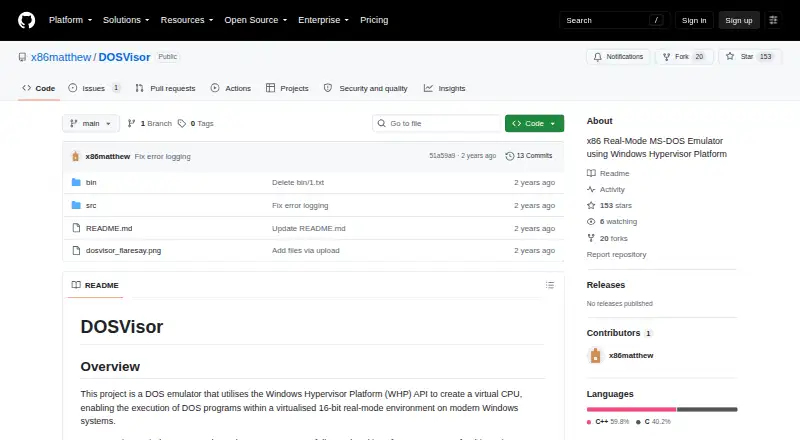
DOSVisor is an experimental MS-DOS emulator for modern Windows systems. It uses the Windows Hypervisor Platform to create a virtual CPU and execute 16-bit real-mode programs. Its intended audience is developers, learners, and users who need basic DOS execution or want to examine a focused WHP demonstration. The implementation targets MS-DOS and includes selected DOS services, interrupts, I/O ports, timers, keyboard input, and terminal commands. It is a narrow tool for basic terminal-style workloads rather than a general-purpose environment for broad legacy software compatibility.
Its main strength is the low-level execution path. The Windows Hypervisor Platform provides the virtual CPU, while DOS interrupt handling and I/O port emulation supply selected DOS behavior. BIOS, RTC, and system-clock timer emulation add important system-level elements, and keyboard state monitoring with key buffering supports interactive input. Together, these features make DOSVisor a useful fit for examining how a small emulator handles real-mode execution and core DOS interactions. The free plan and open-source status also make it accessible for users seeking a focused Windows project rather than a commercial compatibility suite.
The trade-off is scope. DOSVisor is described as a demonstration with minimal DOS functionality, and its verified behavior is limited to basic terminal-style support and a few sample programs. Choose it for simple MS-DOS execution, emulator experimentation, or learning around the Windows Hypervisor Platform. Choose an alternative when you need wider application compatibility, a mature DOS environment, or support beyond Windows. Its value comes from a constrained implementation that exposes the essential execution pieces without presenting itself as a complete emulator.
Your product? Our editors can test DOSVisor in depth and publish a review, labelled as paid · from $149/mo →
DOSVisor pricing
DOSVisor fact sheet
| Free plan | Yes |
|---|---|
| Paid from | Free |
| Supported host platforms | windows |
| DOS target versions | Ms-dos |
| Disk image formats | Not verified |
| Gamepad support | Not verified |
| Save states | Not verified |
| Audio CD support | Not verified |
| Source available | Yes |
| Deployment | Desktop |
| Platforms | Windows |
| Built for | Solo, Small business (editorial estimate) |
| Pricing | Free plan |
| Website | github.com |
| Facts checked | 20 Sep 2026 |
Alternatives to DOSVisor
- DOSBox StagingA capable free emulator for DOS software, games, and Windows 3.1 environments.9.4
- DOSBox PureA focused, free DOS emulator with convenient archive loading and Libretro support.9.2
- DOSBox-XA free, highly configurable choice for advanced DOS and legacy Windows emulation.9.1


See all DOSVisor alternatives →
Used DOSVisor? Be the first to review it
The editor score above is our own research. What this page doesn't have yet is a reader's view — what you used DOSVisor for, what worked and what didn't. No stars are seeded and no review is paid for; an editor reads every one before it appears.
Write a reviewTwo minutes · verified accounts only · read by an editor before it appears
Featured on iTechGuides

DOSVisor is listed in our MS-DOS Emulators directory. Add the badge to your site — it links back to this page.
<a href="https://www.itechguides.com/products/dosvisor/"><img src="https://www.itechguides.com/best/badge/dosvisor.svg" alt="Featured on iTechGuides" width="230" height="46"></a>
Reviewed by iTechGuides Editors · Editorial team · Updated Oct 2026
Advertiser disclosure: iTechGuides is reader-supported. Vendors can pay for top positions in our rankings and for a place on other products' pages, and we may earn a commission when you click some links. Bought places stand at the number bought; this page and our disclosure say so. Paying vendors may get a fuller, more detailed review from our editors, and that review can change their score. How we rank.
Last updated · How we research and update