Docling
Docling: A developer-focused PDF converter for structured extraction, OCR, and local processing. Ranked #5 of 46 in PDF Converter Software by our editors (8.7/10); pricing: Open source; best for open-source document understanding and extraction.
At a glance
- Editor score8.7 / 10
- PricingOpen source
- Best forOpen-source document understanding and extraction
- Paid fromFree
- OCR conversionYes
- Facts checked19 Sep 2026
Where it wins
- Analyzes page layout, reading order, and table structure
- Exports PDFs to Markdown, HTML, JSON, XML, and LaTeX
- Supports OCR, batch conversion, APIs, and local execution
Where it doesn't
- Not packaged as a conventional subscription PDF converter
- Developer-oriented interfaces may exceed simple conversion needs
- The REST API is provided through an optional service
Our verdict on Docling
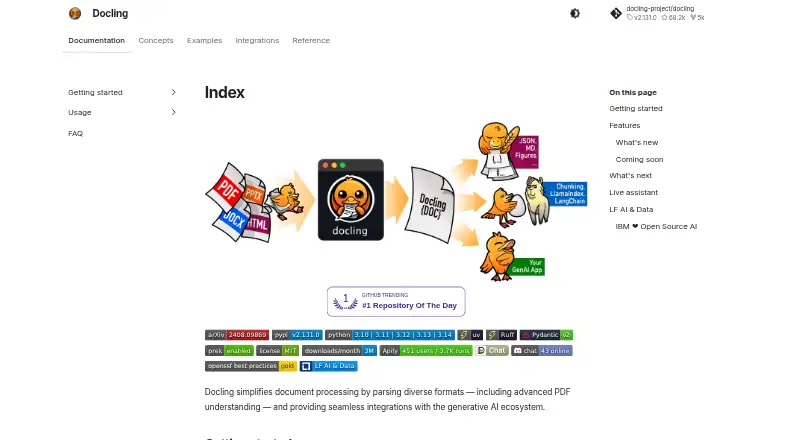
Docling is an open-source document-processing toolkit for developers building PDF conversion, extraction, and retrieval workflows. It converts PDFs and other supported formats into a unified DoclingDocument representation, with command-line and Python interfaces for local files, URLs, and directories. OCR supports scanned PDFs and images, while local execution suits sensitive or air-gapped environments. It runs on Windows, macOS, and Linux, and can also be deployed through API and self-hosted options.
Its standout capability is document understanding rather than basic file conversion. Docling analyzes page layout, reading order, and table structure, then exports content to Markdown, HTML, JSON, DocLang XML, text, Doctags, WebVTT, DocLang archives, JSONL chunks, and LaTeX. Batch conversion supports multiple documents, and the Python DocumentConverter API gives developers a programmatic route into the workflow. This breadth makes Docling a strong fit for teams that need structured outputs for extraction, indexing, or retrieval rather than only a new PDF file.
The ecosystem fit is also practical for AI-oriented pipelines: integrations include LangChain, LlamaIndex, Crew AI, and Haystack. A REST API service is available through docling-serve, alongside command-line and Python access. Docling follows an open-source model rather than conventional subscription tiers, so it is best suited to developers and organizations comfortable with local or self-hosted document processing. Choose an alternative if the priority is a simple consumer converter with packaged paid plans and a narrower, file-conversion-first workflow.
Your product? Our editors can test Docling in depth and publish a review, labelled as paid · from $149/mo →
Docling pricing
Docling fact sheet
| Free plan | Not verified |
|---|---|
| Paid from | Free |
| Conversion targets | PDF → HTML, Markdown, JSON, DocLang XML, Text, Doctags, WebVTT, DocLang archive, Chunks (JSONL), LaTeX |
| OCR conversion | Yes |
| Batch conversion | Yes |
| Maximum file size | Not verified |
| Supported platforms | windows, macos, linux, api, self_hosted |
| API access | Yes |
| Deployment | Desktop, Self-hosted |
| Platforms | Windows, macOS, Linux |
| Integrations | 4 integrations: LangChain, LlamaIndex, Crew AI, Haystack |
| Pricing | Open source |
| Website | docling-project.github.io |
| Facts checked | 19 Sep 2026 |
Docling integrations
Docling lists 4 integrations on its own site.
- LangChain
- LlamaIndex
- Crew AI
- Haystack
Alternatives to Docling
- Wondershare PDFelementA full PDF workbench with conversion, OCR, forms, security, signatures, and AI tools.9.3
- Adobe PDF Services APIA broad PDF automation API with a useful free tier and quote-based paid scaling.9.1
- ConvertioA broad cloud converter for documents, media, images, and automated workflows.9.0



See all Docling alternatives →
Docling vs the competition
- Docling vs Wondershare PDFelement
- Docling vs Adobe PDF Services API
- Docling vs Convertio
- Docling vs Ghostscript
- Docling vs MinerU
- Docling vs PDFCreator



Compare Docling with any tool side by side →
Also Ranked In
Docling is ranked in 2 of our directories.
Used Docling? Be the first to review it
The editor score above is our own research. What this page doesn't have yet is a reader's view — what you used Docling for, what worked and what didn't. No stars are seeded and no review is paid for; an editor reads every one before it appears.
Write a reviewTwo minutes · verified accounts only · read by an editor before it appears
Featured on iTechGuides

Docling is listed in our PDF Converter Software directory. Add the badge to your site — it links back to this page.
<a href="https://www.itechguides.com/products/docling/"><img src="https://www.itechguides.com/best/badge/docling.svg" alt="Featured on iTechGuides" width="230" height="46"></a>
Reviewed by iTechGuides Editors · Editorial team · Updated Oct 2026
Advertiser disclosure: iTechGuides is reader-supported. Vendors can pay for top positions in our rankings and for a place on other products' pages, and we may earn a commission when you click some links. Bought places stand at the number bought; this page and our disclosure say so. Paying vendors may get a fuller, more detailed review from our editors, and that review can change their score. How we rank.
Last updated · How we research and update