
DJ.Studio
DJ.Studio: A strong timeline editor for creators who make mixes, mashups, and video exports. Ranked #14 of 29 in DJ Software by our editors (6.1/10); pricing: 7-day trial; best for creators editing mixes and mashups on a timeline.
At a glance
- Editor score6.1 / 10
- Pricing7-day trial
- Best forCreators editing mixes and mashups on a timeline
- Free planNo
- Facts checked20 Sep 2026
Where it wins
- Timeline workflow supports mix and mashup editing
- AI beat grids, stems, and automated transitions
- Integrates with major DJ libraries and music services
Where it doesn't
- No free plan
- Focused on Windows and macOS desktop workflows
- Less focused on live deck mixing
Our verdict on DJ.Studio
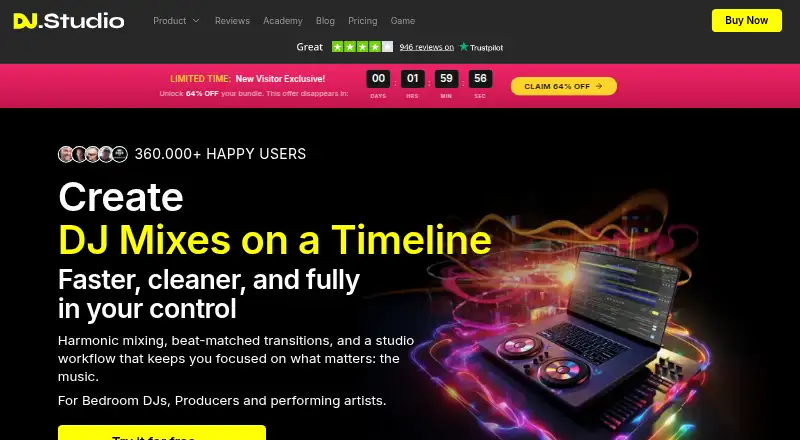
DJ.Studio is desktop DJ production software for bedroom, professional, mobile, and radio DJs who create mixes, mashups, and radio shows. Its timeline-based workflow lets creators arrange tracks, automate or edit transitions, adjust beat grids, apply effects, separate stems, and export finished audio or video. It runs on Windows and macOS, with a 7-day free trial and paid plans. The product is better suited to planned production than performance-led deck mixing.
The plan structure adds capabilities in clear stages. Studio includes MP3 mixing, default transition presets, library integration, Beatport and Beatsource integration, and an AI beat grid. Pro adds WAV mixing, manual transitions, custom presets, sample lanes, and Ableton Live export. Pro + Stems adds stem separation and the FX Pack. Ultimate adds video export, VST support, and higher-quality export. The published plans show a progression from streamlined mix creation to deeper editing, stem-based work, plugin workflows, and video production.
Its ecosystem fit is a major strength for creators managing music across established DJ tools and services. Integrations include YouTube, Mixed In Key, rekordbox, Serato, VirtualDJ, Engine DJ, Traktor, Apple Music, Beatport, Beatsource, and Dropbox. DJ.Studio also supports VST3 and AU plugins, while Ableton Live export connects timeline work to another production environment. Stem separation covers vocals, drums, bass, and melody, giving remixers and mashup creators more control over arrangements. Choose DJ.Studio if timeline editing, library connectivity, automated transitions, stems, or video exports are central to your workflow. Choose another DJ tool if live deck mixing is the primary requirement.
DJ.Studio pricing
All 4 DJ.Studio plans and prices →
DJ.Studio fact sheet
| Free plan | No |
|---|---|
| Paid from | Not verified |
| Supported operating systems | Windows and mac |
| Deck count | Not verified |
| DVS support | Not verified |
| Stem separation | Yes |
| Video mixing | Yes |
| Cloud library sync | No |
| Free trial | 7 days · no card needed |
| Deployment | Desktop |
| Platforms | Windows, macOS |
| Support | Email, Community, Docs |
| Built for | Solo, Small business, Mid-market (editorial estimate) |
| Integrations | 11 integrations: YouTube, Mixed In Key, rekordbox, Serato, VirtualDJ, Engine DJ … |
| Pricing | 7-day trial (source) |
| Website | dj.studio |
| Facts checked | 20 Sep 2026 |
DJ.Studio integrations
DJ.Studio lists 11 integrations on its own site.
- YouTube
- Mixed In Key
- rekordbox
- Serato
- VirtualDJ
- Engine DJ
- Traktor
- Apple Music
- Beatport
- Beatsource
- Dropbox
Alternatives to DJ.Studio
- VirtualDJA flexible Windows and macOS DJ suite with free personal use and broad mixing features.9.8
- Traktor Pro 4A capable four-deck desktop setup for advanced DJs who need stems, DVS, and effects.8.4
- rekordboxA broad DJ workspace with free access, four decks and paid cloud-library upgrades.8.0


See all DJ.Studio alternatives →
Also listed in
Used DJ.Studio? Be the first to review it
The editor score above is our own research. What this page doesn't have yet is a reader's view — what you used DJ.Studio for, what worked and what didn't. No stars are seeded and no review is paid for; an editor reads every one before it appears.
Write a reviewTwo minutes · verified accounts only · read by an editor before it appears
Featured on iTechGuides

DJ.Studio is listed in our DJ Software directory. Add the badge to your site — it links back to this page.
<a href="https://www.itechguides.com/products/dj-studio/"><img src="https://www.itechguides.com/best/badge/dj-studio.svg" alt="Featured on iTechGuides" width="230" height="46"></a>
Reviewed by iTechGuides Editors · Editorial team · Updated Sep 2026
Advertiser disclosure: iTechGuides is reader-supported. We may earn a commission when you click some links. How we rank.
Last updated · How we research and update