
DITA Exchange
DITA Exchange: A strong fit for Microsoft-centric teams managing traceable, reusable DITA content. Ranked #17 of 29 in Help Authoring Tools by our editors (7.6/10); pricing: Pricing on request; best for microsoft-centric structured-content teams.
At a glance
- Editor score7.6 / 10
- PricingPricing on request
- Best forMicrosoft-centric structured-content teams
- Authoring modelHybrid
- Facts checked21 Sep 2026
Where it wins
- DITA component management with Word authoring in SharePoint
- Review, approval, sign-off, version history, and snapshots
- Publishes reusable content to documents, portals, APIs, and more
Where it doesn't
- Pricing is scoped per engagement rather than published as plans
- SharePoint-centered architecture may not suit non-Microsoft ecosystems
- Structured workflows may exceed the needs of simple documentation teams
Our verdict on DITA Exchange
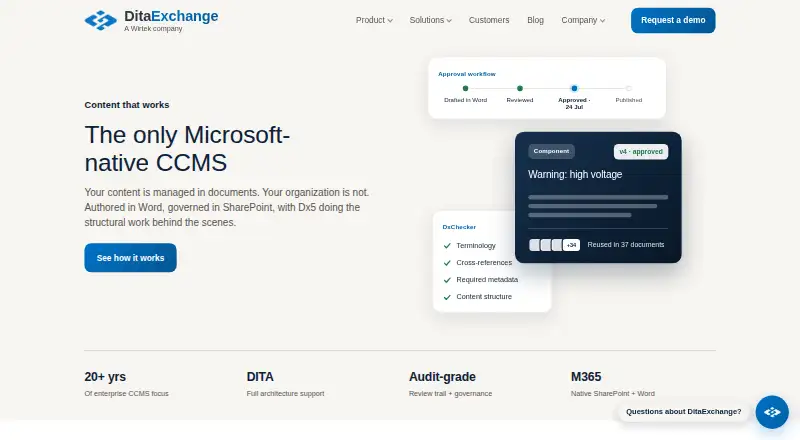
DITA Exchange is a component content management platform for organizations using Microsoft 365. It stores DITA components in SharePoint and supports authoring through Microsoft Word with DxAuthor+. The platform is aimed at regulated industries and technical documentation teams that need reusable, traceable content across structured workflows. Deployments support SharePoint Online and SharePoint Server, including on-premises environments.
Its strongest advantage is the depth of its structured-content workflow. Component-level version history and snapshots support traceability, while built-in review, approval, and sign-off workflows give teams a defined path from draft to approved content. Rule-based quality checks cover terminology, metadata, links, and structure. Translation package generation and language variants extend the workflow for multilingual documentation, while single-source publishing supports outputs including Word, HTML, XML, PDF, JSON, Markdown, plain text, portal pages, and API delivery.
The platform also fits broadly across the Microsoft ecosystem. Integrations include SharePoint, Word, Teams, OneDrive, Power Automate, Power Apps, Loop, Entra ID, Outlook, and Planner. This makes DITA Exchange a practical choice for teams that already organize content and collaboration in Microsoft 365. Pricing is scoped per engagement, so organizations evaluating it should expect a sales-led commercial process rather than published plan comparisons. Teams that need controlled DITA content, reuse, review, translation, and varied publishing outputs should consider it; smaller teams seeking a lightweight authoring tool or organizations outside the Microsoft ecosystem may prefer a narrower alternative.
Your product? Our editors can test DITA Exchange in depth and publish a review, labelled as paid · from $149/mo →
DITA Exchange pricing
DITA Exchange fact sheet
| Free plan | Not verified |
|---|---|
| Paid from | Not verified |
| Authoring model | Hybrid |
| Single-sourcing | Yes |
| Version control | Yes |
| Translation support | Yes |
| Review workflows | Yes |
| Publishing outputs | Word, HTML, XML, PDF, JSON, Markdown, plain text, portal pages, API |
| Deployment | Cloud, Self-hosted |
| Platforms | Web, Windows |
| Support | |
| Built for | Mid-market, Enterprise (editorial estimate) |
| Integrations | 10 integrations: Microsoft SharePoint, Microsoft Word, Microsoft Teams, Microsoft OneDrive, Microsoft Power Automate, Microsoft Power Apps … |
| Pricing | Pricing on request |
| Website | ditaexchange.com |
| Facts checked | 21 Sep 2026 |
DITA Exchange integrations
DITA Exchange lists 10 integrations on its own site.
- Microsoft SharePoint
- Microsoft Word
- Microsoft Teams
- Microsoft OneDrive
- Microsoft Power Automate
- Microsoft Power Apps
- Microsoft Loop
- Microsoft Entra ID
- Microsoft Outlook
- Microsoft Planner
Alternatives to DITA Exchange
- Adobe RoboHelpA broad help-authoring workspace for teams publishing across support platforms.9.3
- Quark Publishing PlatformEnterprise content teams get structured reuse, controlled workflows, and broad publishing outputs.9.2
- Adobe FrameMakerA broad Windows authoring suite for DITA-based technical publishing and PDF output.9.1


See all DITA Exchange alternatives →
Used DITA Exchange? Be the first to review it
The editor score above is our own research. What this page doesn't have yet is a reader's view — what you used DITA Exchange for, what worked and what didn't. No stars are seeded and no review is paid for; an editor reads every one before it appears.
Write a reviewTwo minutes · verified accounts only · read by an editor before it appears
Featured on iTechGuides

DITA Exchange is listed in our Help Authoring Tools directory. Add the badge to your site — it links back to this page.
<a href="https://www.itechguides.com/products/dita-exchange/"><img src="https://www.itechguides.com/best/badge/dita-exchange.svg" alt="Featured on iTechGuides" width="230" height="46"></a>
Reviewed by iTechGuides Editors · Editorial team · Updated Oct 2026
Advertiser disclosure: iTechGuides is reader-supported. Vendors can pay for top positions in our rankings and for a place on other products' pages, and we may earn a commission when you click some links. Bought places stand at the number bought; this page and our disclosure say so. Paying vendors may get a fuller, more detailed review from our editors, and that review can change their score. How we rank.
Last updated · How we research and update