
DISKO
DISKO: A flexible search and review suite with low-cost cloud and local options. Ranked #5 of 24 in AI Video Search Tools by our editors (8.7/10); pricing: Free plan · 30-day trial; best for editors wanting low-cost production search.
At a glance
- Editor score8.7 / 10
- PricingFree plan · 30-day trial
- Best forEditors wanting low-cost production search
- Free planYes
- Paid from$12/mo
- Visual searchYes
- Facts checked21 Sep 2026
Where it wins
- Searches footage by visuals, dialogue, faces, voices, and metadata
- Exports transcripts, SRT files, and timelines to Premiere Pro or Resolve
- Supports review, multicamera sync, version comparison, and client delivery
Where it doesn't
- DISKO LOCAL is available on macOS rather than across desktop platforms
- Cloud storage and local indexing are split across separate product options
- Advanced recognition and export features are concentrated in paid plans
Our verdict on DISKO
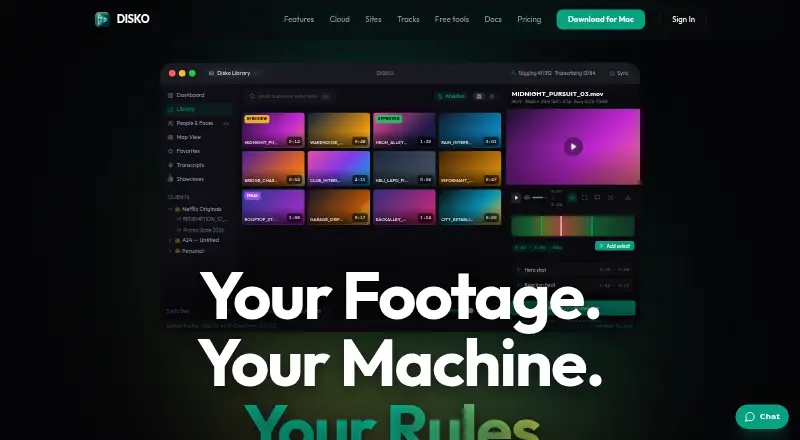
DISKO is a media asset management and video search suite for filmmakers, editors, and small to mid-market video teams. Its Mac desktop app uses on-device AI to index local footage, while DISKO Cloud supports browser-based review, client delivery, versioning, and related production workflows. Searches can combine visual shot descriptions, spoken dialogue, transcripts, faces, speaker voices, products, props, gear, and metadata. Free screenplay and shot-list tools are also available to account holders.
Pricing is divided between a local purchase and cloud plans. DISKO LOCAL costs $99 as a one-time purchase and includes on-device AI vision, smart search, face recognition, speaker voice identification, full-shoot transcription, SRT export, native playback for professional video formats, and exports to Premiere Pro and DaVinci Resolve. DISKO CLOUD Free includes screenplays, shot lists, and a free account. DISKO CLOUD Pro costs $12 per month, billed monthly, and adds desktop sync, review links, and client delivery. The published plans show a 30-day free trial and do not require a card for the trial.
Its strongest fit is for production teams that need more than keyword search. Google Drive library indexing can work without downloading original files, while frame-accurate review includes comments and drawing tools. Version stacking, side-by-side comparison, and transcript- and waveform-based multicamera synchronization extend the workflow from discovery into review and editing. The main choice is between a Mac-based local workflow and a separate cloud subscription, so teams should select the plan structure that matches how they store, search, review, and deliver footage. DISKO is particularly suitable for editors seeking low-cost production search; teams needing a single platform across desktop environments may prefer a different arrangement.
Your product? Our editors can test DISKO in depth and publish a review, labelled as paid · from $99/mo →
DISKO pricing
All 3 DISKO plans and prices →
DISKO fact sheet
| Free plan | Yes |
|---|---|
| Paid from | $12/mo |
| Visual search | Yes |
| Audio search | Yes |
| Multimodal search | Yes |
| Indexed video hours | Not verified |
| API access | Not verified |
| Free trial | 30 days · no card needed |
| Deployment | Cloud, Desktop |
| Platforms | Web, macOS |
| Support | Email, Live chat, Docs |
| Built for | Solo, Small business, Mid-market (editorial estimate) |
| Integrations | 3 integrations: Google Drive, Adobe Premiere Pro, DaVinci Resolve |
| Pricing | Free plan · 30-day trial (source) |
| Website | disko.media |
| Facts checked | 21 Sep 2026 |
DISKO integrations
DISKO lists 3 integrations on its own site.
- Google Drive
- Adobe Premiere Pro
- DaVinci Resolve
Alternatives to DISKO
- Twelve LabsA developer-focused API for multimodal video search, analysis, and embeddings.9.4
- Moments LabA multimodal search and workflow platform for complex video archives.9.2
- Coactive Content DiscoveryAn API-first search layer for finding precise moments across multimodal media libraries.9.0



DISKO vs the competition
- DISKO vs Twelve Labs
- DISKO vs Moments Lab
- DISKO vs Coactive Content Discovery
- DISKO vs FrameQuery
- DISKO vs Valossa Assistant
- DISKO vs Nomad Media



Compare DISKO with any tool side by side →
Used DISKO? Be the first to review it
The editor score above is our own research. What this page doesn't have yet is a reader's view — what you used DISKO for, what worked and what didn't. No stars are seeded and no review is paid for; an editor reads every one before it appears.
Write a reviewTwo minutes · verified accounts only · read by an editor before it appears
Featured on iTechGuides

DISKO is listed in our AI Video Search Tools directory. Add the badge to your site — it links back to this page.
<a href="https://www.itechguides.com/products/disko/"><img src="https://www.itechguides.com/best/badge/disko.svg" alt="Featured on iTechGuides" width="230" height="46"></a>
Reviewed by iTechGuides Editors · Editorial team · Updated Oct 2026
Advertiser disclosure: iTechGuides is reader-supported. Vendors can pay for top positions in our rankings and for a place on other products' pages, and we may earn a commission when you click some links. Bought places stand at the number bought; this page and our disclosure say so. Paying vendors may get a fuller, more detailed review from our editors, and that review can change their score. How we rank.
Last updated · How we research and update