
DIALux
DIALux: A focused Windows lighting tool with free core features and optional BIM workflows. Ranked #21 of 29 in Architectural Design Software by our editors (5.8/10); pricing: Free plan · paid from €19.99/mo · 30-day trial; best for lighting design specialists supporting BIM projects.
At a glance
- Editor score5.8 / 10
- PricingFree plan · paid from €19.99/mo · 30-day trial
- Best forLighting design specialists supporting BIM projects
- Free planYes
- BIM authoringNo
- Facts checked25 Sep 2026
Where it wins
- Standards-based calculations cover indoor, outdoor, road and emergency lighting
- Realistic visualizations, daylight analysis and energy assessments support reviews
- Pro adds IFC workflows, custom reports and office-format exports
Where it doesn't
- Runs as Windows desktop software only
- General-purpose architectural BIM authoring is outside its focus
- Non-member luminaire access requires a paid subscription
Our verdict on DIALux
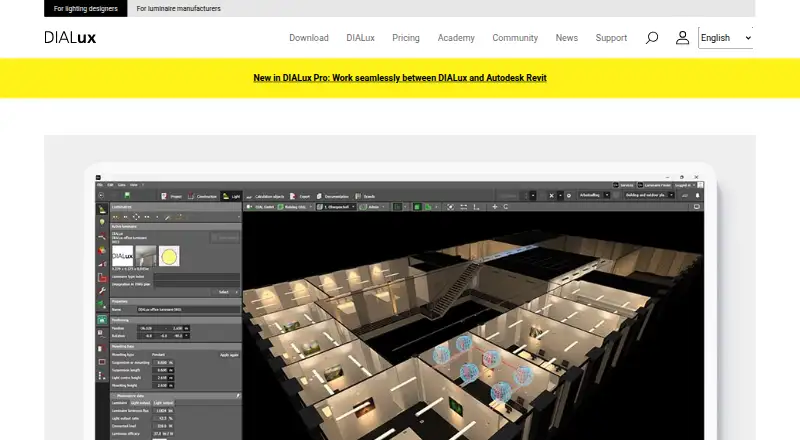
DIALux evo is desktop software for planning, calculating and visualizing lighting across rooms, buildings, streets and outdoor areas. It supports indoor, outdoor, emergency and road lighting, daylight analysis, energy assessment and verification against international norms. Lighting designers, technicians, architects, students and other project contributors can use it to develop lighting schemes and documentation. The product is particularly suited to specialists contributing lighting information to BIM-led projects rather than teams seeking a complete architectural authoring environment.
The free plan provides core lighting design functions and access to luminaires from DIALux Member manufacturers. The monthly Unlock Non-Members plan costs €5.99 and adds luminaires from manufacturers outside the member catalogue. Pro costs €19.99 per month or €219.99 per year, with IFC import and export, office-format project exports, custom report layouts and non-member luminaires. These paid options make the catalogue and documentation workflow more flexible while preserving a no-cost entry point for basic projects.
For project coordination, DIALux imports and exports DWG files, integrates with Autodesk Revit, and uses IFC for BIM exchange in Pro. It can export project data to PPT, DOCX, XML and CSV, create customized documentation layouts, and produce realistic lighting visualizations. The trade-off is scope: DIALux concentrates on lighting calculations and presentation, and its Windows-only desktop deployment may not fit teams needing broader platform coverage. Choose it when lighting analysis, standards verification and luminaire selection are central; choose a general architectural BIM authoring tool when building design is the primary requirement.
DIALux pricing
All 3 DIALux plans and prices →
DIALux fact sheet
| Free plan | Yes |
|---|---|
| Paid from | Not verified |
| Platform | Windows |
| BIM authoring | No |
| Parametric modeling | Not verified |
| Construction documents | Yes |
| Rendering tools | Yes |
| IFC support | Yes |
| Project limit | Not verified |
| Free trial | 30 days |
| Deployment | Desktop |
| Platforms | Windows |
| Support | Community, Docs |
| Built for | Solo, Small business, Mid-market, Enterprise (editorial estimate) |
| Integrations | 1 integrations: Autodesk Revit |
| Pricing | Free plan · paid from €19.99/mo · 30-day trial (source) |
| Website | dialux.com |
| Facts checked | 25 Sep 2026 |
DIALux integrations
DIALux lists 1 integrations on its own site.
- Autodesk Revit
Alternatives to DIALux
- Autodesk RevitA multidiscipline BIM platform with strong Autodesk coordination and automation support.8.8
- ArchicadA mature OpenBIM platform for architectural teams that need modeling, documentation, and teamwork.8.4
- AllplanA broad BIM suite for firms coordinating architecture, engineering, construction and cost workflows.7.9



Also listed in
Used DIALux? Be the first to review it
The editor score above is our own research. What this page doesn't have yet is a reader's view — what you used DIALux for, what worked and what didn't. No stars are seeded and no review is paid for; an editor reads every one before it appears.
Write a reviewTwo minutes · verified accounts only · read by an editor before it appears
Featured on iTechGuides

DIALux is listed in our Architectural Design Software directory. Add the badge to your site — it links back to this page.
<a href="https://www.itechguides.com/products/dialux/"><img src="https://www.itechguides.com/best/badge/dialux.svg" alt="Featured on iTechGuides" width="230" height="46"></a>
Reviewed by iTechGuides Editors · Editorial team · Updated Sep 2026
Advertiser disclosure: iTechGuides is reader-supported. We may earn a commission when you click some links. How we rank.
Last updated · How we research and update