Diagram Designer
Diagram Designer: A capable free Windows diagram tool for core diagrams, images and utilities. Ranked #36 of 36 in Diagram Software by our editors (6.0/10); pricing: Free plan; best for basic free Windows diagramming.
At a glance
- Editor score6.0 / 10
- PricingFree plan
- Best forBasic free Windows diagramming
- Free planYes
- Paid fromFree
- Founded2003
- Facts checked20 Sep 2026
Where it wins
- Freeware plan provides the full version without limitations
- Supports flowcharts, UML class diagrams, illustrations and slide shows
- Imports and exports nine listed image formats
Where it doesn't
- Windows desktop focus limits platform coverage
- No documented real-time collaboration features
- Its diagram types and ecosystem are narrower than broader suites
Our verdict on Diagram Designer
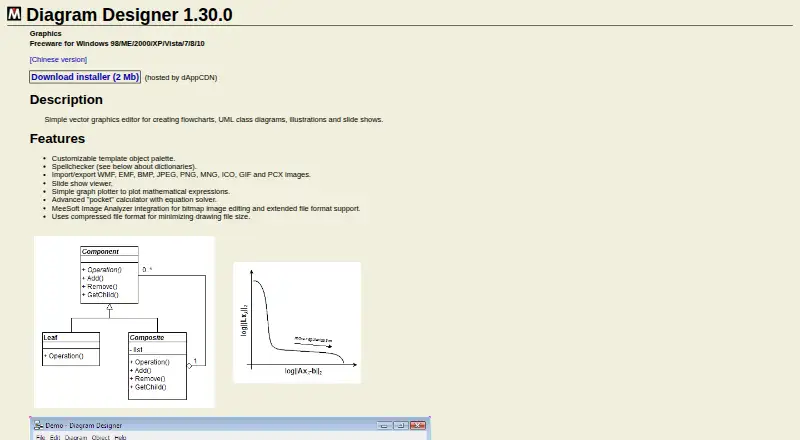
Diagram Designer is a free, open-source Windows desktop application for creating flowcharts, UML class diagrams, illustrations and slide shows. It is aimed at individuals and teams that need basic diagramming on Windows, along with image handling and a few utility features. The customizable template object palette supports reusable diagram elements, while spellchecking, downloadable dictionaries and text formatting help with document preparation.
Pricing is straightforward: the Freeware plan costs $0 and provides the full version without limitations. The feature set extends beyond core diagram creation with image import and export in WMF, EMF, BMP, JPEG, PNG, MNG, ICO, GIF and PCX formats. It also includes a mathematical graph plotter, an equation-solving calculator, a slide show viewer and a compressed drawing file format. These additions make the application useful for diagrams that combine structured visuals, illustrations and supporting calculations without introducing a paid tier.
The strongest fit is a Windows user who values a free desktop tool with broad image-format support and an open-source codebase under the MIT license. Integration is focused: Diagram Designer can connect with MeeSoft Image Analyzer for bitmap editing and extended file-format support. Its platform coverage is limited to Windows, and its collaboration support is limited compared with tools built around shared editing. Choose it for self-contained desktop diagramming and basic utilities; choose another category tool when real-time collaboration or wider platform coverage is central.
Your product? Our editors can test Diagram Designer in depth and publish a review, labelled as paid · from $149/mo →
Diagram Designer pricing
All 1 Diagram Designer plans and prices →
Diagram Designer fact sheet
| Free plan | Yes |
|---|---|
| Paid from | Free |
| Diagram types | flowcharts, UML class diagrams, illustrations, slide shows |
| Real-time collaboration | Not verified |
| Export formats | WMF, EMF, BMP, JPEG, PNG, MNG, ICO, GIF, PCX |
| Import formats | WMF, EMF, BMP, JPEG, PNG, MNG, ICO, GIF, PCX |
| Desktop app | Yes |
| Version history | Yes |
| Maximum editors | Not verified |
| Deployment | Desktop |
| Platforms | Windows |
| Support | Email, Docs |
| Built for | Solo, Small business (editorial estimate) |
| Integrations | 1 integrations: MeeSoft Image Analyzer |
| Pricing | Free plan (source) |
| Website | meesoft.com |
| Facts checked | 20 Sep 2026 |
Diagram Designer integrations
Diagram Designer lists 1 integrations on its own site.
- MeeSoft Image Analyzer
Alternatives to Diagram Designer
- draw.ioA broad, flexible diagramming editor for teams that want free cross-platform coverage.9.4
- Visual ParadigmA broad modeling suite with collaboration, engineering tools, and a free plan.9.2
- LucidchartA broad, collaborative diagramming workspace with a free tier and web-only access.9.0


See all Diagram Designer alternatives →
Used Diagram Designer? Be the first to review it
The editor score above is our own research. What this page doesn't have yet is a reader's view — what you used Diagram Designer for, what worked and what didn't. No stars are seeded and no review is paid for; an editor reads every one before it appears.
Write a reviewTwo minutes · verified accounts only · read by an editor before it appears
Featured on iTechGuides

Diagram Designer is listed in our Diagram Software directory. Add the badge to your site — it links back to this page.
<a href="https://www.itechguides.com/products/diagram-designer/"><img src="https://www.itechguides.com/best/badge/diagram-designer.svg" alt="Featured on iTechGuides" width="230" height="46"></a>
Reviewed by iTechGuides Editors · Editorial team · Updated Oct 2026
Advertiser disclosure: iTechGuides is reader-supported. Vendors can pay for top positions in our rankings and for a place on other products' pages, and we may earn a commission when you click some links. Bought places stand at the number bought; this page and our disclosure say so. Paying vendors may get a fuller, more detailed review from our editors, and that review can change their score. How we rank.
Last updated · How we research and update