
dayGLANCE
dayGLANCE: A broad, open-source planner for time blocking, habits, focus, and self-hosting. Ranked #36 of 137 in Daily Planner Apps by our editors (5.3/10); pricing: Free plan · 14-day trial; best for open-source visual time blocking.
At a glance
- Editor score5.3 / 10
- PricingFree plan · 14-day trial
- Best forOpen-source visual time blocking
- Free planYes
- Planning methodTime blocking
- Facts checked20 Sep 2026
Where it wins
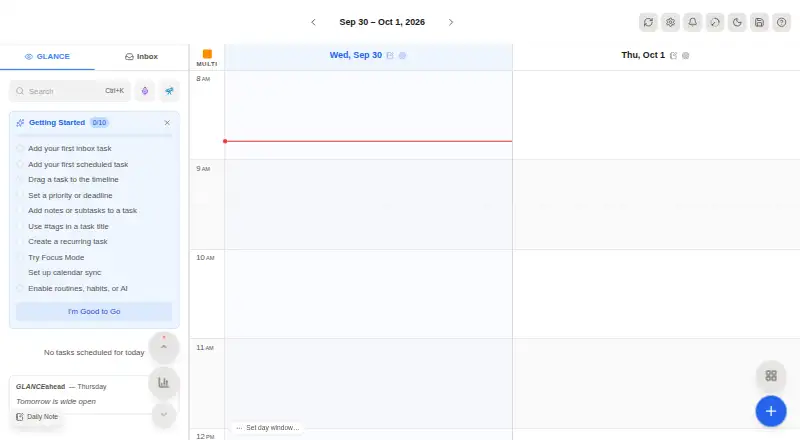
- Visual drag-and-drop planning on a 24-hour timeline
- Open source with local storage and self-hosting
- Broad integrations, including calendars, Obsidian, and Nextcloud
Where it doesn't
- Calendar imports refresh periodically rather than continuously
- Pro access is paid through the App Store
- Its broad planning scope may be more than simple task lists need
Our verdict on dayGLANCE
dayGLANCE is a privacy-focused daily planning app for individuals who want to arrange tasks on a visual 24-hour timeline. Its core workflow combines drag-and-drop time blocking with a smart inbox for unscheduled tasks, priorities, tags, recurring tasks, routines, habits, goals, projects, frames, and roadmap planning. It is available on the web, Windows, macOS, Linux, iOS, Android, and as a self-hosted deployment. The Free plan includes web app access, requires no sign-up, and supports self-hosting, while dayGLANCE Pro is available through the App Store.
Its strongest advantage is breadth across planning and ecosystem fit. Users can import calendars through CalDAV and iCal, with integrations spanning Nextcloud, WebDAV, Google Calendar, Apple Calendar, Fastmail, Proton Calendar, iCloud, Todoist, Obsidian, TRMNL, Stream Deck, Health Connect, and GLANCEvault. Obsidian synchronization covers tasks and daily notes, while WebDAV and Nextcloud provide additional synchronization paths. This makes dayGLANCE a practical choice for people who want a daily planner connected to an existing personal productivity setup rather than an isolated task list.
The standout feature is visual time blocking, supported by a Pomodoro-style Focus Mode with customizable work and break durations. Habit tracking and daily summaries add structure beyond the calendar, and local storage by default plus open-source availability suit privacy-conscious users. Calendar refresh is periodic, so it is less suitable for workflows that depend on continuously updated scheduling. Choose dayGLANCE if you want an open-source planner with self-hosting, visual scheduling, focus sessions, and broad integrations; choose a narrower tool if you only need a simple checklist or real-time calendar synchronization.
Your product? Our editors can test dayGLANCE in depth and publish a review, labelled as paid · from $149/mo →
dayGLANCE pricing
All 2 dayGLANCE plans and prices →
dayGLANCE fact sheet
| Free plan | Yes |
|---|---|
| Paid from | Not verified |
| Planning method | Time blocking |
| Calendar sync | Yes |
| Recurring tasks | Yes |
| Mobile platforms | Both |
| Daily task limit | Not verified |
| Focus sessions | Yes |
| Free trial | 14 days |
| Deployment | Cloud, Self-hosted, Desktop, Mobile |
| Platforms | Web, Windows, macOS, Linux, iOS, Android |
| Support | Docs |
| Built for | Solo, Small business (editorial estimate) |
| Integrations | 15 integrations: Nextcloud, WebDAV, CalDAV, iCal, Google Calendar, Apple Calendar … |
| Pricing | Free plan · 14-day trial (source) |
| Website | dayglance.app |
| Facts checked | 20 Sep 2026 |
dayGLANCE integrations
dayGLANCE lists 15 integrations on its own site.
- Nextcloud
- WebDAV
- CalDAV
- iCal
- Google Calendar
- Apple Calendar
- Fastmail
- Proton Calendar
- Obsidian
- TRMNL
- Stream Deck
- Health Connect
- iCloud
- Todoist
- GLANCEvault
Alternatives to dayGLANCE
- SunsamaA guided daily planner for turning tasks, calendars, and workload limits into a focused workday.8.9
- Amazing MarvinA flexible planner for people who want structured days without a fixed workflow.8.8
- MotionA broad AI planner for scheduling, booking, calendars, and project work.8.7

See all dayGLANCE alternatives →
Used dayGLANCE? Be the first to review it
The editor score above is our own research. What this page doesn't have yet is a reader's view — what you used dayGLANCE for, what worked and what didn't. No stars are seeded and no review is paid for; an editor reads every one before it appears.
Write a reviewTwo minutes · verified accounts only · read by an editor before it appears
Featured on iTechGuides

dayGLANCE is listed in our Daily Planner Apps directory. Add the badge to your site — it links back to this page.
<a href="https://www.itechguides.com/products/dayglance/"><img src="https://www.itechguides.com/best/badge/dayglance.svg" alt="Featured on iTechGuides" width="230" height="46"></a>
Reviewed by iTechGuides Editors · Editorial team · Updated Oct 2026
Advertiser disclosure: iTechGuides is reader-supported. Vendors can pay for top positions in our rankings and for a place on other products' pages, and we may earn a commission when you click some links. Bought places stand at the number bought; this page and our disclosure say so. Paying vendors may get a fuller, more detailed review from our editors, and that review can change their score. How we rank.
Last updated · How we research and update