DataLens
DataLens: A focused, open-source workspace for exploring CSVs, with no SQL connections. Ranked #22 of 27 in AI Data Analysis Tools by our editors (6.1/10); pricing: Open source; best for open-source CSV visualization and insights.
At a glance
- Editor score6.1 / 10
- PricingOpen source
- Best forOpen-source CSV visualization and insights
- Paid fromFree
- Natural-language queriesYes
- Facts checked19 Sep 2026
Where it wins
- Detects numeric, categorical and date columns on CSV import
- Combines interactive charts, statistics, heatmaps and automated insights
- Supports several AI endpoints and PDF or filtered CSV exports
Where it doesn't
- CSV is the only supported file import format
- Does not support SQL connections
- AI assistant use depends on connecting a supported endpoint
Our verdict on DataLens
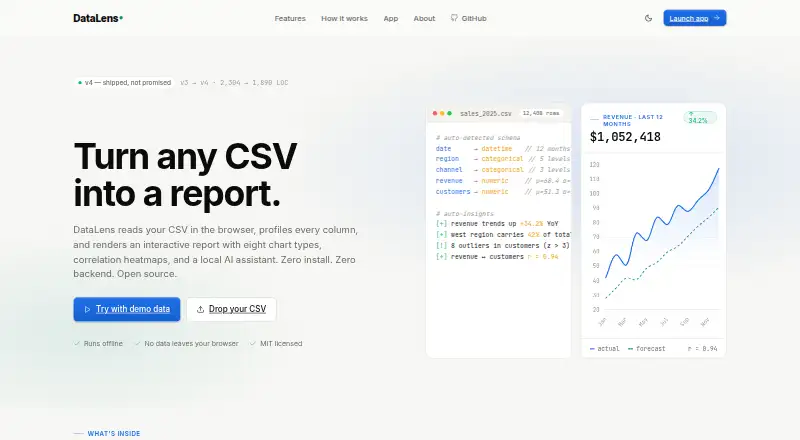
DataLens is a browser-based dashboard for exploring CSV datasets, suited to people who want visual analysis without installing software or configuring a backend. It detects numeric, categorical and date columns, then brings charts, statistical summaries and automated insights into one interface. The project is open source under the MIT license and supports use offline in the browser. Its scope is deliberately centered on CSV exploration rather than broad data-source connectivity.
For analysis, DataLens offers bar, line, pie, donut, scatter, radar, histogram and boxplot charts, along with per-column minimum, maximum, mean, median and standard deviation. A correlation heatmap covers numeric variables, while automated insights call out trends, outliers and patterns. This makes the product useful for exploratory work where a quick view of distributions and relationships matters. It also supports filtered CSV export and PDF reports. The interface is available in French and English, with a dark mode preference that persists.
The AI assistant can connect to Ollama, OpenRouter, Groq or a custom OpenAI-compatible endpoint. That flexibility may suit users who already have an endpoint in mind, but the assistant is not a substitute for data connectivity: DataLens imports CSV only and offers no SQL connections. The published product details describe an open-source project, not a priced hosted service, so it is a stronger fit for people comfortable with a browser-based, self-contained tool than teams seeking a managed analytics platform with database integrations. Choose DataLens for interactive CSV analysis; look elsewhere if querying SQL sources or working across multiple import formats is central to your workflow.
Your product? Our editors can test DataLens in depth and publish a review, labelled as paid · from $149/mo →
DataLens pricing
DataLens fact sheet
| Free plan | Not verified |
|---|---|
| Paid from | Free |
| File imports | CSV |
| SQL connections | No |
| Natural-language queries | Yes |
| AI visualizations | Not verified |
| Maximum upload size | Not verified |
| Export formats | PDF, CSV |
| Team collaboration | Not verified |
| Deployment | Cloud, Self-hosted |
| Platforms | Web |
| Integrations | 4 integrations: Ollama, OpenRouter, Groq, OpenAI-compatible custom endpoints |
| Pricing | Open source |
| Website | bran9910.github.io |
| Facts checked | 19 Sep 2026 |
DataLens integrations
DataLens lists 4 integrations on its own site.
- Ollama
- OpenRouter
- Groq
- OpenAI-compatible custom endpoints
Alternatives to DataLens
- H2O.aiA broad enterprise suite for automated ML, forecasting, governance, and deployment.9.1
- Julius AIAsk questions of files and connected data, then generate charts, analysis, and reports.8.8
- VeezooConversational analytics with governed metrics, broad warehouse support, and sales-led pricing.8.5



See all DataLens alternatives →
Used DataLens? Be the first to review it
The editor score above is our own research. What this page doesn't have yet is a reader's view — what you used DataLens for, what worked and what didn't. No stars are seeded and no review is paid for; an editor reads every one before it appears.
Write a reviewTwo minutes · verified accounts only · read by an editor before it appears
Featured on iTechGuides

DataLens is listed in our AI Data Analysis Tools directory. Add the badge to your site — it links back to this page.
<a href="https://www.itechguides.com/products/datalens/"><img src="https://www.itechguides.com/best/badge/datalens.svg" alt="Featured on iTechGuides" width="230" height="46"></a>
Reviewed by iTechGuides Editors · Editorial team · Updated Oct 2026
Advertiser disclosure: iTechGuides is reader-supported. Vendors can pay for top positions in our rankings and for a place on other products' pages, and we may earn a commission when you click some links. Bought places stand at the number bought; this page and our disclosure say so. Paying vendors may get a fuller, more detailed review from our editors, and that review can change their score. How we rank.
Last updated · How we research and update