Darkroom
Darkroom: A capable Apple-only editor for RAW files, masks, batch workflows, and video. Ranked #25 of 158 in Photo Editing Software by our editors (7.0/10); pricing: Free plan; best for apple users needing RAW batch edits.
At a glance
- Editor score7.0 / 10
- PricingFree plan
- Best forApple users needing RAW batch edits
- Free planYes
- PlatformMulti-platform
- Founded2015
- Facts checked20 Sep 2026
Where it wins
- RAW and ProRAW editing with AI-powered subject and detail masks
- Batch adjustments, organization, copying, editing, and export
- Works with Apple Photos, iCloud Photos, and Siri Shortcuts
Where it doesn't
- Limited to iOS and macOS ecosystems
- Premium edits require a paid plan for export
- Layer editing is not part of the documented feature set
Our verdict on Darkroom
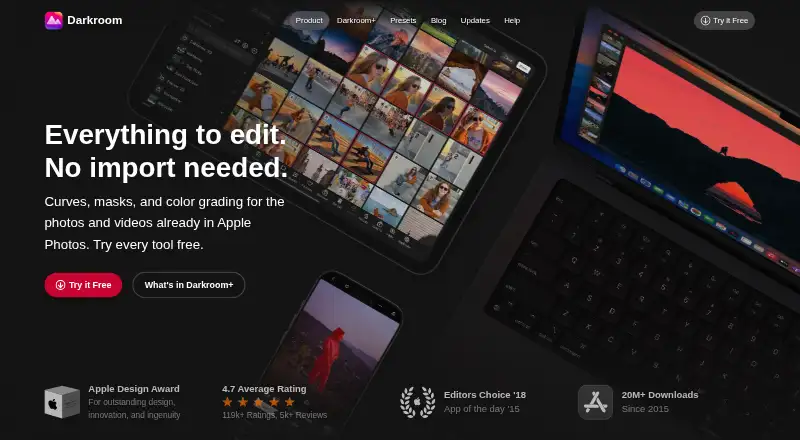
Darkroom is a non-destructive photo and video editor for Apple users who want advanced adjustments without leaving the Apple Photos workflow. It supports RAW and ProRAW files, presets, curves, color grading, metadata controls, video editing, and edit history with undo, redo, reset, and selective copy and paste. Its strongest fit is for photographers managing RAW libraries on iPhone, iPad, or Mac, especially when batch work matters.
The pricing structure starts with the free Starter plan, which lets users try premium editing tools, while exporting premium edits requires Darkroom+. The Yearly plan costs $39.99 per year and includes full access, Family Sharing, and premium editing and export features. The Monthly plan costs $9.99 per month, includes full access and premium editing and export features, and can be canceled anytime. The Forever plan costs $99.99 as a one-time payment and provides full access now and moving forward. These choices make the annual plan the lower recurring-price option compared with monthly billing, while the one-time plan targets longer-term users.
Darkroom’s ecosystem fit is a central advantage: it works with Apple Photos and iCloud Photos, and Siri Shortcuts adds automation options. AI-powered masks cover subjects, skies, depth, skin, hair, glasses, and teeth, giving the editor a broad set of targeted adjustments. Batch adjustment copying, editing, organization, and export also support larger photo libraries. The trade-off is platform focus: users outside iOS and macOS will need another editor, and anyone requiring documented layer editing should look elsewhere. Choose Darkroom for Apple-based RAW workflows and integrated photo management; choose an alternative for cross-platform access or layer-centric editing.
Questions about Darkroom
Does Darkroom have a free plan? No free plan is listed; paid plans start at $39.99/yr (Yearly).
How much does Darkroom cost? Darkroom lists 3 paid plans; the lowest is Yearly at $39.99/yr.
What does Darkroom run on? macOS and iOS. It runs as a desktop app and as a mobile app.
What does Darkroom integrate with? 16 integrations, including Apple Photos, iCloud Photos, Siri Shortcuts, Apple Shortcuts and Share Edit Extension.
Who is Darkroom built for? Solo users, small businesses and mid-market companies (our editorial estimate).
Your product? Our editors can test Darkroom in depth and publish a review, labelled as paid · from $149/mo →
Darkroom pricing
All 4 Darkroom plans and prices →
Darkroom fact sheet
| Free plan | Yes |
|---|---|
| Paid from | Not verified |
| Platform | Multi-platform |
| RAW photo support | Yes |
| Layer editing | Not verified |
| Masking tools | Yes |
| Batch editing | Yes |
| Cloud sync | Yes |
| AI retouching | Yes |
| Deployment | Desktop, Mobile |
| Platforms | macOS, iOS |
| Support | Email, Docs |
| Built for | Solo, Small business, Mid-market (editorial estimate) |
| Integrations | 16 integrations: Apple Photos, iCloud Photos, Siri Shortcuts, Apple Shortcuts, Share Edit Extension, Leica LUX … See all → |
| Pricing | Free plan (source) |
| Website | darkroom.co |
| Facts checked | 20 Sep 2026 |
Darkroom integrations
Darkroom lists 16 integrations on its own site.
- Apple Photos
- iCloud Photos
- Siri Shortcuts
- Apple Shortcuts
- Share Edit Extension
- Leica LUX
- Leica FOTOS
- Halide Mark II
- Pro Camera by Moment
- Obscura
- Fjorden
- ProShot
- ReeXpose
- Camera M
- Zerocam
- Photon
See all Darkroom integrations →
Alternatives to Darkroom
- Adobe PhotoshopA deep, multi-platform editor for compositing, retouching, RAW work, and AI-assisted edits.9.4
- Adobe LightroomA broad Lightroom workflow for RAW editing, masking, organization, and synchronized access.9.2
- Capture OneA deep choice for professional RAW and tethered workflows, without a free plan.9.0



See all Darkroom alternatives →
Also Ranked In
Darkroom is ranked in 2 of our directories.
Used Darkroom? Be the first to review it
The editor score above is our own research. What this page doesn't have yet is a reader's view — what you used Darkroom for, what worked and what didn't. No stars are seeded and no review is paid for; an editor reads every one before it appears.
Write a reviewTwo minutes · verified accounts only · read by an editor before it appears
Featured on iTechGuides

Darkroom is listed in our Photo Editing Software directory. Add the badge to your site — it links back to this page.
<a href="https://www.itechguides.com/products/darkroom/"><img src="https://www.itechguides.com/best/badge/darkroom.svg" alt="Featured on iTechGuides" width="230" height="46"></a>
Reviewed by iTechGuides Editors · Editorial team · Updated Nov 2026
Advertiser disclosure: iTechGuides is reader-supported. Vendors can pay for top positions in our rankings and for a place on other products' pages, and we may earn a commission when you click some links. Bought places stand at the number bought; this page and our disclosure say so. Paying vendors may get a fuller, more detailed review from our editors, and that review can change their score. How we rank.
Last updated · How we research and update