
CutePDF Writer
CutePDF Writer: A straightforward free PDF printer for Windows document conversion and basic protection. Ranked #37 of 45 in PDF Creation Software by our editors (5.7/10); pricing: Free plan; best for basic free Windows PDF printing.
At a glance
- Editor score5.7 / 10
- PricingFree plan
- Best forBasic free Windows PDF printing
- Free planYes
- Paid fromFree
- Founded1998
- Facts checked21 Sep 2026
Where it wins
- Creates PDFs from any application that supports printing
- Adds password protection with 256-bit AES encryption
- Supports Windows Server and terminal-server environments
Where it doesn't
- Requires a separately downloaded PS2PDF converter such as Ghostscript
- Windows is the only listed platform
- Programmatic access is limited to basic registry settings
Our verdict on CutePDF Writer
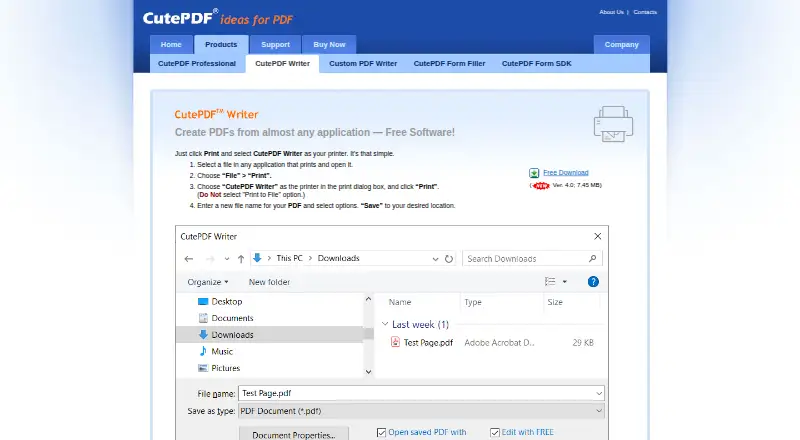
CutePDF Writer is a free desktop PDF printer for Windows. It creates PDF files from documents in applications that support printing, making it suited to individuals and teams that need a simple way to convert printable documents without a paid plan. The workflow is direct: select CutePDF Writer in the Windows print dialog, provide a filename, and save the resulting PDF. It also supports Windows Server and terminal-server environments, extending the same print-based approach to supported server setups.
The product’s main strength is its focused PDF creation workflow. Its single free plan includes PDF creation from printable applications, changes to PDF document properties, password protection, and 256-bit AES encryption. CutePDF Writer also supports PS2PDF converters such as Ghostscript, and basic programmatic access through registry settings. That combination covers routine document conversion and basic control over generated files, but the converter requirement adds a separate installation step before PDF creation is ready.
CutePDF Writer fits users who want free Windows PDF printing, basic document properties, and password protection in a desktop deployment. It is less suitable for teams seeking template generation, bulk document workflows, broad platform coverage, modern integrations, or a dedicated HTTP API. CutePDF Professional and Ghostscript are the listed ecosystem connections, while the core product remains centered on the Windows print dialog. Choose it for straightforward printable-document conversion; consider another PDF creation tool when automation depth, cross-platform access, or larger workflow capabilities are central requirements.
Your product? Our editors can test CutePDF Writer in depth and publish a review, labelled as paid · from $149/mo →
CutePDF Writer pricing
All 1 CutePDF Writer plans and prices →
CutePDF Writer fact sheet
| Free plan | Yes |
|---|---|
| Paid from | Free |
| Data merge | Not verified |
| Bulk PDF generation | Not verified |
| API access | Yes |
| Maximum pages | Not verified |
| Input sources | any printable document |
| Fillable form creation | Not verified |
| Deployment | Desktop |
| Deployment | Desktop |
| Platforms | Windows |
| Support | |
| Built for | Solo, Small business, Mid-market, Enterprise (editorial estimate) |
| Integrations | 2 integrations: CutePDF Professional, Ghostscript |
| Pricing | Free plan (source) |
| Website | cutepdf.com |
| Facts checked | 21 Sep 2026 |
CutePDF Writer integrations
CutePDF Writer lists 2 integrations on its own site.
- CutePDF Professional
- Ghostscript
Alternatives to CutePDF Writer
- Wondershare PDFelementA broad PDF toolkit covering editing, OCR, forms, conversion, signatures, and AI workflows.9.3
- Adobe PDF Services APIA broad PDF automation API for enterprise document workflows and integrations.9.2
- PDFCreatorA Windows-focused PDF converter for batch processing, automation, and controlled output.9.1



See all CutePDF Writer alternatives →
Used CutePDF Writer? Be the first to review it
The editor score above is our own research. What this page doesn't have yet is a reader's view — what you used CutePDF Writer for, what worked and what didn't. No stars are seeded and no review is paid for; an editor reads every one before it appears.
Write a reviewTwo minutes · verified accounts only · read by an editor before it appears
Featured on iTechGuides

CutePDF Writer is listed in our PDF Creation Software directory. Add the badge to your site — it links back to this page.
<a href="https://www.itechguides.com/products/cutepdf-writer/"><img src="https://www.itechguides.com/best/badge/cutepdf-writer.svg" alt="Featured on iTechGuides" width="230" height="46"></a>
Reviewed by iTechGuides Editors · Editorial team · Updated Oct 2026
Advertiser disclosure: iTechGuides is reader-supported. Vendors can pay for top positions in our rankings and for a place on other products' pages, and we may earn a commission when you click some links. Bought places stand at the number bought; this page and our disclosure say so. Paying vendors may get a fuller, more detailed review from our editors, and that review can change their score. How we rank.
Last updated · How we research and update