CrystalSound
CrystalSound: A capable desktop audio enhancer with free isolation, echo control, and collaboration integrations. Ranked #28 of 35 in AI Speech Enhancement Software by our editors (5.9/10); pricing: Free plan · 7-day trial; best for teams needing free voice isolation and echo control.
At a glance
- Editor score5.9 / 10
- PricingFree plan · 7-day trial
- Best forTeams needing free voice isolation and echo control
- Free planYes
- Processing modeBoth
- Facts checked19 Sep 2026
Where it wins
- Free plan includes bidirectional noise cancellation and voice isolation
- Supports Windows, macOS, and Linux with major meeting integrations
- Enhances MP3, WAV, and FLAC files alongside calls and recordings
Where it doesn't
- Advanced team administration is reserved for Enterprise
- Mobile platforms are not part of the supported desktop platform set
- Elite features are marked Coming soon and billed annually
Our verdict on CrystalSound
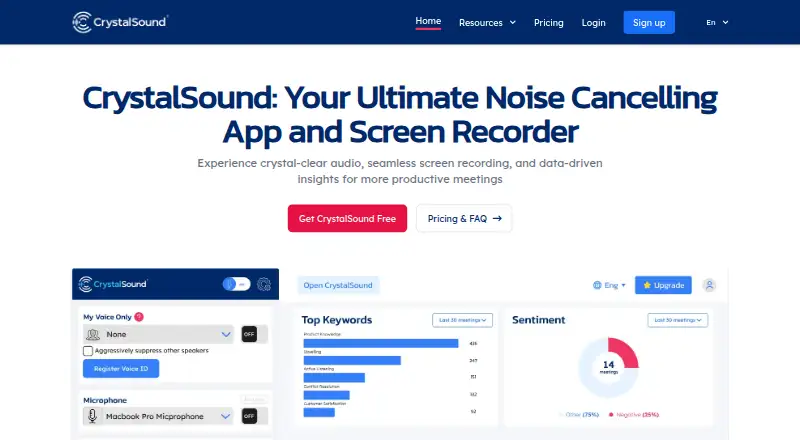
CrystalSound is desktop software for improving audio in online meetings, calls, recordings, and audio-file playback. It combines bidirectional noise cancellation, My Voice Only voice isolation, acoustic and room-echo removal, residual noise removal, microphone volume boosting, and audio-file enhancement. Screen recording and voice effects such as pitch shift, reverb, and robotic voice effects broaden its use beyond meetings. It is suited to teams and individuals working across calls, collaboration tools, and recorded content who need voice cleanup on Windows, macOS, or Linux.
The published plans show a freemium structure. Starter provides a free account after the Premium trial ends. Premium adds unlimited noise cancellation, audio file enhancement, My Voice Only, voice effects, and a cloud call recording preview. Enterprise focuses on organizational control and controlled deployment, adding on-device processing features, offline screen recording, Virtual Desktop Infrastructure support, and team license management. Elite is listed at $228 USD per user per year with annual billing and adds meeting transcription, performance analysis, risk analysis, and areas of improvement; it is marked Coming soon.
CrystalSound fits ecosystems built around OBS, Discord, Loom, Slack, Microsoft Teams, Skype, and Google Meet. Its processing options cover both real-time and file-based audio, while core audio and voice-profile functions are performed on the device. That combination makes it a practical choice for teams seeking free voice isolation and echo control across desktop operating systems. Buyers needing mobile support should look elsewhere, and organizations that require team administration or virtual desktop support will need the Enterprise tier. Teams seeking transcription and performance analysis may also need to wait for Elite availability.
Your product? Our editors can test CrystalSound in depth and publish a review, labelled as paid · from $149/mo →
CrystalSound pricing
All 4 CrystalSound plans and prices →
CrystalSound fact sheet
| Free plan | Yes |
|---|---|
| Paid from | Not verified |
| Processing mode | Both |
| Echo removal | Yes |
| Reverb removal | Not verified |
| Voice isolation | Yes |
| Input types | Audio |
| Supported platforms | Desktop |
| Free trial | 7 days |
| Deployment | Desktop |
| Platforms | Windows, macOS, Linux |
| Integrations | 7 integrations: OBS, Discord, Loom, Slack, Microsoft Teams, Skype … |
| Pricing | Free plan · 7-day trial (source) |
| Website | crystalsound.ai |
| Facts checked | 19 Sep 2026 |
CrystalSound integrations
CrystalSound lists 7 integrations on its own site.
- OBS
- Discord
- Loom
- Slack
- Microsoft Teams
- Skype
- Google Meet
Alternatives to CrystalSound
- Adobe Enhance SpeechA flexible browser tool for cleaning dialogue, with useful source-separation features.9.0
- CrumplePopA broad cleanup toolkit for editors who need noise removal, voice enhancement, and stem separation.8.9
- Waves Clarity VxA focused DAW plugin for reducing background noise in vocals and dialogue.8.8


See all CrystalSound alternatives →
Used CrystalSound? Be the first to review it
The editor score above is our own research. What this page doesn't have yet is a reader's view — what you used CrystalSound for, what worked and what didn't. No stars are seeded and no review is paid for; an editor reads every one before it appears.
Write a reviewTwo minutes · verified accounts only · read by an editor before it appears
Featured on iTechGuides

CrystalSound is listed in our AI Speech Enhancement Software directory. Add the badge to your site — it links back to this page.
<a href="https://www.itechguides.com/products/crystalsound/"><img src="https://www.itechguides.com/best/badge/crystalsound.svg" alt="Featured on iTechGuides" width="230" height="46"></a>
Reviewed by iTechGuides Editors · Editorial team · Updated Sep 2026
Advertiser disclosure: iTechGuides is reader-supported. Vendors can pay for top positions in our rankings and for a place on other products' pages, and we may earn a commission when you click some links. Bought places stand at the number bought; this page and our disclosure say so. Paying vendors may get a fuller, more detailed review from our editors, and that review can change their score. How we rank.
Last updated · How we research and update