
CourtDrive
CourtDrive: A broad docketing system with strong automation, integrations, and firm-wide pricing. Ranked #5 of 26 in Legal Docketing Software by our editors (7.9/10); pricing: 30-day trial; best for firms needing broad, affordable docket automation.
At a glance
- Editor score7.9 / 10
- Pricing30-day trial
- Best forFirms needing broad, affordable docket automation
- Free planNo
- Paid from$35/mo
- Rules coverageMulti_state
- Facts checked22 Sep 2026
Where it wins
- AI calendaring supports human review and approval
- Multi-state eNotice automation, docket monitoring, and alerts
- APIs, webhooks, mobile apps, and extensive integrations
Where it doesn't
- Firms with more than 16 attorneys require enterprise pricing
- The trial requires a credit card and auto-charges unless canceled
- Advanced calendaring features are limited to the Elite plan
Our verdict on CourtDrive
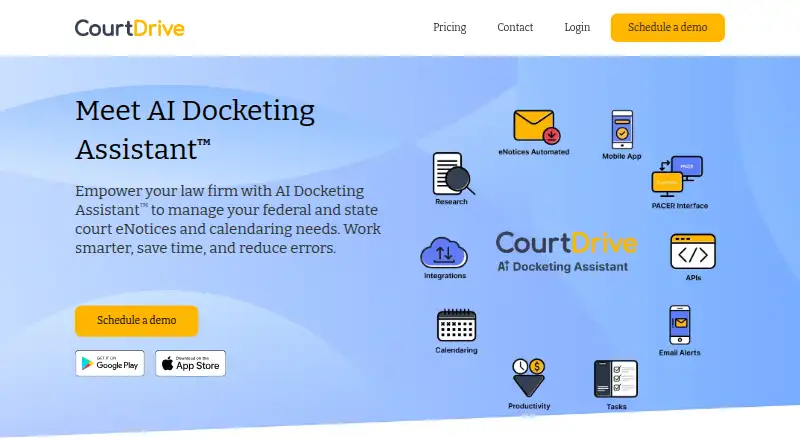
CourtDrive is a cloud-based court management system for law firms that need to automate docketing, calendaring, and court filing workflows. It downloads, saves, organizes, and shares federal and state court eNotices, while also supporting PACER and local-court access, docket and PDF search, task tracking, alerts, reporting, and mobile access. Its AI Docketing Assistant extracts calendar events and supports human review and approval, making it suited to firms that want centralized deadline and notice management.
Pricing is sold as a firm-wide license. Basic costs $35 per month or $420 per year and includes ECF notice downloads, PDF sharing, local court and PCL access, bulk PDF tools, client code tracking, and email support. Pro costs $70 per month or $840 per year, adding research service access, automated PACER searches, a business bankruptcies database, event monitoring and alerts, and 250 app uploads. Elite costs $140 per month or $1,680 per year and adds AI calendaring, an AI event approval queue, third-party calendar sync, a built-in calendar, task management, and phone support. A 30-day trial requires a credit card and auto-charges unless canceled.
CourtDrive fits firms that need more than deadline calculation alone. Calendar Rules and Clio Court Rules integrations support rules-based dates, while Outlook and Google Calendar connect with the built-in calendar. Integrations with Clio, iManage, NetDocuments, Dropbox, Google Drive, OneDrive, Box, SharePoint, Rocket Matter, and Zapier extend document and practice-management workflows; APIs and webhooks support custom connections. Firms with more than 16 attorneys should expect enterprise pricing, while smaller firms seeking a firm-wide system with notice automation, monitoring, search, and calendaring are the clearest match.
Your product? Our editors can test CourtDrive in depth and publish a review, labelled as paid · from $149/mo →
CourtDrive pricing
All 3 CourtDrive plans and prices →
CourtDrive fact sheet
| Free plan | No |
|---|---|
| Paid from | $35/mo |
| Rules coverage | Multi_state |
| Docket monitoring | Yes |
| Rules-based dates | Yes |
| Filing alerts | Yes |
| Calendar sync | Yes |
| Court filing integration | Not verified |
| Deadline audit trail | Not verified |
| Free trial | 30 days · card required |
| Deployment | Cloud, Mobile |
| Platforms | Web, iOS, Android |
| Compliance & security | SSO/SAML |
| Support | Email, Phone, Docs |
| Built for | Solo, Small business, Mid-market, Enterprise (editorial estimate) |
| Integrations | 12 integrations: NetDocuments, iManage, Dropbox, Google Drive, OneDrive, Box … |
| Pricing | 30-day trial (source) |
| Website | courtdrive.com |
| Facts checked | 22 Sep 2026 |
CourtDrive integrations
CourtDrive lists 12 integrations on its own site.
- NetDocuments
- iManage
- Dropbox
- Google Drive
- OneDrive
- Box
- Clio
- SharePoint
- Rocket Matter
- Outlook
- Google Calendar
- Zapier
Alternatives to CourtDrive
- Deadline AssistantA customizable web calendar for calculating and coordinating legal deadlines.9.3
- C-TrackA configurable court case system for filing, records, scheduling, reporting, and public access.9.0
- Lexis CourtLinkA docket search and monitoring service with alerts, tracking, retrieval and litigation profiles.8.8



See all CourtDrive alternatives →
CourtDrive vs the competition
- CourtDrive vs Deadline Assistant
- CourtDrive vs C-Track
- CourtDrive vs Lexis CourtLink
- CourtDrive vs Clio Docket
- CourtDrive vs CourtAlert Case Management
- CourtDrive vs DocketBird


Compare CourtDrive with any tool side by side →
Used CourtDrive? Be the first to review it
The editor score above is our own research. What this page doesn't have yet is a reader's view — what you used CourtDrive for, what worked and what didn't. No stars are seeded and no review is paid for; an editor reads every one before it appears.
Write a reviewTwo minutes · verified accounts only · read by an editor before it appears
Featured on iTechGuides

CourtDrive is listed in our Legal Docketing Software directory. Add the badge to your site — it links back to this page.
<a href="https://www.itechguides.com/products/courtdrive/"><img src="https://www.itechguides.com/best/badge/courtdrive.svg" alt="Featured on iTechGuides" width="230" height="46"></a>
Reviewed by iTechGuides Editors · Editorial team · Updated Oct 2026
Advertiser disclosure: iTechGuides is reader-supported. Vendors can pay for top positions in our rankings and for a place on other products' pages, and we may earn a commission when you click some links. Bought places stand at the number bought; this page and our disclosure say so. Paying vendors may get a fuller, more detailed review from our editors, and that review can change their score. How we rank.
Last updated · How we research and update