Corel Painter
Corel Painter: A deep digital painting studio for artists who want natural-media brush simulation. Ranked #4 of 46 in Digital Painting Software by our editors (9.0/10); pricing: 30-day trial; best for natural-media painters seeking advanced brush control.
At a glance
- Editor score9.0 / 10
- Pricing30-day trial
- Best forNatural-media painters seeking advanced brush control
- Free planNo
- Layer supportYes
- Founded1985 · Ottawa, Ontario, Canada
- Facts checked20 Sep 2026
Where it wins
- Extensive natural-media brushes, including oils, watercolor, and particles
- Detailed brush creation with pressure, tilt, bearing, and rotation support
- Photoshop workflows, composition guides, layers, and tablet compatibility
Where it doesn't
- Paid software with no free plan
- Desktop support is limited to Windows and macOS
- Advanced controls may be more than artists seeking a simple painting tool need
Our verdict on Corel Painter
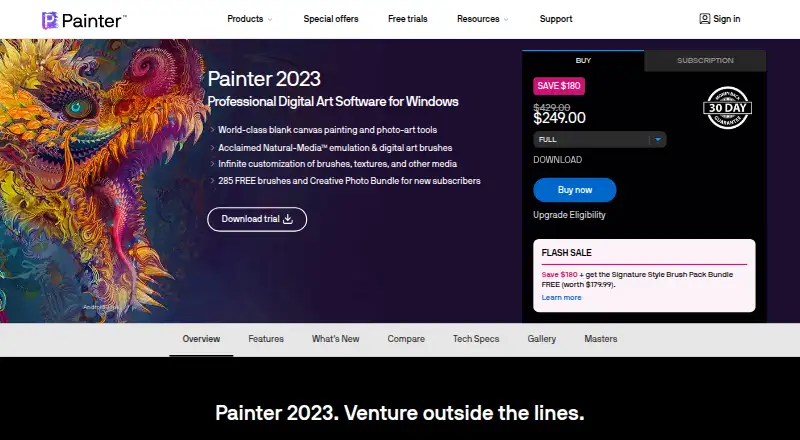
Corel Painter is desktop digital painting software for illustrators, fine artists, concept artists, and photo artists. Its focus is natural-media simulation, with brushes for Fluid Paint, watercolor, oils, and particles alongside custom brush creation and detailed controls. Layer-based workflows, canvas surfaces, paper textures, color-mixing tools, and composition guides support both expressive painting and structured work. Painter runs on Windows and macOS and accepts input from pressure-sensitive tablets, including Wacom, Xencelabs, Huion, and Wintab-compatible devices.
The published plans show three purchase paths: a 30-day Subscription, a 365-day Subscription, and a Full version that lets buyers own the purchased software version permanently. The subscription options provide access to Painter, while the full version is aimed at buyers who prefer permanent ownership. A 30-day trial gives prospective users time to evaluate the application before committing. Corel Painter is paid software with no free plan, so it suits artists budgeting for a dedicated desktop painting application rather than users seeking a no-cost tool.
Its strongest case is depth. The Color Wheel, Mixer, Color Sets, Color Harmonies, textures, patterns, Perspective Guides, Mirror Painting, Divine Proportion, and Layout Grid give artists substantial control over color, surface, and composition. AI-assisted photo stylization, auto-painting, and cloning add additional workflows, while Brush Accelerator provides GPU-assisted brush performance. Photoshop brush and file workflow support helps it fit into an established Adobe workflow. Choose Painter for advanced natural-media control and tablet-based painting; artists who want a simpler interface, a free plan, or a broader non-desktop setup should look elsewhere.
Your product? Our editors can test Corel Painter in depth and publish a review, labelled as paid · from $149/mo →
Corel Painter pricing
All 3 Corel Painter plans and prices →
Corel Painter fact sheet
| Free plan | No |
|---|---|
| Paid from | Not verified |
| Brush customization | Yes |
| Layer support | Yes |
| Pressure sensitivity | Yes |
| Supported platforms | Windows, macOS |
| Color management | Not verified |
| Stroke stabilization | Not verified |
| Free trial | 30 days |
| Deployment | Desktop |
| Platforms | Windows, macOS |
| Integrations | 5 integrations: Adobe Photoshop, Wacom tablets, Xencelabs tablets, Huion tablets, Wintab-compatible tablets |
| Pricing | 30-day trial (source) |
| Website | painterartist.com |
| Facts checked | 20 Sep 2026 |
Corel Painter integrations
Corel Painter lists 5 integrations on its own site.
- Adobe Photoshop
- Wacom tablets
- Xencelabs tablets
- Huion tablets
- Wintab-compatible tablets
Alternatives to Corel Painter
- KritaA broad, professional-grade painting toolkit with no paid plan and wide platform coverage.9.4
- Clip Studio PaintA broad digital art workspace spanning illustration, comics, 3D, animation, and cloud tools.9.3
- ProcreateA polished iPad painting workflow with broad creative tools and limited platform coverage.9.1



See all Corel Painter alternatives →
Corel Painter vs the competition
- Corel Painter vs Krita
- Corel Painter vs Clip Studio Paint
- Corel Painter vs Procreate
- Corel Painter vs ibisPaint
- Corel Painter vs Adobe Fresco
- Corel Painter vs Rebelle



Compare Corel Painter with any tool side by side →
Also Ranked In
Corel Painter is ranked in 3 of our directories.
Used Corel Painter? Be the first to review it
The editor score above is our own research. What this page doesn't have yet is a reader's view — what you used Corel Painter for, what worked and what didn't. No stars are seeded and no review is paid for; an editor reads every one before it appears.
Write a reviewTwo minutes · verified accounts only · read by an editor before it appears
Featured on iTechGuides

Corel Painter is listed in our Digital Painting Software directory. Add the badge to your site — it links back to this page.
<a href="https://www.itechguides.com/products/corel-painter/"><img src="https://www.itechguides.com/best/badge/corel-painter.svg" alt="Featured on iTechGuides" width="230" height="46"></a>
Reviewed by iTechGuides Editors · Editorial team · Updated Oct 2026
Advertiser disclosure: iTechGuides is reader-supported. Vendors can pay for top positions in our rankings and for a place on other products' pages, and we may earn a commission when you click some links. Bought places stand at the number bought; this page and our disclosure say so. Paying vendors may get a fuller, more detailed review from our editors, and that review can change their score. How we rank.
Last updated · How we research and update