comic-maker
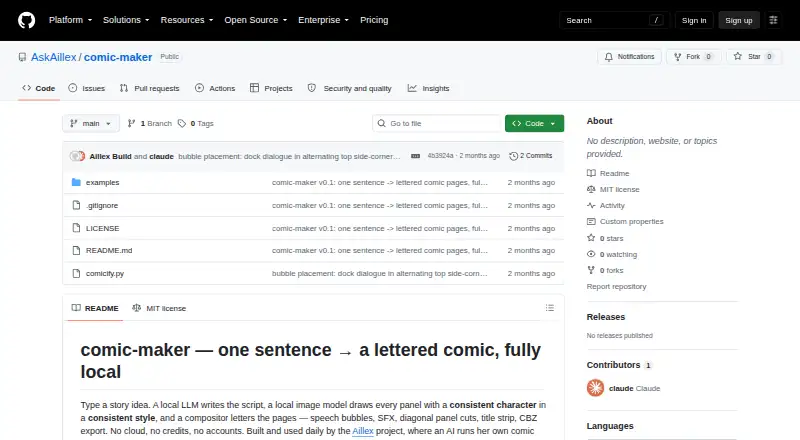
comic-maker: A capable local comic workflow for users comfortable managing Python and AI dependencies. Ranked #13 of 26 in AI Comic Generators by our editors (6.8/10); pricing: Open source; best for open-source desktop comic workflows.
At a glance
- Editor score6.8 / 10
- PricingOpen source
- Best forOpen-source desktop comic workflows
- Paid fromFree
- Character consistencyYes
- Facts checked20 Sep 2026
Where it wins
- Generates scripts, panels, dialogue, SFX, and lettered pages
- Supports character consistency, dynamic layouts, and multiple comic styles
- Exports PNG pages and CBZ comic archives locally
Where it doesn't
- Requires Python, Ollama, ComfyUI, and model checkpoints
- Creates one AI-generated image per panel through ComfyUI
- The project is actively developing
Our verdict on comic-maker
comic-maker is a self-hosted Python tool for turning a story idea into a multi-page comic. It is aimed at creators who want a local workflow rather than a cloud account or credit-based service, and who are comfortable installing and managing Python, Ollama, ComfyUI, and local models. The tool uses a local LLM to generate titles, characters, scenes, emotions, dialogue, and sound effects, then uses ComfyUI to create panel artwork. A PIL-based compositor assembles the result into pages with speech bubbles, tails, SFX, gutters, borders, and title strips.
Its strongest area is the script-to-page pipeline. Users can keep script, panel generation, and assembly as independent stages, which gives the workflow a clear structure for moving from story planning to finished pages. Repeated visual descriptions and seed families support character appearance across panels, while layouts can place 1–9 panels on a page. Sunday strip, manga, noir, and euro-album styles provide different visual directions. PNG export supports individual page output, while CBZ export packages the comic as an archive.
The main tradeoff is setup effort and dependency management. Ollama handles the local language-model stage, while ComfyUI handles image generation, so the workflow depends on both systems and on suitable model checkpoints. That makes comic-maker a better fit for technically comfortable desktop users than for someone seeking a browser-based generator with an immediate start. Its one-image-per-panel approach also keeps the generation model straightforward rather than offering a broader multi-image panel workflow. Choose comic-maker for local control, open-source access, structured comic production, and export flexibility; choose another tool if minimal installation or a hosted workflow matters more.
Your product? Our editors can test comic-maker in depth and publish a review, labelled as paid · from $149/mo →
comic-maker pricing
comic-maker fact sheet
| Free plan | Not verified |
|---|---|
| Paid from | Free |
| Script to panels | Yes |
| Character consistency | Yes |
| Page layouts | Yes |
| Reference images | Not verified |
| Commercial use | Not verified |
| Maximum panels | Not verified |
| Export formats | Other |
| Deployment | Self-hosted |
| Platforms | Windows, Linux |
| Support | Docs, Community |
| Built for | Solo, Small business (editorial estimate) |
| Integrations | 2 integrations: Ollama, ComfyUI |
| Pricing | Open source |
| Website | github.com |
| Facts checked | 20 Sep 2026 |
comic-maker integrations
comic-maker lists 2 integrations on its own site.
- Ollama
- ComfyUI
Alternatives to comic-maker
- GenToonA flexible AI comic maker for social formats, with character consistency and mobile access.8.8
- ComicsAIA web-based comic studio with strong layout, character, and editing controls.7.9
- TaleAtelierA flexible web comic generator with strong character consistency and export options.7.8



See all comic-maker alternatives →
Used comic-maker? Be the first to review it
The editor score above is our own research. What this page doesn't have yet is a reader's view — what you used comic-maker for, what worked and what didn't. No stars are seeded and no review is paid for; an editor reads every one before it appears.
Write a reviewTwo minutes · verified accounts only · read by an editor before it appears
Featured on iTechGuides

comic-maker is listed in our AI Comic Generators directory. Add the badge to your site — it links back to this page.
<a href="https://www.itechguides.com/products/comic-maker/"><img src="https://www.itechguides.com/best/badge/comic-maker.svg" alt="Featured on iTechGuides" width="230" height="46"></a>
Reviewed by iTechGuides Editors · Editorial team · Updated Oct 2026
Advertiser disclosure: iTechGuides is reader-supported. Vendors can pay for top positions in our rankings and for a place on other products' pages, and we may earn a commission when you click some links. Bought places stand at the number bought; this page and our disclosure say so. Paying vendors may get a fuller, more detailed review from our editors, and that review can change their score. How we rank.
Last updated · How we research and update