
Colorize Photo
Colorize Photo: A private, free browser tool with batch processing and detailed color adjustments. Ranked #5 of 25 in AI Image Colorizers by our editors (8.7/10); pricing: Free plan; best for free, private, high-resolution browser colorization.
At a glance
- Editor score8.7 / 10
- PricingFree plan
- Best forFree, private, high-resolution browser colorization
- Free planYes
- Paid fromFree
- Maximum resolution4096 px
- Facts checked20 Sep 2026
Where it wins
- On-device processing keeps photos from being uploaded
- Batch processing with JPEG, PNG, and WebP export
- Manual brush, palettes, and 15-step undo history
Where it doesn't
- Access is limited to the web
- Color results may need manual refinement
- Palette choice is limited to eight tonal options
Our verdict on Colorize Photo
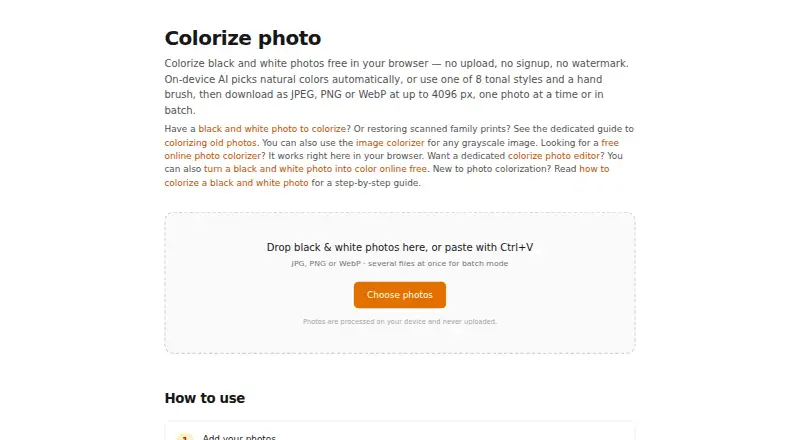
Colorize Photo is a free browser-based tool for adding color to black-and-white and grayscale images. It suits people restoring personal photos, preparing visual projects, or exploring colorization without signing up or uploading images. Its neural network runs locally through WebAssembly, while the interface supports automatic colorization, intensity adjustments, eight tonal palettes, and a manual color brush for targeted edits.
The strongest fit is privacy-conscious, high-resolution browser work. Because processing happens on the user's device, photos are not uploaded. Colorize Photo accepts JPG, PNG, WebP, and other browser-supported image formats, then exports to JPEG, WebP, or PNG. Adjustable output quality and dimensions support files up to 4096 pixels, while clipboard paste and copy support can make moving images into and out of the tool more convenient.
Its editing workflow is broader than one-click colorization but remains focused on this single task. Batch processing allows multiple photos to be handled and downloaded together, and each photo has a 15-step undo history for reversing changes. The eight palettes and manual brush provide control, although users seeking highly specialized color grading or a native desktop workflow should look elsewhere. Choose Colorize Photo for free, local, browser-based colorization with practical refinement tools; avoid it if web-only access or neural-network output is not suitable for your process.
Your product? Our editors can test Colorize Photo in depth and publish a review, labelled as paid · from $149/mo →
Colorize Photo pricing
Colorize Photo fact sheet
| Free plan | Yes |
|---|---|
| Paid from | Free |
| Maximum resolution | 4096 px |
| Batch processing | Yes |
| Image upload formats | JPG, PNG, WebP, and other browser-supported image formats |
| Output formats | JPEG, WebP, PNG |
| Processing mode | Local |
| Commercial use | Not verified |
| Deployment | Cloud |
| Platforms | Web |
| Built for | Solo, Small business (editorial estimate) |
| Pricing | Free plan |
| Website | colorize-photo.com |
| Facts checked | 20 Sep 2026 |
Alternatives to Colorize Photo
- PaletteA flexible colorization tool with free previews, batch workflows, and API access.9.4
- SnapOtterA broad, offline-capable colorization toolkit for technical teams that control their infrastructure.9.2
- PicWish Photo ColorizerA flexible colorization tool for individuals, teams, and API-driven workflows.9.0



See all Colorize Photo alternatives →
Colorize Photo vs the competition
- Colorize Photo vs Palette
- Colorize Photo vs SnapOtter
- Colorize Photo vs PicWish Photo Colorizer
- Colorize Photo vs AKVIS Coloriage AI
- Colorize Photo vs ImageColorizer
- Colorize Photo vs VanceAI Photo Colorizer



Compare Colorize Photo with any tool side by side →
Also Ranked In
Colorize Photo is ranked in 2 of our directories.
Used Colorize Photo? Be the first to review it
The editor score above is our own research. What this page doesn't have yet is a reader's view — what you used Colorize Photo for, what worked and what didn't. No stars are seeded and no review is paid for; an editor reads every one before it appears.
Write a reviewTwo minutes · verified accounts only · read by an editor before it appears
Featured on iTechGuides

Colorize Photo is listed in our AI Image Colorizers directory. Add the badge to your site — it links back to this page.
<a href="https://www.itechguides.com/products/colorize-photo/"><img src="https://www.itechguides.com/best/badge/colorize-photo.svg" alt="Featured on iTechGuides" width="230" height="46"></a>
Reviewed by iTechGuides Editors · Editorial team · Updated Oct 2026
Advertiser disclosure: iTechGuides is reader-supported. Vendors can pay for top positions in our rankings and for a place on other products' pages, and we may earn a commission when you click some links. Bought places stand at the number bought; this page and our disclosure say so. Paying vendors may get a fuller, more detailed review from our editors, and that review can change their score. How we rank.
Last updated · How we research and update